
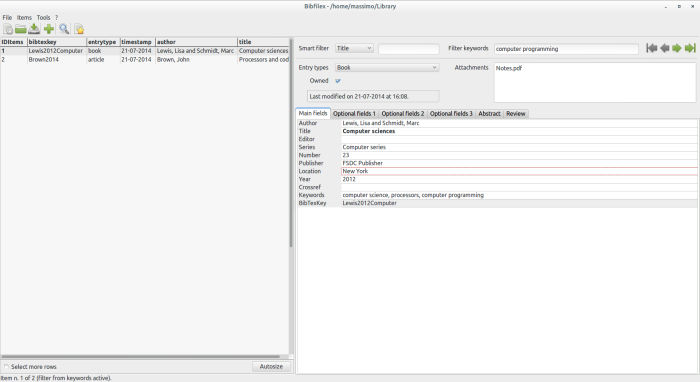
Bibfilex is a free bibliographic manager to create and to manage archives of bibliographical items (books, articles, etc.) with possible attachments of any kind according to Biblatex structure and rules, even if it can be used also with a wordprocessor like Writer or Word.
Biblatex is a package of LaTeX which implements its bibliographic facilities in conjunction with BibTeX.
Its strength is simplicity, speed, especially when used with many items, and lightness: it’s a compiled software (no runtime needed, like Java Virtual Machine or .Net framework) and uses a fast database to store data.
Key Features
- Store the items according to each one of the entry types described in the Biblatex manual (book, article, etc.).
- Import the content of a file in BibLaTeX format like a JabRef database, a BibTeX file exported from Mendeley or downloaded from Google Books.
- Export data in a BibLaTeX file.
- Import and export data from a Bibfilex file to another along with possible attachments.
- Filter the items on a single field.
- Filter the items by keywords.
- Filter the items on three fields or less, or modify manually the SQL statement of the filter to work on more fields or to make it more suitable or complex.
- Filter the items by the BibTeX keys contained in a Latex document within a \cite{}
command or the like. - Replace the citation commands (\cite, etc.) and \printbibliography command in a LaTeX document with extended citations and bibliography, which are composed according to a user defined pattern, and convert the resulting file in other formats with Pandoc.
- Associate various attachments (files of every kind) to each item; the attachments are zipped and stored in a directory with the same name and path of the Bibfilex file in use, and automatically managed by the software; the number of attachments is limited only
by the available disk space. - Activate auto completion of data in each field with “Ctrl + Space”.
- Compose the citation of one or more items according to a user defined pattern, and copy them in the clipboard in Latex or HTML format; for the latter, available in Linux and Mac OS versions, the citation may be pasted in a word processor like Writer or Word maintaining font formatting (italic, small caps, etc.).
- Automatically create unique BibTeX keys according to a pattern defined by the user in an item, in the filtered items, or in all the items of the file in use.
- Store a specific keyword in a buffer and insert or remove it easily within the selected item with a shortcut.
- Specify the fields (columns) shown in the grid view of the data.
- Insert special characters and keywords with a dedicated form.
- Go easily to a specified item with bookmarks.
- Copy in the current item the content of some fields of another item referenced by the crossref field.
- Check for double items in the file in use.
Website: sites.google.com/site/bibfilex
Support:
Developer: Massimo Nardello
License: GNU General Public License v3.0
Related Software
| GUI Bibliography Tools | |
|---|---|
| Zotero | Powerful online/offline research tool |
| KBibTeX | Reference management software primarily for BibTeX |
| JabRef | Graphical frontend to manage BibTeX databases |
| WIKINDX | Provides a Virtual Research Environment |
| Paperlib | Academic paper management tool |
| cb2Bib | Extract bibliographic references from various sources |
| Citations | Manage your bibliographies using the BibTeX format |
| QuickBib | Fetch BibTeX for DOIs and arXiv identifiers |
| Pybliographer | Tool for manipulating bibliographic databases |
| Referencer | Document organiser and bibliography manager for Gnome |
| Bibfilex | LaTeX package implementing bibliographic functions with BibTeX |
Read our verdict in the software roundup.
 Explore our comprehensive directory of recommended free and open source software. Our carefully curated collection spans every major software category. Explore our comprehensive directory of recommended free and open source software. Our carefully curated collection spans every major software category.This directory is part of our ongoing series of informative articles for Linux enthusiasts. It features hundreds of detailed reviews, along with open source alternatives to proprietary solutions from major corporations such as Google, Microsoft, Apple, Adobe, IBM, Cisco, Oracle, and Autodesk. You’ll also find interesting projects to try, hardware coverage, free programming books and tutorials, and much more. Discovered a useful open source Linux program that we haven’t covered yet? Let us know by completing this form. |
Please read our Comment Policy before commenting.