
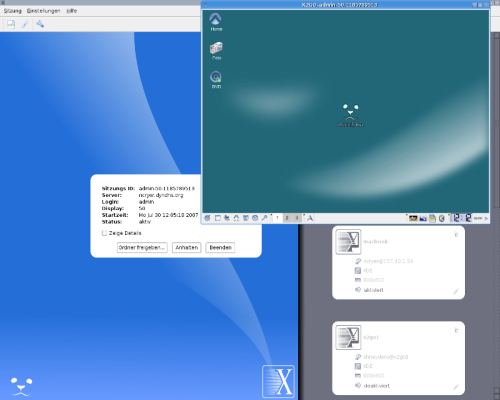
x2go is a fast terminal server suite based on NoMachine’s NX libraries.
This software is a “server based computing environment” combining the advantages of different existing solutions. x2go is “end user ready” and has improved usability.
It can be sized from single PC-installations to enterprise networks with multiple servers and LDAP Trees.
x2go is a fast, secure and simple way to connect to your desktop over local LAN or even over a low bandwidth internet connection such as a cellphone connection.
x2go is open source and available for different CPU architectures.
Key Features
- Seamless windows.
- Run individual applications without a desktop.
- Supports modern authentication technologies:
- Card readers.
- USB tokens.
- Store authentication data on a USB stick or a SmartCard.
- Login manager.
- NX compression methods.
- Configuration module integrated into KDE’s Control Center:
- User.
- Group.
- Device management.
- Session control.
- Text-capable pushmail system.
- Front end for Samba administration.
- Front end to manage desktop sharing.
- Centralized user management via LDAP.
- Clients:
- Gtk client with Gnome integration.
- Qt client.
- Mobile client for the open source Maemo platform.
Website: wiki.x2go.org
Support: Documentation
Developer: Hein-M. Graesing
License: GNU General Public License
x2go is written in C++. Learn C++ with our recommended free books and free tutorials.
Related Software
| Remote Display Clients | |
|---|---|
| TigerVNC | Platform-neutral implementation of VNC |
| Remmina | GTK+/Gnome Remote Desktop Client |
| KRDC | Connect with RDP or VNC to another computer |
| X2Go | Fast terminal server suite based on NoMachine's NX libraries |
| RustDesk | Works out of the box with no configuration required |
| Veyon | Computer monitoring and classroom management |
| TurboVNC | TightVNC-compatible remote desktop software |
| FreeRDP | Remote Desktop Protocol Implementation |
| TightVNC | Client/server allowing remote network access to graphical desktops |
| noVNC | VNC client web application |
| Connections | Aims at replacing Vinagre as the remote desktop client for GNOME |
| Xpra | Multi-platform persistent remote display server with built-in HTML5 client |
| Guacamole | Clientless remote desktop gateway |
| Dayon! | Easy to use, cross-platform remote desktop assistance solution |
| RustConn | Connection orchestrator for Linux with a GTK4/Wayland-native interface |
| HopToDesk | Remote desktop tool with end-to-end encryption |
| Field Monitor | Remote desktop client designed for GNOME |
| Vinagre | VNC client for the Gnome Desktop |
| rdesktop | Client for Windows Terminal Services |
Read our verdict in the software roundup.
| Remote Desktop Servers | |
|---|---|
| TigerVNC | Platform-neutral implementation of VNC |
| GNOME Remote Desktop | Designed for GNOME using pipewire. |
| X2Go | Fast terminal server suite based on NoMachine's NX libraries |
| RustDesk | Works out of the box with no configuration required |
| TurboVNC | TightVNC-compatible remote desktop software |
| FreeRDP | Remote Desktop Protocol Implementation |
| TightVNC | Remote network access to graphical desktops |
| xrdp | Accepts connections from variety of RDP clients |
| Xpra | Multi-platform persistent remote display server |
| Guacamole | Clientless remote desktop gateway |
| OpenSSH | Encrypted communication sessions using the ssh protocol |
| Veyon | Computer monitoring and classroom management |
| KasmVNC | Browser-based VNC server for secure remote desktop access |
| IronRDP | Rust implementation of RDP |
| Dayon! | Easy to use, cross-platform remote desktop assistance solution |
| wayvnc | VNC server for wlroots-based Wayland compositors |
| Lamco RDP Server | Wayland-native RDP server for Linux |
| hypr-rdp | Native RDP server for Hyprland |
Read our verdict in the software roundup.
 Explore our comprehensive directory of recommended free and open source software. Our carefully curated collection spans every major software category. Explore our comprehensive directory of recommended free and open source software. Our carefully curated collection spans every major software category.This directory is part of our ongoing series of informative articles for Linux enthusiasts. It features hundreds of detailed reviews, along with open source alternatives to proprietary solutions from major corporations such as Google, Microsoft, Apple, Adobe, IBM, Cisco, Oracle, and Autodesk. You’ll also find interesting projects to try, hardware coverage, free programming books and tutorials, and much more. Discovered a useful open source Linux program that we haven’t covered yet? Let us know by completing this form. |