

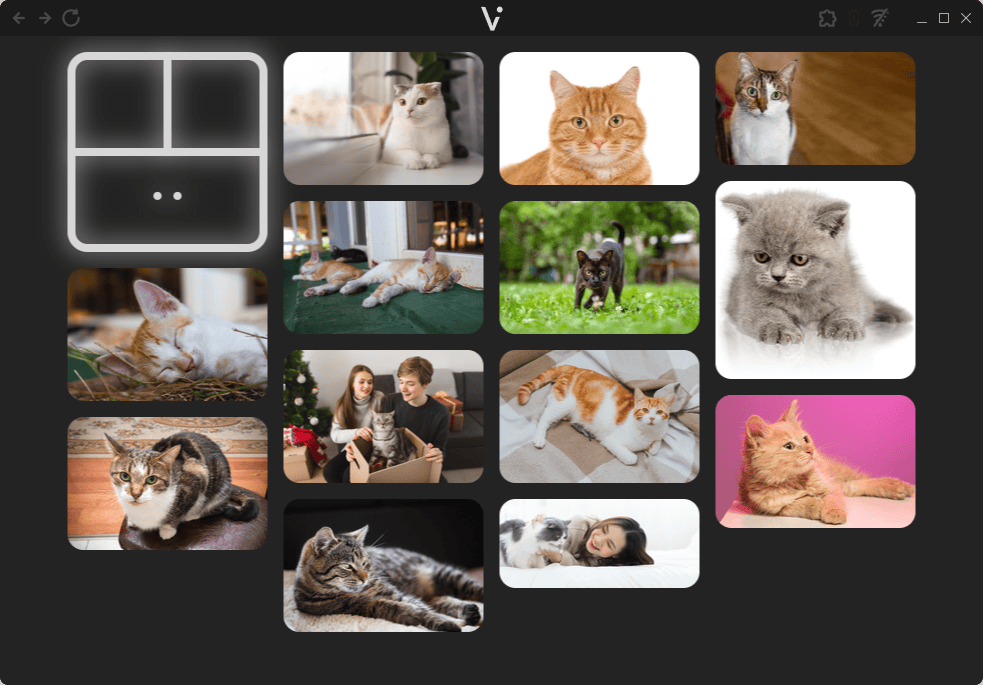
Vistava is a multimedia browser for viewing images and videos stored on your computer. It presents media in a minimalist, masonry-style gallery, making it easy to browse folders and open individual files without the complexity of a full photo management application. The interface focuses on the media itself, with controls designed to work across different screen sizes and input devices.
Vistava can also make your media available to other devices on your local network. Once sharing is enabled, the application provides a temporary address that can be opened in a web browser on a television, smartphone, tablet or VR headset. The remote device displays the same interface and can access the media stored on the host computer without copying files or uploading them to a cloud service.
This is free and open source software.
Key Features
- Browse local images and videos in a masonry-style gallery.
- Navigate using a mouse, keyboard, touchscreen or gamepad.
- Customise keyboard and gamepad controls through configuration files.
- Generate thumbnails for images and videos, with FFmpeg used for video previews.
- Cache media information and thumbnails to avoid unnecessary regeneration.
- Import local playlists in M3U, M3U8 and XSPF formats.
- Display additional image formats including TIFF, PSD and DDS.
- Open a specified directory directly when launching the application.
- Enable optional local network sharing with a temporary HTTP address and QR code.
- Access media from third-party sources with HTTP APIs through optional extensions.
- Cross-platform support – runs on Linux and Windows.
Website: github.com/bauermaximilian/Vistava
Support:
Developer: Maximilian Bauer
License: GNU General Public License v3.0
The program is written in JavaScript and C#. Learn JavaScript with our recommended free books and free tutorials. Learn C# with our recommended free books and free tutorials.
 LinuxLinks helps you discover the best free and open source software for Linux. Explore our extensive collection of recommended applications, including alternatives to popular proprietary software. We also publish software reviews, Linux tutorials, hardware reviews, free programming books and articles covering the wider open source community. Browse our Linux resources to discover more. Know a useful free and open source Linux application we haven't covered? Suggest a program for inclusion. Has your software been featured on LinuxLinks? Display one of our Featured on LinuxLinks badges on your website or GitHub README. |
Please read our Comment Policy before commenting.