
Umbrello UML Modeller is a Unified Modelling Language (UML) diagram program based on KDE Technology.
UML allows you to create diagrams of software and other systems in a standard format to document or design the structure of your programs.
This software can also generate code from UML diagrams in a variety of programming languages.
Key Features
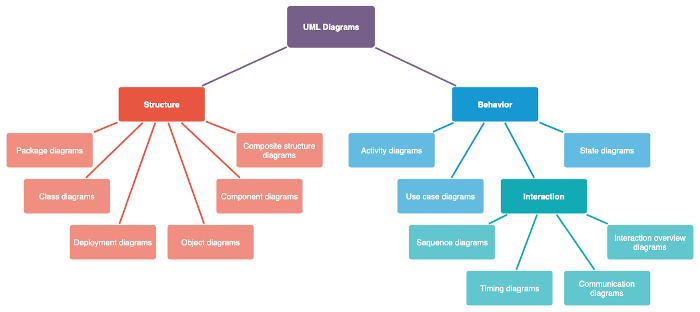
- Supported diagrams:
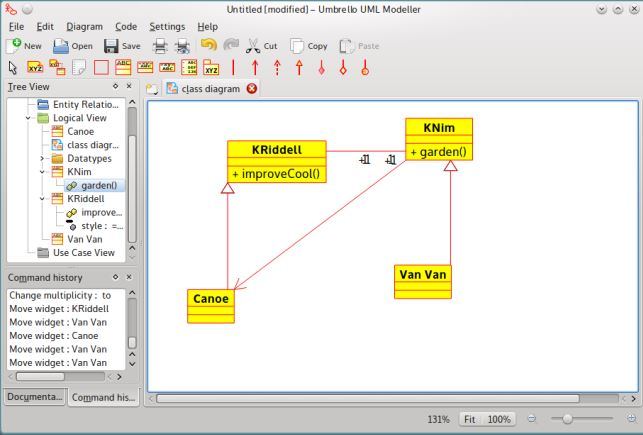
- Class Diagram – show classes and the relationships between them. Class Diagrams are said to be “static” diagrams because they show the classes, along with their methods and attributes as well as the static relationships between them: which classes “know” about which classes or which classes “are part” of another class, but do not show the method calls between them.
- Sequence Diagram – show objects and a sequence of method calls they make to other objects. Sequence Diagrams put special emphasis in the order and the times in which the messages to the objects are sent.
- Collaboration Diagram – show objects and their relationship, putting emphasis on the objects that participate in the message exchange. They are specially well suited to showing a specific program flow or situation and are one of the best diagram types to quickly demonstrate or explain one process in the program logic.
- Use Case Diagram – show actors (people or other users of the system), use cases (the scenarios when they use the system), and their relationships. Use Case Diagrams are meant to facilitate the communication with the future users of the system, and with the customer, and are specially helpful to determine the required features the system is to have.
- State Diagram – show states, state changes and events in an object or a part of the system. State Diagrams view Objects as state machines or finite automates that can be in one of a set of finite states and that can change its state via one of a finite set of stimuli.
- Activity Diagram – show activities and the changes from one activity to another with the events occurring in some part of the system. Activity Diagrams are a special form of State Diagrams, that only (or mostly) contains Activities.
- Component Diagram – show the high level programming components (such as KParts or Java Beans). Components can have interfaces (i.e. abstract classes with operations) that allow associations between components.
- Deployment Diagram – show the instances of the components and their relationships. They include Nodes which are physical resources, typically a single computer. They also show interfaces and objects (class instances).
- Entity Relationship Diagram – show data and the relationships and constraints between the data.
- Umbrello UML Modeller’s main window is divided in three areas that will help you keep an overview of your entire system and access the different diagrams quickly while working on your model:
- Tree View.
- Work Area.
- Documentation and Command history Window.
Website: umbrello.kde.org
Support: Handbook, Mailing List
Developer: The Umbrello Team
License: GNU General Public License v2.0
UML is written in C++. Learn C++ with our recommended free books and free tutorials.
Related Software
| Unified Modeling Language tools | |
|---|---|
| Eclipse Papyrus | Edit models based on UML and related languages |
| PlantUML | Draw UML diagrams from simple textual description |
| Mermaid | Generate diagrams from markdown-like text |
| Umple | Create UML models textually |
| Modelio | UML and BPMN modeling environment |
| Gaphor | Simple UML and SysML modeling tool |
| Umbrello | UML Modeller based on KDE technology |
| UMLet | Java-based UML tool |
| JetUML | Sketch software design ideas with a minimum of fuss |
| Violet | Designed for people who need to produce simple UML diagrams |
| Dia | GTK+ based diagram creation software |
| ArgoUML | UML modeling tool |
| crystal-facet-uml | Desktop UML and SysML modeling application |
| UML Designer | UML tool based on Sirius and Eclipse |
Read our verdict in the software roundup.
 Explore our comprehensive directory of recommended free and open source software. Our carefully curated collection spans every major software category. Explore our comprehensive directory of recommended free and open source software. Our carefully curated collection spans every major software category.This directory is part of our ongoing series of informative articles for Linux enthusiasts. It features hundreds of detailed reviews, along with open source alternatives to proprietary solutions from major corporations such as Google, Microsoft, Apple, Adobe, IBM, Cisco, Oracle, and Autodesk. You’ll also find interesting projects to try, hardware coverage, free programming books and tutorials, and much more. Discovered a useful open source Linux program that we haven’t covered yet? Let us know by completing this form. |
Please read our Comment Policy before commenting.