

In Operation
TagStudio sports an attractive UI. Here’s an image of TagStudio in action.
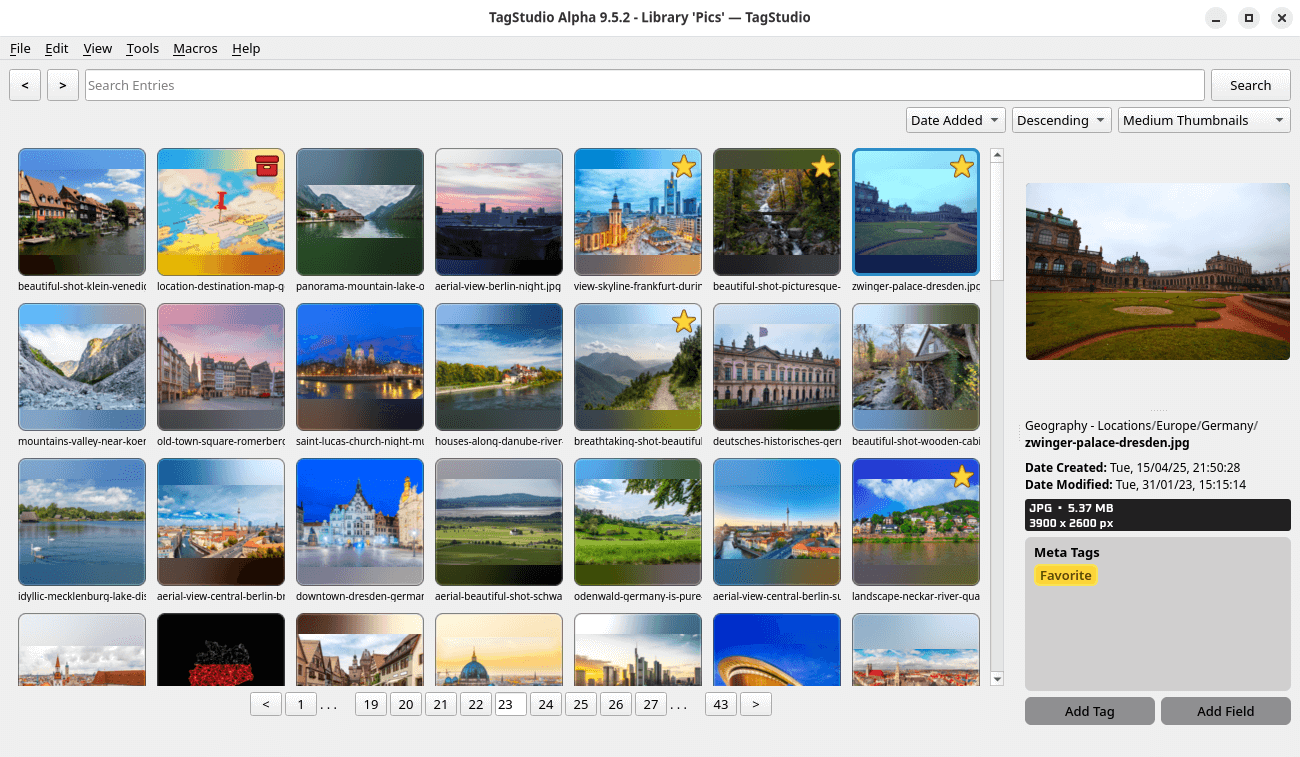
One of the core functions of TagStudio is the ability to tag your image collection. There’s a couple of pre-defined meta tags, but it’s easy to add your own from the Edit menu. There you can assign each tag its own color (choose from earth tones, grayscale, neon, pastels, shades, and standard colors). Tags can be added individually or to a selection of items. These rich tags also include a list of aliases and a list of “parent tags”. We can copy and paste tags and files across entries.
There’s a useful extension where you can specify additional file extensions to include or exclude.
You can create tags based on your folder structure. A macro applies them to your entries.
Other features include:
- Unified media player.
- Good search functionality based on tags, file path, file types, and media types with Boolean operators and special search conditions available.
- Preview images, animated GIFs, videos, plain text documents, audio files, and more.
- Thumbnail caching.
- Supports importing DupeGuru results to manage duplicate files.
- Themes – Light and dark.
- Internationalization support with translations for Chinese (traditional), Dutch, English, Filipino, French, German, Hungarian, Japanese, Norwegian Bokmål, Polish, Portuguese (Brazilian), Russian, Spanish, Swedish, Tamil, Toki Pona, and Turkish.
Summary
TagStudio offers a good way of organizing your files. It’s got an attractive UI, good methods for organization, and is already very usable even though it’s in a fairly early stage of development. It warrants our recommendation.
We like that the program doesn’t do anything to our files, and that SQL is used for the database backend.
It’s far more useful than just a photo management tool. As there’s support for nearly all file types, the program is very versatile.
Website: docs.tagstud.io
Support: GitHub Code Repository
Developer: TagStudio
License: GNU General Public License v3.0
TagStudio is written in Python. Learn Python with our recommended free books and free tutorials.
Pages in this article:
Page 1 – Introduction and Installation
Page 2 – In Operation and Summary
Related Software
| Photo Management Software | |
|---|---|
| digiKam | Image organiser and editor using KDE |
| darktable | Photography workflow application and raw developer |
| TagStudio | Tag-based photo and file organization program |
| gThumb | Image viewer and organizer for the GNOME desktop environment |
| Shotwell | Personal photo management |
| KPhotoAlbum | Tool for indexing, searching and viewing images for KDE |
| Pix | Image viewer and browser utility which is based on gThumb |
| Lap | Photo manager with private search and smart organisation |
| Tropy | Explore your research photos |
| Rapid Photo Downloader | Photo and video downloader |
| Allusion-rafauc | Fork of Allusion |
| Allusion | Organize your visual library |
| GNOME Photos | Access, organize and share your photos on GNOME |
| Snu Photo Manager | Feature-rich photo manager |
| Fotocx | Image editing and collection management |
| FerrumPix | Photo manager with RAW development and extensive editing |
Read our verdict in the software roundup.
 Explore our comprehensive directory of recommended free and open source software. Our carefully curated collection spans every major software category. Explore our comprehensive directory of recommended free and open source software. Our carefully curated collection spans every major software category.This directory is part of our ongoing series of informative articles for Linux enthusiasts. It features hundreds of detailed reviews, along with open source alternatives to proprietary solutions from major corporations such as Google, Microsoft, Apple, Adobe, IBM, Cisco, Oracle, and Autodesk. You’ll also find interesting projects to try, hardware coverage, free programming books and tutorials, and much more. Discovered a useful open source Linux program that we haven’t covered yet? Let us know by completing this form. |
Please read our Comment Policy before commenting.