

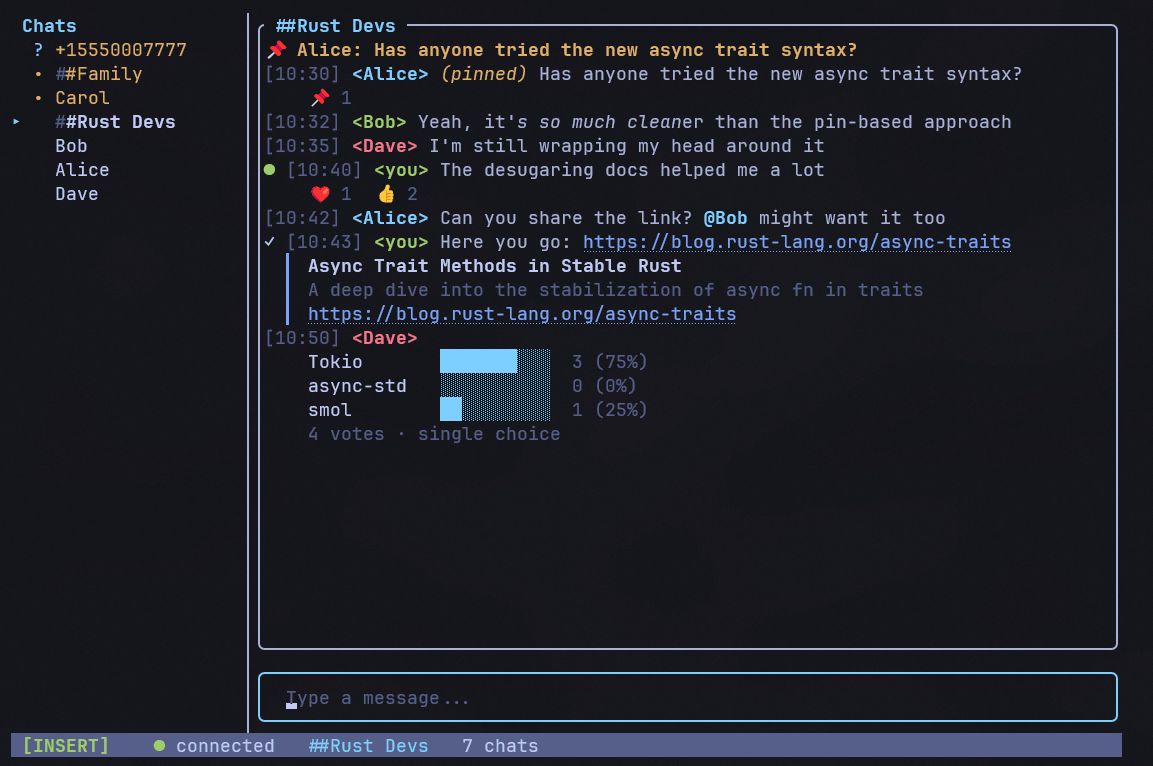
Siggy is a terminal-based client for the Signal messaging service that uses signal-cli as its messaging backend and presents conversations in a text user interface with an IRC-inspired look and feel.
The application is designed for keyboard-driven use, offers vim-style modal editing, guides users through linking a Signal account as a secondary device with QR code pairing, and keeps local conversation data so message history, unread markers, and settings persist across sessions.
This is free and open source software.
Key Features
- Supports direct and group messaging with contact name resolution, typing indicators, unread counts, and synced messages sent from your phone.
- Handles attachments with inline image previews in compatible terminals, while showing non-image attachments clearly in chats.
- Offers message reactions, quoted replies, message editing, deletion, and in-chat search.
- Includes @mentions, group management commands, message requests, and block or unblock controls.
- Provides read receipt indicators, disappearing message support, desktop notifications, and terminal bell alerts.
- Features mouse support, theme selection, command autocomplete, and configurable behavior through a TOML configuration file.
Website: github.com/johnsideserf/siggy
Support:
Developer: John Sideserf
License: GNU General Public License v3.0
Siggy is written in Rust. Learn Rust with our recommended free books and free tutorials.
 LinuxLinks helps you discover the best free and open source software for Linux. Explore our extensive collection of recommended applications, including alternatives to popular proprietary software. We also publish software reviews, Linux tutorials, hardware reviews, free programming books and articles covering the wider open source community. Browse our Linux resources to discover more. Know a useful free and open source Linux application we haven't covered? Suggest a program for inclusion. Has your software been featured on LinuxLinks? Display one of our Featured on LinuxLinks badges on your website or GitHub README. |
Please read our Comment Policy before commenting.