
Podcasts are everywhere these days, covering just about every subject imaginable. Most people listen through a dedicated podcast app, but sometimes that’s more machinery than you need. If the aim is simply to download episodes, keep a local archive, or feed them into another workflow, a small command-line tool can make more sense.
podcast-dl does exactly that. Give it a podcast RSS feed and it downloads the episodes to disk, but there’s a lot more here than basic fetching. Downloads can be limited by date, season or regular expression, multiple episodes can be downloaded concurrently, and an archive can be maintained so previously processed episodes aren’t downloaded again.
It can also save podcast and episode metadata, artwork and transcripts. Filename templates give plenty of control over how files are named and organised. FFmpeg support adds metadata embedding, audio conversion, bitrate adjustment and mono conversion.
Installation
I evaluated podcast-dl using CachyOS, an Arch-based distribution.
The developer provides a standalone Linux x86-64 binary. Node.js is bundled with the binary, so there’s no need to install it separately.
After downloading the binary from the project’s GitHub Releases page, I made it executable and installed it in /usr/local/bin:
$ chmod u+x podcast-dl-*-linux-x64
$ sudo install -m 755 podcast-dl-*-linux-x64 /usr/local/bin/podcast-dl
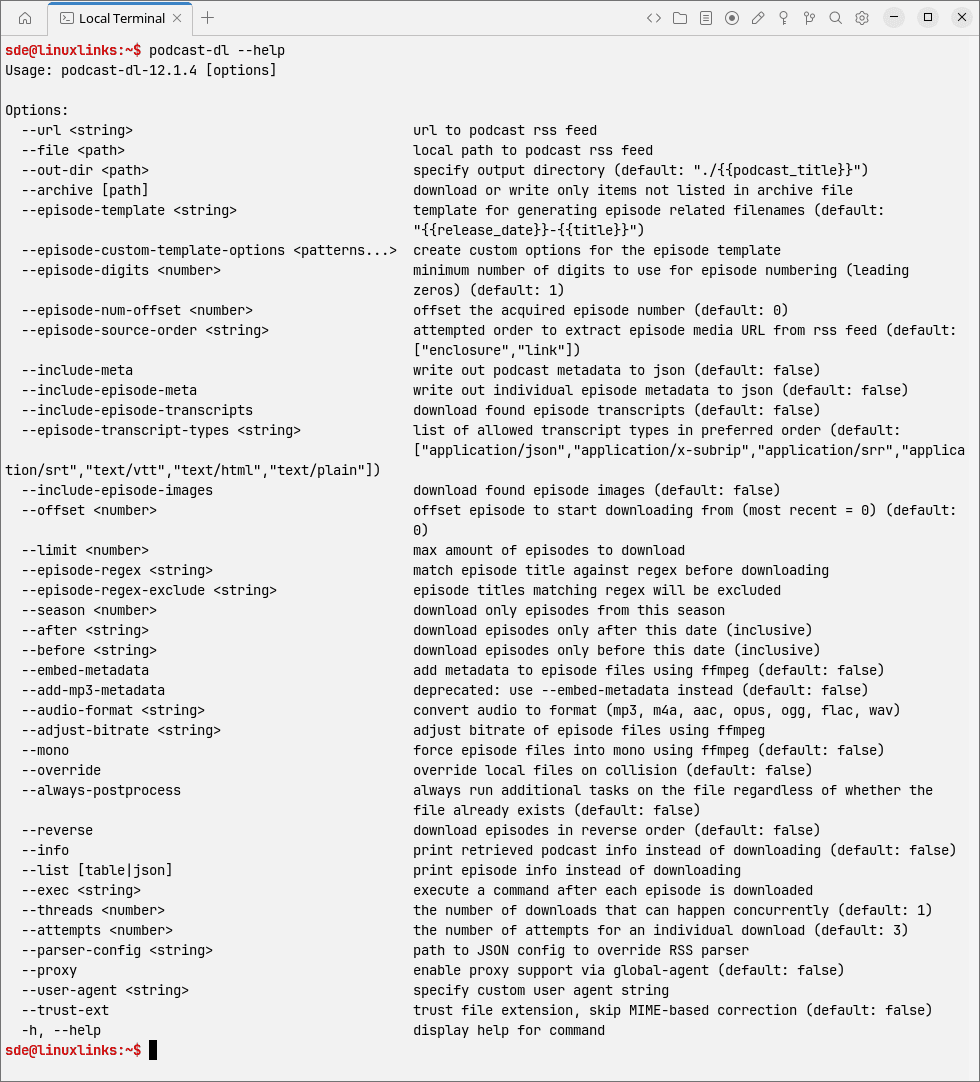
A quick check confirms everything is in place:
$ podcast-dl --help
In Operation
podcast-dl has no graphical interface. Everything is controlled from the command line, with either an RSS URL or a local RSS file supplied as input.
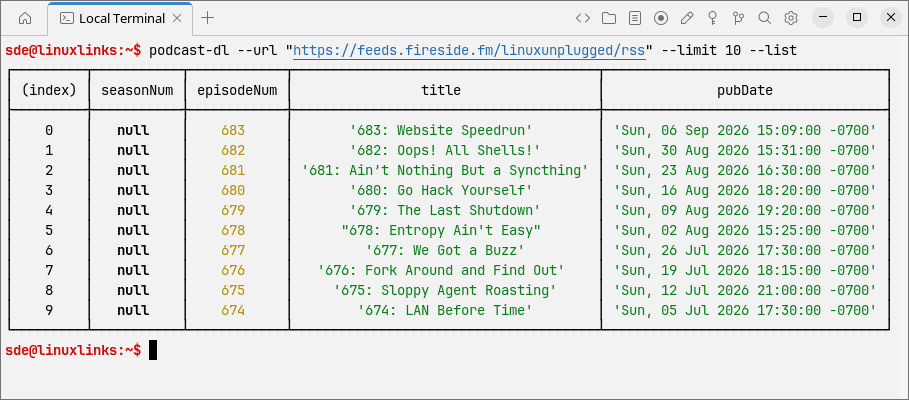
You don’t have to download anything immediately. Episode information can be displayed as a table, which is useful for checking a feed before doing anything with it. Here’s the latest 10 entries from Linux Unplugged:
$ podcast-dl --url "https://feeds.fireside.fm/linuxunplugged/rss" --limit 10 --list
For my first download test, I limited podcast-dl to two episodes and put them in their own directory:
$ podcast-dl --url "https://feeds.fireside.fm/linuxunplugged/rss" --limit 2 --out-dir "./linux-unplugged"
The output is fairly spartan. podcast-dl reports the episodes being processed and the destination filenames, but there’s no transfer speed or live progress display. That’s not a serious problem, although a basic progress indicator would be useful when downloading larger files or working over a slow connection.
The downloaded files are placed beneath the specified linux-unplugged directory with episode-based filenames. The default arrangement is simple and perfectly usable, although the filename templating system gives much more control if you want something different.
One of the more useful features is the archive mechanism:
$ podcast-dl --url "https://feeds.fireside.fm/linuxunplugged/rss" --limit 2 --archive
The archive records episodes that have already been processed. Run the command again and podcast-dl can recognise them and skip them rather than fetching the same files twice. That’s particularly handy if the command is being run regularly against the same feed.
The program can preserve quite a bit more than the audio itself. For example:
$ podcast-dl --url "https://feeds.fireside.fm/linuxunplugged/rss" --limit 2 --include-meta --include-episode-meta --include-episode-images --include-episode-transcripts
That pulls in podcast metadata, episode metadata, artwork and any available transcripts alongside the media files.
Filename generation is another strong point. Templates can use information such as the title, publication date and episode number, with filters available to clean up or transform the resulting text:
$ podcast-dl --url "https://feeds.fireside.fm/linuxunplugged/rss" --limit 2 --episode-template "{{release_date}}-{{title|strip_special|dash}}"
There are plenty of controls for dealing with larger feeds too. --after and --before restrict episodes by date, while --episode-regex and --episode-regex-exclude let you select or reject episodes by title. --threads controls how many downloads can run at the same time.
Key Features
- Download podcast episodes from a remote RSS URL or local RSS file.
- Maintain a JSON archive of processed episodes to avoid downloading them again.
- Restrict downloads by episode count, offset, publication date, season, title regular expression or exclusion regular expression.
- Run multiple downloads concurrently and configure retry attempts for individual files.
- Save podcast metadata, episode metadata, episode artwork and available transcripts alongside downloaded media.
- Flexible filename and directory templates using podcast title, episode title, publication date, episode number, GUID, duration and other feed information.
- Transform template values by stripping characters, changing case, replacing whitespace and trimming text.
- Display podcast information or list episodes as a table or JSON without downloading anything.
- Optional FFmpeg integration for embedding metadata, converting audio to MP3, M4A, AAC, Opus, Ogg, FLAC or WAV, changing bitrate and forcing mono output.
- Run a user-defined command after downloading each episode.
- Supports custom HTTP user agents, proxies, parser configuration, output directories, filename collision handling and configurable logging.
Summary
podcast-dl is a good example of a command-line program that starts with a simple job and then adds the options that actually matter.
At its most basic, you give it an RSS feed and it downloads the episodes. But the archive support, filtering and filename templates make it much more useful if you’re building a permanent local collection. Being able to save artwork, metadata and transcripts alongside the audio is particularly welcome for archival purposes.
The FFmpeg integration is useful too. It means audio conversion and metadata handling can be folded into the same command rather than bolted on afterwards with a separate script.
There are a few rough edges. Download output is very basic, and I’d like to see a proper progress indicator with transfer speed. But the underlying functionality is strong and the command-line options are well chosen.
podcast-dl works equally well for grabbing the occasional episode or maintaining a much larger collection. And because everything is command driven, it’s also easy to drop into shell scripts, cron jobs or other automated workflows.
Website: github.com/lightpohl/podcast-dl
Support:
Developer: Joshua Pohl
License: MIT License
podcast-dl is written in JavaScript. Learn JavaScript with our recommended free books and free tutorials.
Related Software
| Terminal-Based Podcast Tools | |
|---|---|
| termusic | Rust-based music player with good podcast support |
| FlexGet | Multipurpose automation download too |
| castero | Command-line podcast player written in Python |
| podliner | Terminal-based podcast player |
| poddl | Useful tool if you like listening to podcasts offline |
| castget | Simple, command-line based RSS enclosure downloader |
| Podbit | Podboat Improved |
| Hullcaster | Fork of Shellcaster |
| podget | Console podcast aggregrator/downloader optimized for cron |
| Shellcaster | Terminal-based podcast manager written in Rust |
| greg | Command-line podcast aggregator written in Python |
| yapa | Basic podcast aggregator and player |
| podfox | Podcatching for the terminal |
| hpodder | Console tool to scan and download podcasts |
Read our verdict in the software roundup.
 Explore our carefully curated directory of recommended free and open source software, covering every major software category. Explore our carefully curated directory of recommended free and open source software, covering every major software category.The directory forms part of our extensive collection of articles for Linux enthusiasts. It includes hundreds of detailed reviews, together with free and open source alternatives to proprietary software from companies such as Google, Microsoft, Apple, Adobe, IBM, Cisco, Oracle, and Autodesk. LinuxLinks also covers interesting projects worth exploring, Linux-compatible hardware, free programming books and tutorials, and much more. Know a useful free and open source Linux application that we haven’t covered? Tell us about it using our submission form. |
Please read our Comment Policy before commenting.