
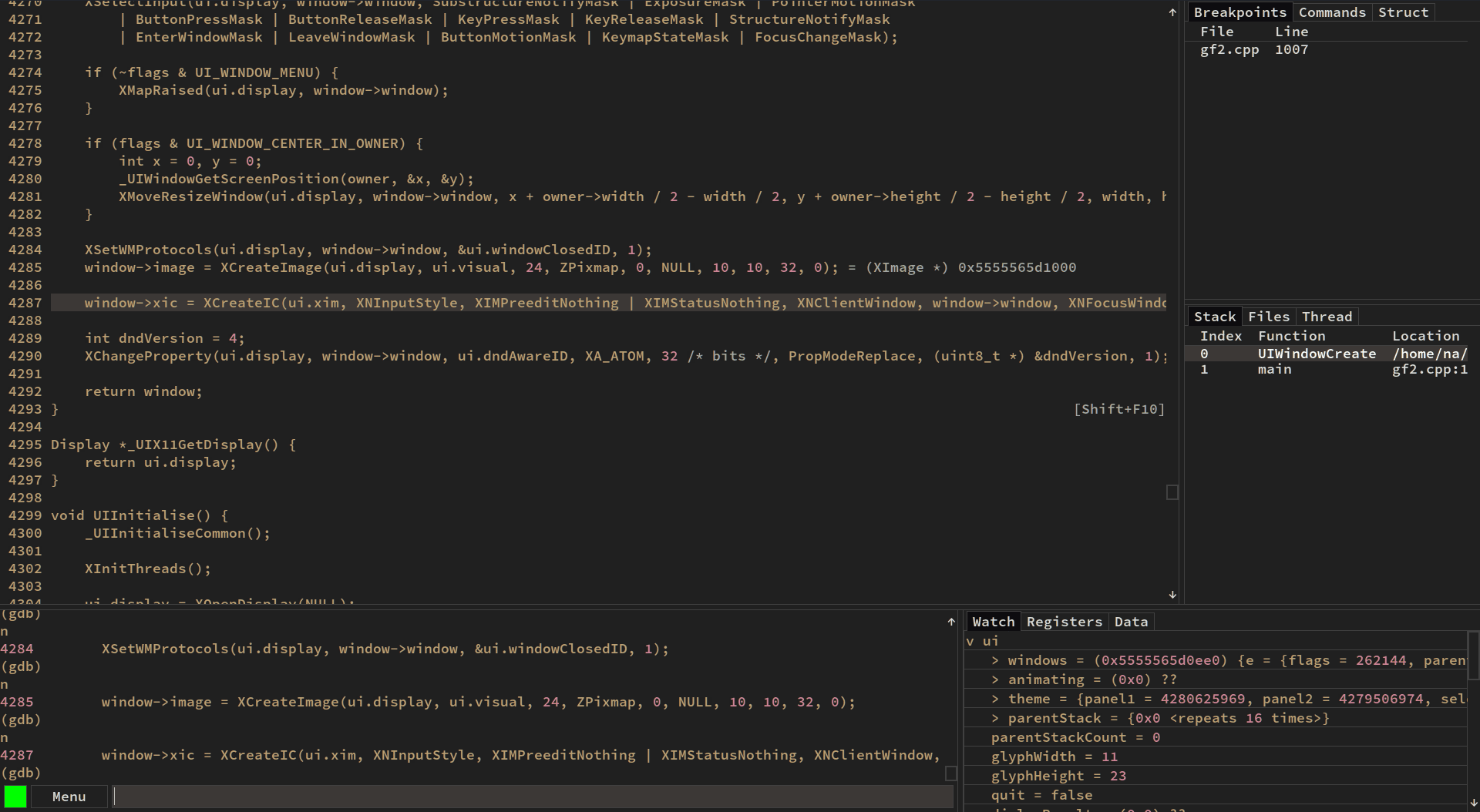
gf is a lightweight graphical front-end for the GNU Project Debugger (GDB). It provides a visual debugging environment while retaining GDB as the underlying debugging engine.
The application is intended to give programmers convenient access to common GDB functionality without requiring them to spend an entire debugging session interacting with the debugger through commands. Its interface exposes source code, program state and low-level debugging information in separate views.
gf can be used to step through an application, control breakpoints and inspect data while the program is stopped. The source view makes it straightforward to follow execution through a program, while assembly-oriented facilities are available when debugging needs to move below source level.
The debugger also exposes information such as registers, local variables and the call stack. Watch expressions allow values of interest to remain visible during a debugging session, reducing the need to repeatedly enter commands.
One of gf’s attractions is its relatively small implementation. It does not attempt to become a complete integrated development environment. Instead it concentrates on presenting GDB functionality through a focused graphical interface.
This is free and open source software.
Key Features
- Graphical front-end for GDB.
- Source code view.
- Assembly view.
- Breakpoint management.
- Program stepping and execution control.
- Register inspection.
- Local variable inspection.
- Watch expressions.
- Call stack display.
- Memory inspection.
- Keyboard-driven debugging workflow.
- Lightweight native interface.
Website: github.com/nakst/gf
Support:
Developer: nakst
License: MIT License
gf is written in C++. Learn C++ with our recommended free books and free tutorials.
 Explore our carefully curated directory of recommended free and open source software, covering every major software category. Explore our carefully curated directory of recommended free and open source software, covering every major software category.The directory forms part of our extensive collection of articles for Linux enthusiasts. It includes hundreds of detailed reviews, together with free and open source alternatives to proprietary software from companies such as Google, Microsoft, Apple, Adobe, IBM, Cisco, Oracle, and Autodesk. LinuxLinks also covers interesting projects worth exploring, Linux-compatible hardware, free programming books and tutorials, and much more. Know a useful free and open source Linux application that we haven’t covered? Tell us about it using our submission form. |
Please read our Comment Policy before commenting.