

Last Updated on September 1, 2020
Football is around us constantly. Even when domestic leagues have finished, there’s always a football score I want to know. Currently, it’s the biggest football tournament in the world, the Fifa World Cup 2018, hosted in Russia. Every World Cup there are some great football nations that don’t manage to qualify for the tournament. This time around the Italians and the Dutch missed out. But even in non-participating countries, it’s a rite of passage to keep track of the latest scores. I also like to keep abreast of the latest scores from the major leagues around the world without having to search different websites.
 If you’re a big fan of the command-line, what better way to keep track of the latest World Cup scores and standings with a small command-line utility. Let’s take a look at one of the hottest trending football utilities available. It’s goes by the name football-cli.
football-cli is not a groundbreaking app. Over the years, there’s been a raft of command line tools that let you keep you up-to-date with the latest football scores and league standings. For example, I am a heavy user of soccer-cli, a Python based tool, and App-Football, written in Perl. But I’m always looking on the look out for trending apps. And football-cli stands out from the crowd in a few ways.
football-cli is developed in JavaScript and written by Manraj Singh. It’s open source software, published under the MIT license. Installation is trivial with npm (the package manager for JavaScript), so let’s get straight into the action.
The utility offers commands that give scores of past and live fixtures, see upcoming and past fixtures of a league and team. It also displays standings of a particular league. There’s a command that lists the various supported competitions. Let’s start with the last command.
At a shell prompt.
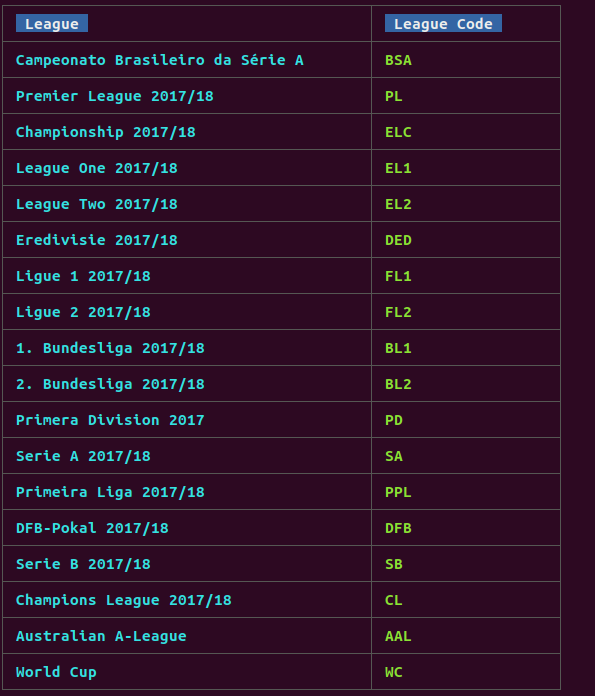
The World Cup is listed at the bottom. I missed yesterday’s games, so to catch up on the scores, I type at a shell prompt:

Now I want to see the current World Cup group standings. That’s easy.
Here’s an excerpt of the output:

The eagle-eyed among you may notice a bug here. Belgium is showing as the leader of Group G. But this is not correct. Belgium and England are (at the time of writing) both tied on points, goal difference, and goals scored. In this situation, the team with the better disciplinary record is ranked higher. England and Belgium have received 2 and 3 yellow cards respectively, so England top the group.
Suppose I want to find out Liverpool’s results in the Premiership going back 90 days from today.

I’m finding the utility really handy, displaying the scores and standings in a clear, uncluttered, and attractive way. When the European domestic games start up again, it’ll get heavy usage. (Actually, the 2018-19 Champions League is already underway)!
These few examples give a taster of the functionality available with football-cli. Read more about the utility from the developer’s GitHub page. Football + command-line = football-cli
Like similar tools, the software retrieves its football data from football-data.org. This service provide football data for all major European leagues in a machine-readable way. This includes fixtures, teams, players, results and more. All this information is provided via an easy-to-use RESTful API in JSON representation.
football-cli is written in JavaScript. Learn JavaScript with our recommended free books and free tutorials.
| Explore Linux | |
|---|---|
 | Best Free and Open Source Software - A huge collection of recommended free and open source software covering every major category. |
 | In-depth Linux Software Reviews - Detailed assessments of Linux software covering features, usability and overall quality. |
 | The Big List of Active Linux Distros - An extensive collection of actively developed Linux distributions. |
 | Open Source Alternatives - Alternatives to software and services from Google, Microsoft, Apple, Adobe, IBM, Autodesk, Oracle and others. |
 | Essential Linux System Tools - Indispensable utilities for monitoring, maintaining and managing Linux systems. |
 | Linux Productivity Tools - Useful utilities for improving productivity and streamlining everyday tasks. |
 | Alternatives to Popular CLI Tools - Modern alternatives to familiar command-line utilities supplied with Linux systems. |
 | Awesome Free Linux Game Tools - Tools, utilities and companion software that improve gaming on Linux. |
 | Machine Learning on Linux - Machine learning and deep learning software, self-hosted applications and practical tools. |
 | Saving Money with Linux - Practical ways to reduce electricity consumption and lower computing costs with Linux. |
 | Linux Candy - Fun, entertaining and sometimes delightfully quirky software from the lighter side of Linux. |
Please read our Comment Policy before commenting.
How do I install this on Debian or CentOS?
# apt-get install football-cli
Reading package lists… Done
Building dependency tree
Reading state information… Done
E: Unable to locate package football-cli
# yum install football-cli
Loaded plugins: fastestmirror, langpacks
Loading mirror speeds from cached hostfile
* base: mirror.rackspace.com
* epel: fedora-epel.mirror.lstn.net
* extras: mirrordenver.fdcservers.net
* updates: mirrors.tummy.com
No package football-cli available.
Error: Nothing to do
Assuming you don’t already have the JavaScript package manager installed, type:
sudo apt install npm
then type:
sudo npm install -g footballcli