

Cockpit is a service for Linux that provides a web-based interface for managing and monitoring hosts.
Cockpit makes Linux discoverable, allowing sysadmins to easily perform tasks such as starting containers, storage administration, network configuration, inspecting logs and so on.
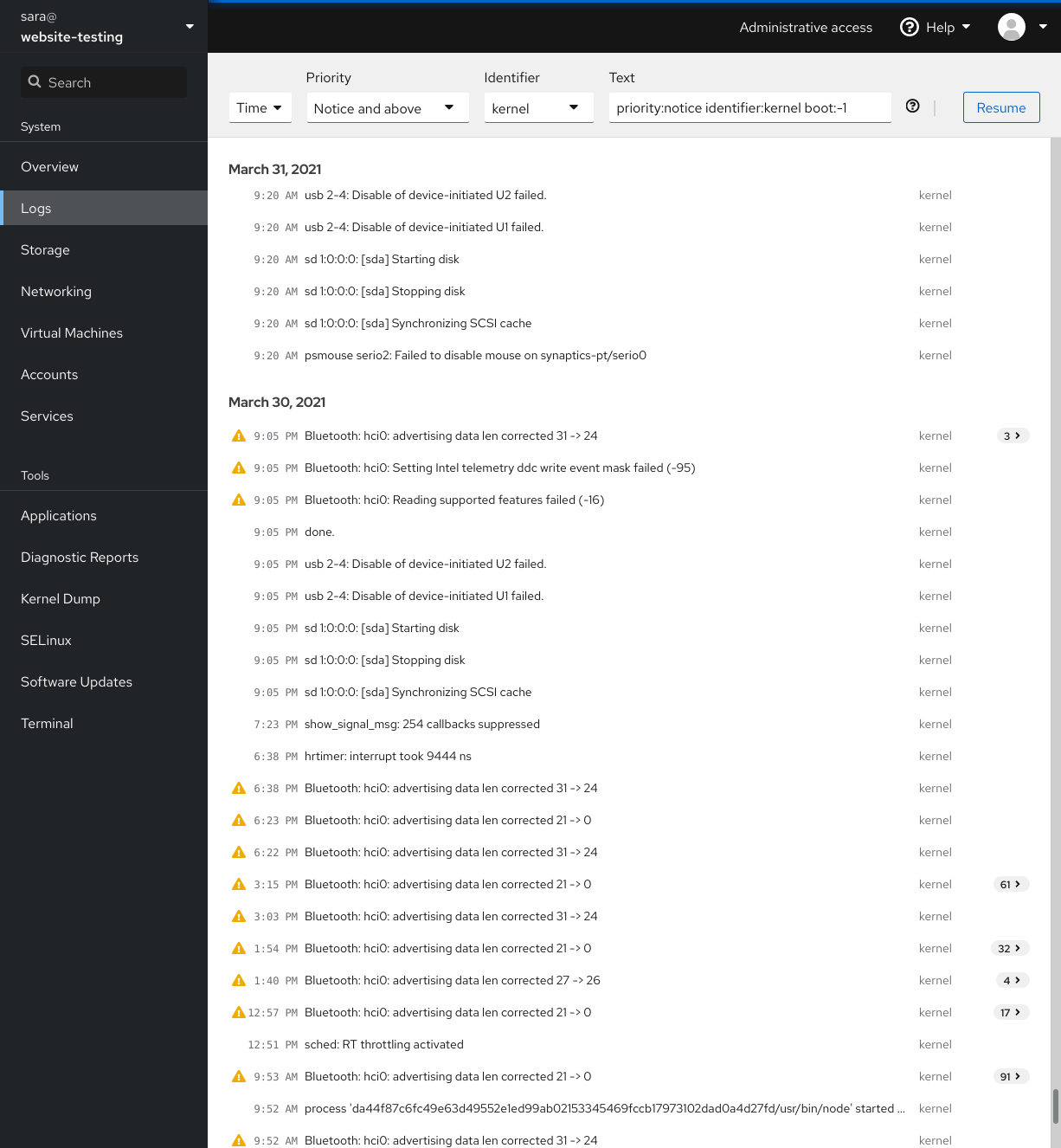
Jumping between the terminal and the web tool is no problem. A service started via Cockpit can be stopped via the terminal. Likewise, if an error occurs in the terminal, it can be seen in the Cockpit journal interface.
You can also easily add other machines that have Cockpit installed and are accessible via SSH and jump between these hosts.
Cockpit is free and open source software.
Key Features
- Graphical and interface designers are involved in the project.
- Modular and can be extended by installing extra modules. You can also develop your own modules.
- Supports multiple servers from a single dashboard.
- Unobtrusive – works alongside other management tools without causing issues.
- Uses a systemd socket, and doesn’t use memory when not in use.
- Builds upon existing functionality; it doesn’t require a configuration by default.
- Doesn’t store the state or data of servers anywhere. It uses the same API command-line tools use.
- No special privileges and doesn’t run as root. It creates a session as the logged in user and has the same permissions as that user. So, to perform administrative tasks, the user needs permission to use sudo or PolicyKit to escalate privileges.
- Supports the following tasks (and more):
- Inspect and change network settings.
- Configure a firewall.
- Manage storage (including RAID and LUKS partitions).
- Create and manage virtual machines.
- Download and run containers.
- Browse and search system logs.
- Inspect a system’s hardware.
- Upgrade software.
- Keep tabs on performance.
- Manage user accounts.
- Inspect and interact with systemd-based services.
- Use a terminal on a remote server in your local web browser.
- Switch between multiple Cockpit servers.
- Extend Cockpit’s functionality by installing a growing list of apps and add-ons.
Website: cockpit-project.org
Support: GitHub Code Repository
Developer: RedHat
License: GNU Lesser General Public License v2.1
Cockpit is written in C and JavaScript. Learn C with our recommended free books and free tutorials. Learn JavaScript with our recommended free books and free tutorials.
Related Software
| System Monitoring Tools | |
|---|---|
| Prometheus | Systems and service monitoring system |
| Nagios | Host and service monitor designed to inform you of network problems |
| OpenNMS | Enterprise grade network monitoring platform |
| LibreNMS | Fully featured network monitoring system |
| SigNoz | Monitor your applications and troubleshoot problems |
| ZABBIX | All-in-one 24x7 free monitoring solution |
| Jaeger | Distributed tracing system |
| Beszel | Lightweight server monitoring platform |
| Loki | Horizontally-scalable, highly-available, multi-tenant log aggregation system |
| Cockpit | Sysadmin login session in a web browser |
| Coroot | Observability platform for monitoring cloud-native apps |
| Monit | Utility for monitoring processes, files, directories and filesystems |
| HyperDX | Cloud-based production monitoring and debugging tool |
| NetXMS | Network and infrastructure monitoring and management system |
| FreeNATS | Automatic network status testing, alerting and reporting package |
| Cacti | Web-based frontend to RRDtool |
| Monitorix | Lightweight system monitoring tool |
| Icinga | Monitoring platform with a powerful configuration language |
| Checkmk | IT monitoring platform |
| Munin | Networked resource monitoring tool designed to be plug and play |
| Shinken | Flexible and scalable monitoring framework |
| openITCOCKPIT | Comprehensive infrastructure monitoring and management platform |
| Pandora FMS | Flexible monitoring system |
| Xymon | System for monitoring of hosts and networks |
| Mon | General-purpose problem alerting system |
Read our verdict in the software roundup.
| Web Hosting Control Panels | |
|---|---|
| 1Panel | Modern web-based control panel for Linux server management |
| Webmin | Web-based interface for system administration |
| ISPConfig | BSD-licensed, hosting control panel supporting many Linux distributions |
| Virtualmin | Powerful and flexible web hosting control panel based on Webmin |
| Cockpit | Sysadmin login session in a web browser |
| Ajenti | Modular server admin panel |
| aaPanel | Simple but powerful control panel |
| Hestia CP | Lightweight and powerful control panel |
| froxlor | Server management panel to manage your hosting platform |
| CyberPanel | Web hosting control panel powered by OpenLiteSpeed |
| Sentora | Web hosting control panel |
| myVesta | Security and stability-focused fork of VestaCP |
| Vesta | Easy to use control panel |
Read our verdict in the software roundup.
 Explore our carefully curated directory of recommended free and open source software, covering every major software category. Explore our carefully curated directory of recommended free and open source software, covering every major software category.The directory forms part of our extensive collection of articles for Linux enthusiasts. It includes hundreds of detailed reviews, together with free and open source alternatives to proprietary software from companies such as Google, Microsoft, Apple, Adobe, IBM, Cisco, Oracle, and Autodesk. LinuxLinks also covers interesting projects worth exploring, Linux-compatible hardware, free programming books and tutorials, and much more. Know a useful free and open source Linux application that we haven’t covered? Tell us about it using our submission form. |
Please read our Comment Policy before commenting.