

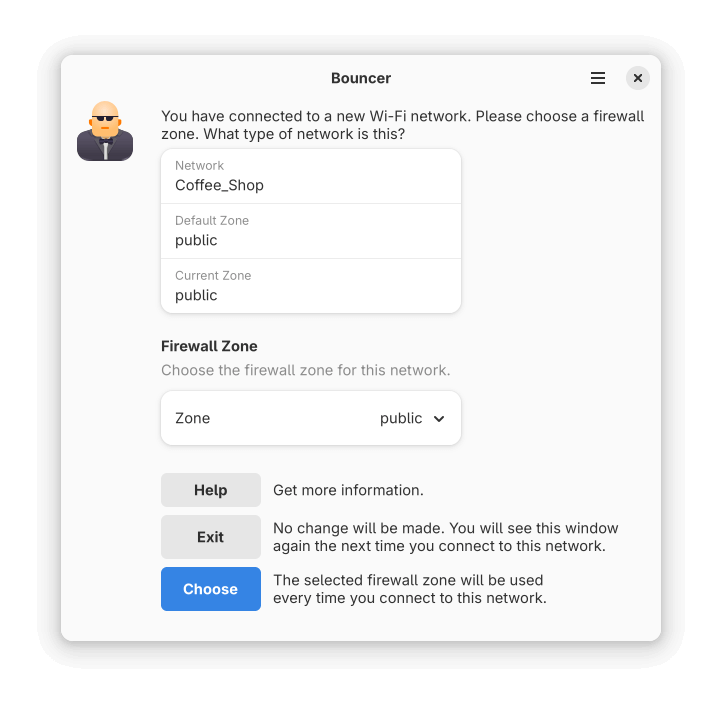
Bouncer is an application to help you choose the correct firewall zone for wireless connections. When you connect to a new network, Bouncer will open a window prompting you for what kind of network (e.g. home, public, work) it is. When you choose the network type, it is associated with that network and automatically used in the future.
NetworkManager and firewalld are required. If you don’t use those, you can’t use Bouncer. Fedora uses both by default. Other distributions may not.
Bouncer integrates with NetworkManager and firewalld using D-Bus. At a high level, it does the following:
- Listen for D-Bus signals from NetworkManager that a Wi-Fi device has changed to a new connection.
- If the connection has already been seen and configured, nothing happens. But if it hasn’t, we continue.
- Use D-Bus to prompt firewalld for a list of zones. This generally large list is pared down to a few basics.
- A window opens to explain what is happening, allowing the user to choose a firewall zone for the network.
- If the user clicks Exit, or closes the window, no changes are made. If the user chooses a zone, we continue.
- Use D-Bus to set the connection zone in NetworkManager. NetworkManager will automatically change the firewall zone to this value on subsequent connections to this network.
This is free and open source software.
Website: github.com/justinrdonnelly/bouncer
Support:
Developer: Justin Donnelly
License: Mozilla Public License 2.0
Bouncer is written in JavaScript. Learn JavaScript with our recommended free books and free tutorials.
| Explore Linux | |
|---|---|
 | Best Free and Open Source Software - A huge collection of recommended free and open source software covering every major category. |
 | In-depth Linux Software Reviews - Detailed assessments of Linux software covering features, usability and overall quality. |
 | The Big List of Active Linux Distros - An extensive collection of actively developed Linux distributions. |
 | Open Source Alternatives - Alternatives to software and services from Google, Microsoft, Apple, Adobe, IBM, Autodesk, Oracle and others. |
 | Essential Linux System Tools - Indispensable utilities for monitoring, maintaining and managing Linux systems. |
 | Linux Productivity Tools - Useful utilities for improving productivity and streamlining everyday tasks. |
 | Alternatives to Popular CLI Tools - Modern alternatives to familiar command-line utilities supplied with Linux systems. |
 | Awesome Free Linux Game Tools - Tools, utilities and companion software that improve gaming on Linux. |
 | Machine Learning on Linux - Machine learning and deep learning software, self-hosted applications and practical tools. |
 | Saving Money with Linux - Practical ways to reduce electricity consumption and lower computing costs with Linux. |
 | Linux Candy - Fun, entertaining and sometimes delightfully quirky software from the lighter side of Linux. |
Please read our Comment Policy before commenting.