
A system profiler is a utility that presents information about the hardware attached to a computer. Having access to hard information about your hardware can be indispensable when you need to establish exactly what hardware is installed in your machine. For example, the information will help a technical support individual diagnose problems, or help to evaluate whether a system will support certain software or hardware.
This type of software lets individuals establish hardware details without opening the computer case. This may not be an option if you do not have direct access to the hardware, relying on the internet to connect to the machine. System profilers let you remotely interrogate a system.
In Windows circles, CPU-Z is a popular freeware tool that gathers information on the main devices of a system without having to conduct technical and manual searching. CPU-Z lays out the raw technical data out to read in easy-to-read tables and is well presented. For Linux, there are a number of good utilities that offer the same type of information, providing essential and extended hardware about the entire system.
This roundup is restricted to terminal-based apps. Here’s our verdict captured in a legendary LinuxLinks-style ratings chart. Only free and open source software is eligible for inclusion.
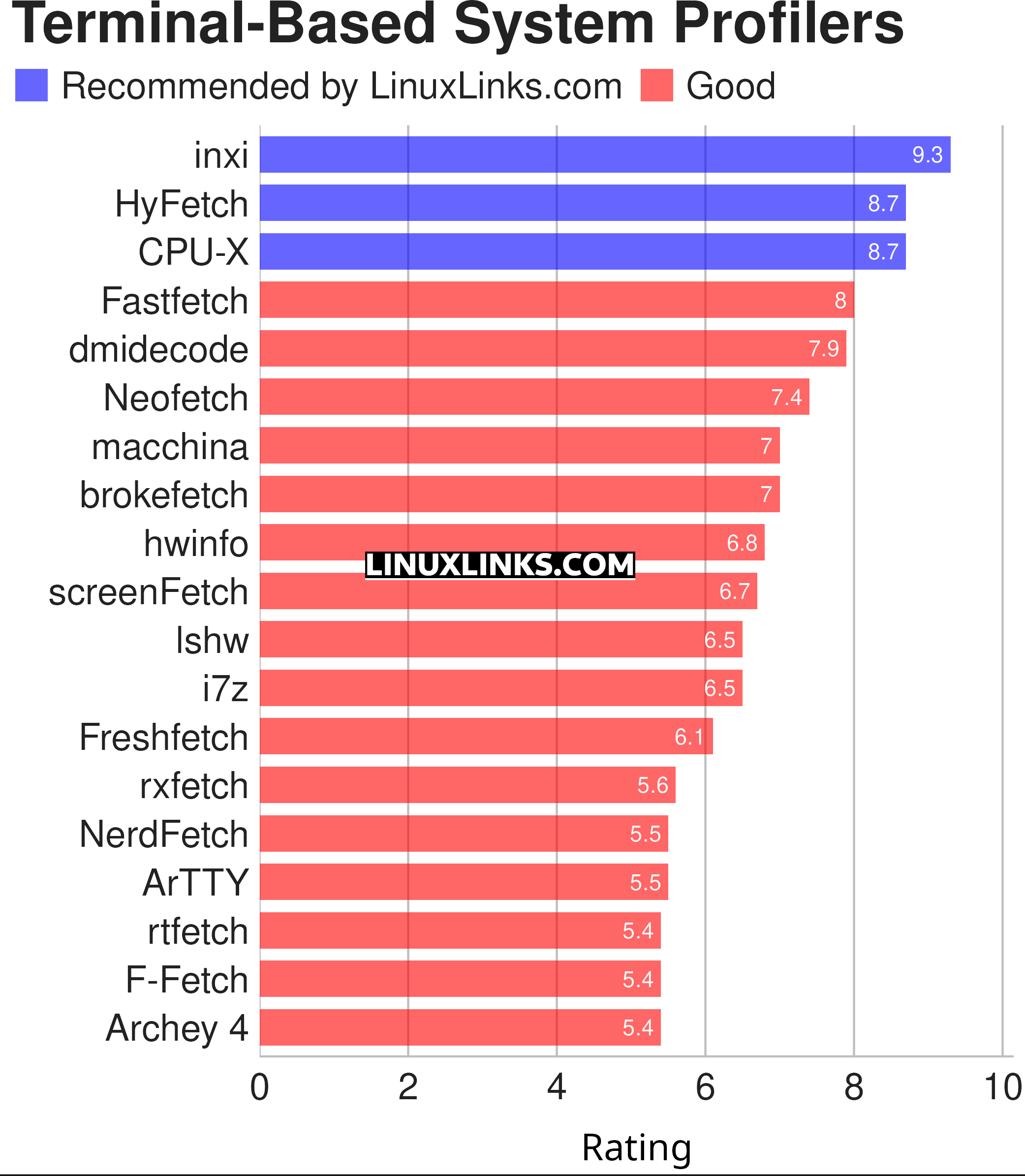
Click the links in the table below to learn all about each profiler.
| Terminal-Based System Profilers | |
|---|---|
| inxi | Perl-based CLI system information tool |
| HyFetch | neofetch with LGBTQ+ pride flags |
| CPU-X | Similar tool to CPU-Z but differs in a few important ways |
| Fastfetch | Written in C, Fastfetch is a speedy fetcher |
| dmidecode | Reports information according to the SMBDIOS/DMI standard |
| Neofetch | Extremely customizable and runs on any operating that supports Bash |
| macchina | System information fetcher |
| brokefetch | neofetch clone |
| hwinfo | Provides a hardware probing library and a command line tool |
| screenFetch | Bash information tool |
| lshw | Console and graphical tool extracting detailed information |
| i7z | Reporting tool for i7, i5, i3 CPUs |
| Freshfetch | Fresh take on Neofetch |
| rxfetch | Minimal but geeky fetch utility |
| NerdFetch | Fetch script using Nerdfonts |
| ArTTY | Art for your TTY |
| rtfetch | Neofetch but in Rust |
| F-Fetch | Fast and minimal system fetcher |
| Archey 4 | Simple system information tool |
GUI system profilers are covered in this separate roundup.
 Explore our comprehensive directory of recommended free and open source software. Our carefully curated collection spans every major software category. Explore our comprehensive directory of recommended free and open source software. Our carefully curated collection spans every major software category.This directory is part of our ongoing series of informative articles for Linux enthusiasts. It features hundreds of detailed reviews, along with open source alternatives to proprietary solutions from major corporations such as Google, Microsoft, Apple, Adobe, IBM, Cisco, Oracle, and Autodesk. You’ll also find interesting projects to try, hardware coverage, free programming books and tutorials, and much more. Know a useful open source Linux program that we haven’t covered yet? Let us know by completing this form. |