

Being able to navigate your local filesystem is an important function of personal computing. File managers have come a long way since early directory editors like DIRED. While they aren’t cutting-edge technology, they are essential software to manage any computer.
File management consists of creating, opening, renaming, moving / copying, deleting and searching for files. But file managers also frequently offer other functionality.
In the field of desktop environments, there are two desktops that dominate the open source landscape: KDE and GNOME. They are smart, stable, and generally stay out of the way. These use the widget toolkits Qt and GTK respectively. And there are many excellent Qt and GTK file managers available.
There are also a wide range of graphical non-Qt and non-Gtk file managers available. This article examines 11 such file managers. The quality is remarkably good.
Here’s our verdict captured in a legendary LinuxLinks-style ratings chart. Only free and open source software is included.
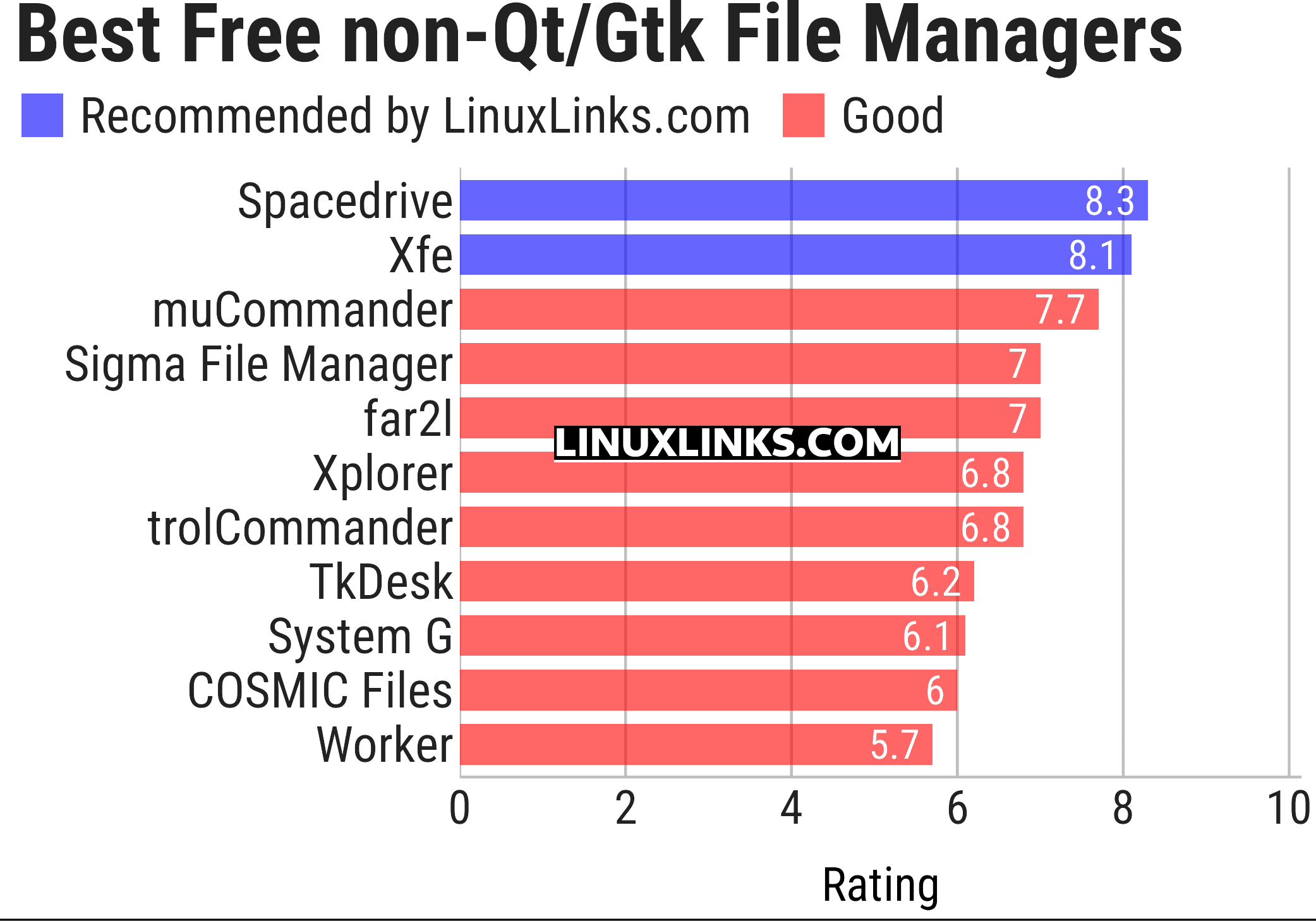
Click the links in the table below to learn more about each file manager.
| Graphical File Managers (Non-Qt, Non-GTK) | |
|---|---|
| Spacedrive | File manager powered by a virtual distributed filesystem |
| Xfe | MS-Explorer or Commander like file manager for X |
| muCommander | File manager with a dual-pane interface |
| Sigma File Manager | Quickly evolving, modern file manager |
| far2l | Linux fork of FAR Manager v2 |
| Xplorer | Modern file explorer written in TypeScript |
| trolCommander | Fork of muCommander |
| TkDesk | Tcl/Tk-based file manager |
| System G | File manager with git support |
| COSMIC Files | File manager designed for the COSMIC desktop environment |
| Worker | File manager in the style of Amiga’s DirOpus |
This article has been updated to reflect the changes outlined in our recent announcement.
 Explore our carefully curated directory of recommended free and open source software, covering every major software category. Explore our carefully curated directory of recommended free and open source software, covering every major software category.The directory forms part of our extensive collection of articles for Linux enthusiasts. It includes hundreds of detailed reviews, together with free and open source alternatives to proprietary software from companies such as Google, Microsoft, Apple, Adobe, IBM, Cisco, Oracle, and Autodesk. LinuxLinks also covers interesting projects worth exploring, Linux-compatible hardware, free programming books and tutorials, and much more. Know a useful free and open source Linux application that we haven’t covered? Tell us about it using our submission form. |
Please read our Comment Policy before commenting.
You forgot to add Xplorer to the list.
Yes, apologies for the oversight. We reviewed this file manager back in October 2023.
This roundup has been updated to include Xplorer.
Your content always keeps me coming back for more!