
Last Updated on July 12, 2021
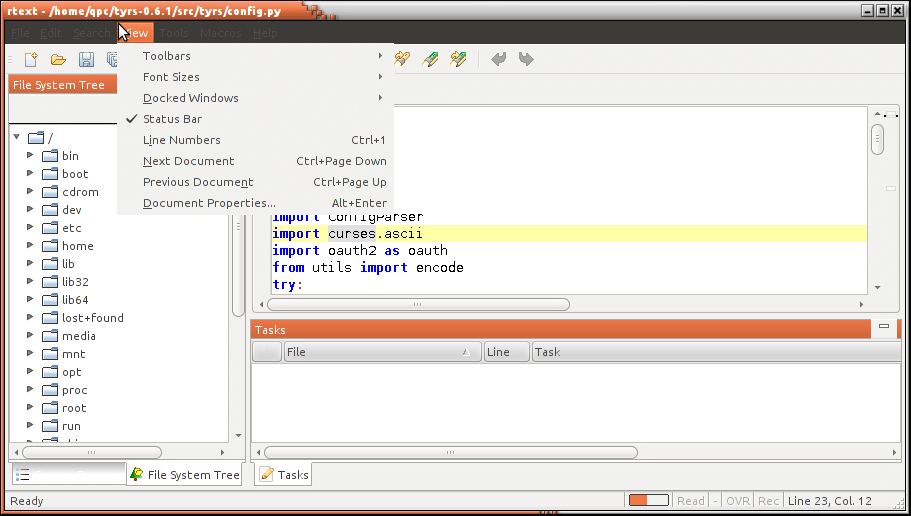
RText is a customizable open source programmer’s text editor.
It is a simple, intuitive text editor with a mature feature-set.
RText is released under a modified BSD license
Features include:
- Syntax highlighting for over 30 languages:
- Assembler (X86), BBCode, C, C++, C#, CSS, Delphi, Fortran, Groovy, HTML, Java, JavaScript, JSON, JSP, Lua, Perl, PHP, Properties Files, Python, Ruby, SAS, Scala, SQL, Tcl, UNIX shell scripts, Visual Basic, Windows batch, and XML.
- Code folding.
- Multiple fonts simultaneously – Different token types can use different fonts and styles.
- Bracket matching – Useful for quickly scoping a block of code.
- Macro record/playback – Automate common editing tasks you do repeatedly.
- Drag-and-drop – Easily move code around in your document, or even into another application.
- Spell Checking – Spell check plain text documents and comments of source code.
- Bookmarking – Mark and quickly navigate to important sections of code.
- Mark Occurrences – Easily see the scope and usage of a variable or method.
- Code templates – Create shortcut key sequences for common coding constructs such as for-loops.
- Unlimited undo/redo – Don’t worry about making a mistake with the handy smart undo & redo.
- File encodings supported – Edit and save files in ASCII, Unicode, or any other encoding supported by your JVM.
- Current line highlighting – Allows you to quickly locate your position in a source file.
- Margin line – Useful for keeping your lines from being too long, if you’re into that kind of thing.
- Drag-and-drop files from the desktop to open them.
- Edit multiple documents simultaneously, using a (tabbed view or traditional MDI).
- Find/Replace, with full regular expression support.
- Find in Files and Replace in Files.
- External Tool Support for running things such as compilers, Ant, etc.
- Task List highlights your TODO items in source code comments.
- Printing and Print Preview, for when you need a hard copy.
- Auto-reload of files when they are modified outside of editor.
- Customizable keyboard shortcuts makes using the editor a little more comfortable.
- Customizable UI – change the toolbar’s icon set, the application’s look and feel, the colors and fonts used in the editor, what buttons are visible on the toolbar, etc.
- Comprehensive Help documentation comes with the application.
- Cross-platform – runs anywhere there is a JVM.
- External tool support.
- Load and save files remotely via FTP.
- Localized into 15 languages.
Website: bobbylight.github.io/RText
Support: GitHub
Developer: Robert Futrell
License: Modified BSD license
RText is written in Java. Learn Java with our recommended free books and free tutorials.
Return to Alternative Text Editors Home Page
| Explore Linux | |
|---|---|
 | Best Free and Open Source Software - A huge collection of recommended free and open source software covering every major category. |
 | In-depth Linux Software Reviews - Detailed assessments of Linux software covering features, usability and overall quality. |
 | The Big List of Active Linux Distros - An extensive collection of actively developed Linux distributions. |
 | Open Source Alternatives - Alternatives to software and services from Google, Microsoft, Apple, Adobe, IBM, Autodesk, Oracle and others. |
 | Essential Linux System Tools - Indispensable utilities for monitoring, maintaining and managing Linux systems. |
 | Linux Productivity Tools - Useful utilities for improving productivity and streamlining everyday tasks. |
 | Alternatives to Popular CLI Tools - Modern alternatives to familiar command-line utilities supplied with Linux systems. |
 | Awesome Free Linux Game Tools - Tools, utilities and companion software that improve gaming on Linux. |
 | Machine Learning on Linux - Machine learning and deep learning software, self-hosted applications and practical tools. |
 | Saving Money with Linux - Practical ways to reduce electricity consumption and lower computing costs with Linux. |
 | Linux Candy - Fun, entertaining and sometimes delightfully quirky software from the lighter side of Linux. |
Please read our Comment Policy before commenting.