
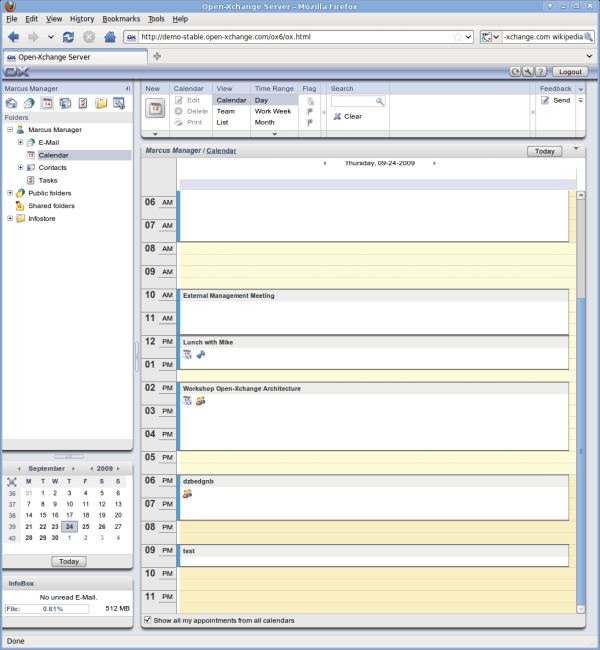
Open-Xchange Server is an open source collaboration software stack that features an integrated Web2.0 E-Mail user interface, calendar, contact, and task management functions. It also offers basic document management and sharing.
Open-Xchange Server supports free standards and proprietary environments like Apple iSync and Microsoft Outlook via commercial extensions. Innovative connectors, called “OXtenders”, enhance customer flexibility by using open standard APIs to integrate existing IT infrastructures or extend capabilities to mobile devices, fax servers, back-up utilities, email archiving tools, and Samba administration tools.
The latest Open-Xchange Server beta versions provide social networking capabilities, enabling automated publish and subscribe capabilities between instances of Open-Xchange Server and social networking sites like linkedin, facebook, and various Google services. The service runs on the #Backend, i.e. on the server, so that data connections stay active even if a user goes off line.
Features include:
-
- Portal.
- Appointments.
- Contacts.
- Tasks.
- Document Management.
- WebMail.
- UWA Widgets.
- WebDAV-Interface.
- Java-API.
- New E‐Mails:
- Current appointments and tasks.
- New available documents.
- Preview for all objects with most important details or contents.
- Integration of universal widgets.
- InfoBox with quota information.
- Create appointments, tasks, contacts, E‐Mails – with just one click.
- Simple and intuitive:
- Create HTML emails in browser.
- H split‐, V split‐, list view.
- User defined mail filter.
- Spam functionality.
- Create appointments with drag & drop in folders and the mini calendar.
- Save attachments directly in the document storage (InfoStore).
- Multiple IMAP‐Accounts and POP3‐Accounts (Beta).
- Unified Inbox (Beta).
- Team‐organization/coordination:
- Day, week, work week, month, team and user specific views and settings.
- Desktop like drag & drop, and inline editing.
- Change dates and duration by dragging appointments.
- Choose participants and resources.
- Create series.
- Conflict management .
- Overview of outstanding tasks:
- Private, public, and shared tasks for a consistent and transparent data management.
- Differentiated lists–Views for a simple and quick access to specific tasks.
- Delegate tasks.
- Set priorities, duration and measure progress.
- Task series for an easy management of repeated tasks.
- Documents available anywhere:
- Personal UserStore.
- Shared public document folders.
- Different views for the best overview.
- Send documents as link or attachments.
- Version and change control.
- Share documents and jointly edit them.
- WebDAV connection for respective client, InfoStore as drive.
Website: www.open-xchange.com
Support:
Developer: Open-Xchange, Inc
License: Dual license (GPL)
| Explore Linux | |
|---|---|
 | Best Free and Open Source Software - A huge collection of recommended free and open source software covering every major category. |
 | In-depth Linux Software Reviews - Detailed assessments of Linux software covering features, usability and overall quality. |
 | The Big List of Active Linux Distros - An extensive collection of actively developed Linux distributions. |
 | Open Source Alternatives - Alternatives to software and services from Google, Microsoft, Apple, Adobe, IBM, Autodesk, Oracle and others. |
 | Essential Linux System Tools - Indispensable utilities for monitoring, maintaining and managing Linux systems. |
 | Linux Productivity Tools - Useful utilities for improving productivity and streamlining everyday tasks. |
 | Alternatives to Popular CLI Tools - Modern alternatives to familiar command-line utilities supplied with Linux systems. |
 | Awesome Free Linux Game Tools - Tools, utilities and companion software that improve gaming on Linux. |
 | Machine Learning on Linux - Machine learning and deep learning software, self-hosted applications and practical tools. |
 | Saving Money with Linux - Practical ways to reduce electricity consumption and lower computing costs with Linux. |
 | Linux Candy - Fun, entertaining and sometimes delightfully quirky software from the lighter side of Linux. |
Please read our Comment Policy before commenting.