
Linux offers a gamut of open source small utilities that perform functions ranging from the mundane to the wonderful. In our eyes, it’s the breadth of these tools that help to make Linux a compelling operating system.
 For beginners to Linux the range of distributions can be daunting. Should you investigate Ubuntu, Arch Linux, openSUSE, elementaryOS, or even try Solus? A good way to experiment with Linux distributions and find the one that best fits your needs is to create a bootable SD card or USB drive flashed with the Linux distros. The tools featured in this article make this process simple and safe. They are all easy to use with a simple interface, and hard drive friendly.
The whole is greater than the sum of its parts is a very famous quote from Aristotle, a Greek philosopher and scientist. This quote is particularly pertinent to Linux. In our view, one of Linux’s biggest strengths is its synergy. The usefulness of Linux doesn’t derive only from the huge raft of open source (command line) utilities. Instead, it’s the synergy generated by using them together, sometimes in conjunction with larger applications.
Good open source developers writing utilities seek to make sure the utility does its job as well as possible, and work well with other utilities. The goal is that users have a handful of tools, each of which seeks to excel at one thing. Some utilities work well independently.
To provide an insight into the quality of software that is available, we have compiled a list of 18 high quality open source tools. Hopefully, there will be something of interest here for anyone who wants to install various Linux distributions and operating systems on a removable flash drive or external hard disk. Here’s our verdict captured in a legendary LinuxLinks-style ratings chart.
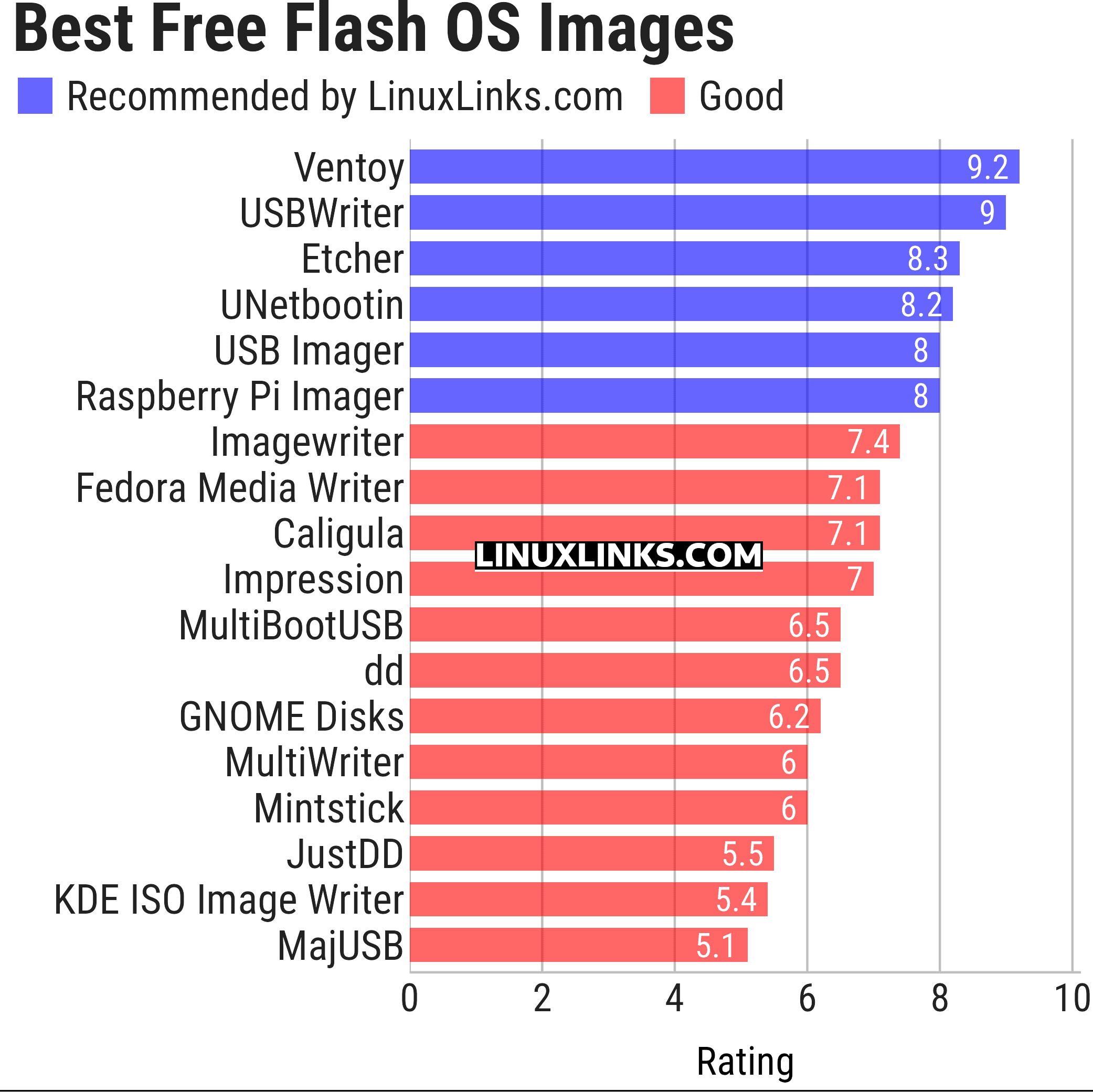
Click the links in the table below to learn more about each program.
| Flash OS Images | |
|---|---|
| Ventoy | Create bootable USB drive for ISO/WIM/IMG/VHD(x)/EFI files |
| USBWriter | Cross-platform disk image writer |
| Etcher | Image burner with multi-platform support |
| UNetbootin | Create bootable Live USB drives for Ubuntu and other distros |
| USB Imager | Lightweight cross-platform utility for writing and verifying disk images |
| Raspberry Pi Imager | Create bootable media. Not only useful for the Raspberry Pi |
| Imagewriter | Write RAW images and ISO images to USB keys |
| Fedora Media Writer | Creates bootable Fedora USB media and supports custom ISOs |
| Caligula | Terminal-based tool for flashing disk images to removable media |
| Impression | Create bootable drives |
| MultiBootUSB | Create multi boot live Linux on a removable USB disk |
| dd | Convert and copy files |
| GNOME Disks | View, modify and configure disks and media |
| MultiWriter | Write an ISO file to multiple USB devices at once |
| Mintstick | Tool for creating bootable USB media and formatting sticks |
| JustDD | USB image writer |
| KDE ISO Image Writer | Simple KDE utility for writing ISO files to USB drives |
| MajUSB | USB bootable drive creator with a GTK4 GUI |
This article has been updated to reflect the changes outlined in our recent announcement.
 Explore our comprehensive directory of recommended free and open source software. Our carefully curated collection spans every major software category. Explore our comprehensive directory of recommended free and open source software. Our carefully curated collection spans every major software category.This directory is part of our ongoing series of informative articles for Linux enthusiasts. It features hundreds of detailed reviews, along with open source alternatives to proprietary solutions from major corporations such as Google, Microsoft, Apple, Adobe, IBM, Cisco, Oracle, and Autodesk. You’ll also find interesting projects to try, hardware coverage, free programming books and tutorials, and much more. Know a useful open source Linux program that we haven’t covered yet? Let us know by completing this form. |
Please read our Comment Policy before commenting.
Why is E2B (Easy 2 Boot) not mentioned here?
Is it open source?
How about providing the ability to find stuff based on processor? there are many ARM based single board computers out there.
I would like to be able to set a flag which then shows me only things that work on that platform.
Thanks for your suggestion, but I doubt we are going to show which software works on every single platform. That would be a mammoth undertaking and out of scope given that we are a few open source enthusiasts writing in our spare time. If anyone wants to help undertake such a task, let us know.
That said, we are going to launch a series on the Raspberry Pi 5 which will look at lots of software that runs well on the single board computer.
I tend to just stick with GNOME Disk Utility aka Disks.
I find Ventoy to be incredibly useful.
Yes, Ventoy is ace for what it does, I just find Disks does all I need. 🙂