

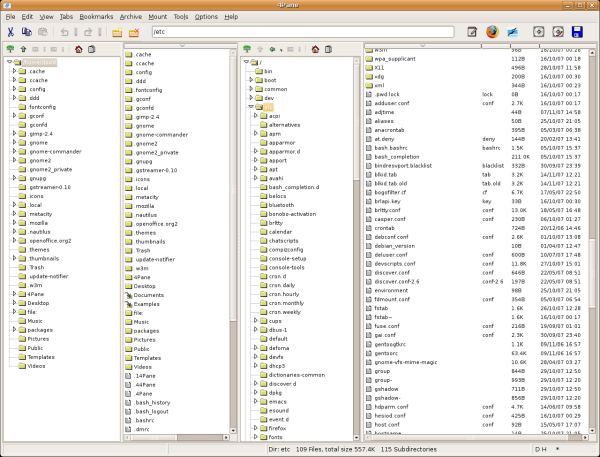
4Pane is a four pane detailed-list file manager.
It is designed to be fully-featured without bloat, and aims for speed rather than visual effects. In addition to standard file manager functionality, it offers advanced features such as multiple undo and redo of most operations (including deletions), archive management including ‘virtual browsing’ inside archives, multiple renaming/duplication of files, a terminal emulator, and user-defined tools.
Directories and files are displayed in separate panes. Generally two pairs of these twin-panes are displayed at a time, allowing easy dragging/pasting of files.
It is targeted at users who want the increased information that a list-view provides, and the ease of navigation that you get with a separate directory pane.
Key Features
- Highly configurable.
- Multi-pane.
- Standard file manager actions.
- Multiple renaming / duplication of files.
- Bookmarks.
- Shortcuts.
- Undo and Redo.
- Archive management; Create and extract gzip, bzip2 and zip archives.
- Browse archives.
- Mount devices including DVD drives and USB keys.
- Extensible; create user-defined tools.
Website: www.4pane.co.uk
Support: Manual
Developer: David Hart
License: GNU General Public License v3.0
4Pane is written in C++. Learn C++ with our recommended free books and free tutorials.
Related Software
| GTK File Managers | |
|---|---|
| Double Commander | File manager with two panels side by side |
| PCManFM | Slim and useful, but not to have any feature bloat |
| Files | File browser designed for elementary OS; loose fork of GNOME Files |
| GNOME Files | Simple file manager for GNOME |
| GNOME Commander | Two-panel graphical file manager |
| 4Pane | Multi-pane, detailed-list file manager |
| Sunflower | Small and highly customizable twin-panel file manager |
| Thunar | xfce’s file manager |
| Tux Commander | Windowed file manager with two panels side by side |
| A couple of GNOME Files forks are also worth mentioning. | |
| Nemo | File manager for the Cinnamon desktop environment |
| Caja | File manager for the MATE desktop |
Read our verdict in the software roundup.
 Explore our comprehensive directory of recommended free and open source software. Our carefully curated collection spans every major software category. Explore our comprehensive directory of recommended free and open source software. Our carefully curated collection spans every major software category.This directory is part of our ongoing series of informative articles for Linux enthusiasts. It features hundreds of detailed reviews, along with open source alternatives to proprietary solutions from major corporations such as Google, Microsoft, Apple, Adobe, IBM, Cisco, Oracle, and Autodesk. You’ll also find interesting projects to try, hardware coverage, free programming books and tutorials, and much more. Discovered a useful open source Linux program that we haven’t covered yet? Let us know by completing this form. |
Be careful. I installed this program and I liked the horizontal split screen. I cut and pasted some folders to my USB hard drive and everything was fine. Then I did a cut / paste on a Neil Young folder and it never appeared on the USB drive. I did a search and it is no where to be found. My music is lost because of 4Pane. I have removed this from my system. I’ll stick with Caja that never did this.
It’s almost certainly nothing to do with 4Pane considering how 4Pane works. More likely a problem with the USB drive, or the data itself.
Your music was ‘lost’ not because of 4Pane.
a) Remember to backup data. Data lost because of file transfer is not 4Pane’s fault. It’s likely the same outcome would have occurred had you simply used mv.
b) You should have checked that the data was on the USB drive. Else you could simply have copied the data back to the directory it was located in.
c) Your music was (is) still available to be recovered. But I’ll leave that as an exercise for the poster.
d) Presumably the Neil Young music was obtained legally. Just obtain it again how you got it in the first place e.g. rip CD (which may not be legal in your country), or download again from whatever service you use.
e) Lots of people have used 4Pane without ever losing a byte.
Personally I would never rely on Flash memory as the only copy of data. Certainly not anything as precious as Neil Young’s music. It is not reliable.
You must always ‘sync’ before you unmount or remove the drive. If not then all bets are off as to the data being there and not being corrupt. That mistake is more likely than the file manager making an error.