

Last Updated on April 12, 2026
YaST (Yet another Setup Tool) is a Linux operating system setup and configuration tool.
YaST is featured in the openSUSE Linux distribution, as well as in SUSE’s derived commercial distributions. It is also part of the defunct United Linux.
YaST features tools that can configure many aspects of the system including GRUB.
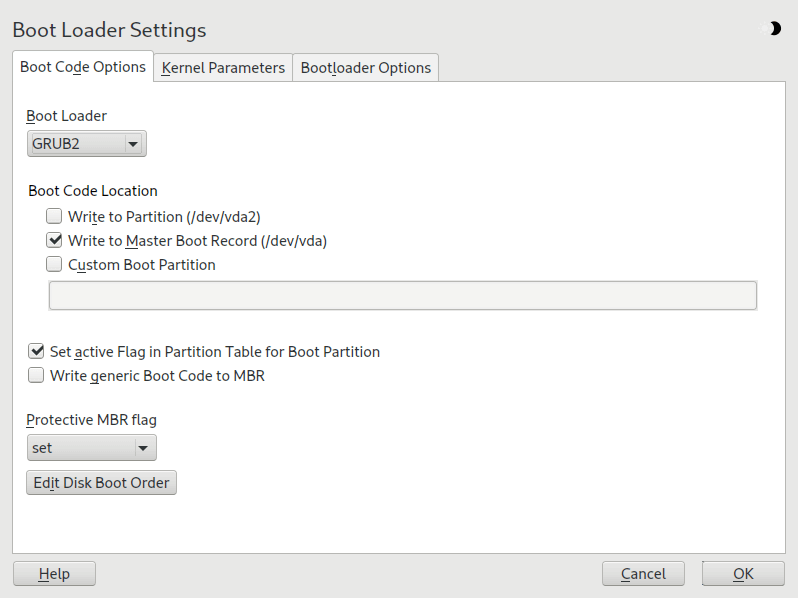
The Boot Code Options tab includes the following additional options:
- Set Active Flag in Partition Table for Boot Partition – Activates the partition that contains the /boot directory. For POWER systems it activates the PReP partition. Use this option on systems with old BIOS and/or legacy operating systems because they may fail to boot from a non-active partition. It is safe to leave this option active.
- Write Generic Boot Code to MBR – If MBR contains a custom ‘non-GRUB’ code, this option replaces it with a generic, operating system independent code. If you deactivate this option, the system may become unbootable.
- Enable Trusted Boot Support – Starts TrustedGRUB2, which supports trusted computing functionality (Trusted Platform Module (TPM))
Website: doc.opensuse.org
Support:
Developer: SuSE
License: GNU General Public License v3.0
YaST2 is written in Ruby. Learn Ruby with our recommended free books and free tutorials.
Related Software
| Graphical GRUB Config Tools | |
|---|---|
| YaST2 | GRUB graphical configuration tool for openSUSE |
| Grub Customizer | Configure the GRUB2/BURG settings and menu entries |
| Grub Editor | GUI application to edit grub configurations |
| Drakboot | GRUB graphical configuration tool |
| MyGrub-Editor | GRUB configuration tool for PCLinuxOS |
Read our verdict in the software roundup.
 Explore our carefully curated directory of recommended free and open source software, covering every major software category. Explore our carefully curated directory of recommended free and open source software, covering every major software category.The directory forms part of our extensive collection of articles for Linux enthusiasts. It includes hundreds of detailed reviews, together with free and open source alternatives to proprietary software from companies such as Google, Microsoft, Apple, Adobe, IBM, Cisco, Oracle, and Autodesk. LinuxLinks also covers interesting projects worth exploring, Linux-compatible hardware, free programming books and tutorials, and much more. Know a useful free and open source Linux application that we haven’t covered? Tell us about it using our submission form. |
Please read our Comment Policy before commenting.