
Last Updated on March 9, 2026
I seem to spend more of my time at the terminal. Using terminal-based software isn’t about nostalgia — it’s about efficiency, control, and reliability. It can be a serious productivity advantage.
Linux has lots of terminal-based music players. tmuzika falls into this category. It aims to offer quick and simple music playback directly in the terminal, with full keyboard control.
Installation
I evaluated tmuzika with the Manjaro distribution. I often gravitate to Manjaro because it’s Arch based and therefore offers access to the Arch User Repository, a community-driven repository. It contains package descriptions (PKGBUILDs) that allow users to compile a package from source with makepkg and then install it. I installed the program using Pamac, Manjaro’s simple GUI package manager.
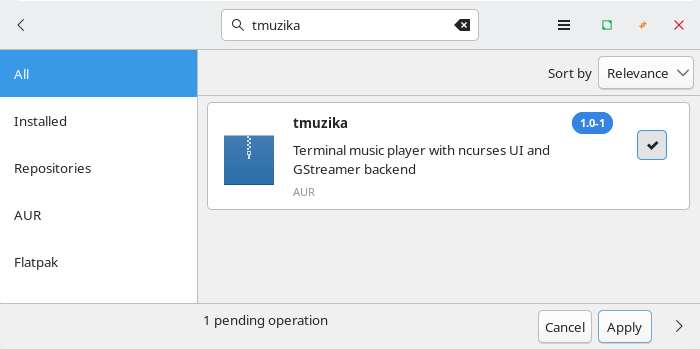
The program builds with no issues.
In Operation
You really need to learn the keyboard shortcuts before starting to use the program.
The main function of the program is to let you listen to your local music collection.
Key Features
- Terminal music playback (ncurses UI)
- Terminal radio station playback (ncurses UI)
- Integrated file manager (copy, cut, paste, rename, delete, undo, bookmarks)
- Add files or entire folders (recursive)
- Save / Load
.m3uplaylists - Search songs / radio stations
- Remember last played song / radio station
- Scroll through lists with keyboard or scroll wheel
Music Playback
The program has a TUI mode but you can also play music from the CLI.
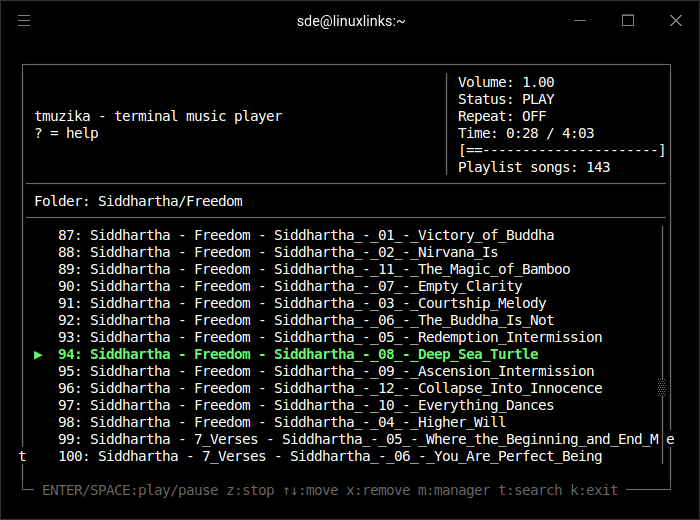
I listen to our CC-licensed collection of music which is in MP3 format. I also tested the program with FLAC music files. FLAC (Free Lossless Audio Codec) is a lossless format.
The software doesn’t retain track ordering when loading albums, and stray characters sometimes appear on the far left hand side (such as shown in the example above).
Gapless playback is the uninterrupted playback of consecutive audio tracks, such that relative time distances in the original audio source are preserved over track boundaries on playback. It’s essential if you listen to classical, electronic music, concept albums, and progressive rock. There are a few Linux music players that don’t offer gapless playback. As tmuzika is in a very early stage of development I wasn’t expecting support for gapless playback. I hope it’s added in a later release.
Internet Radio mode
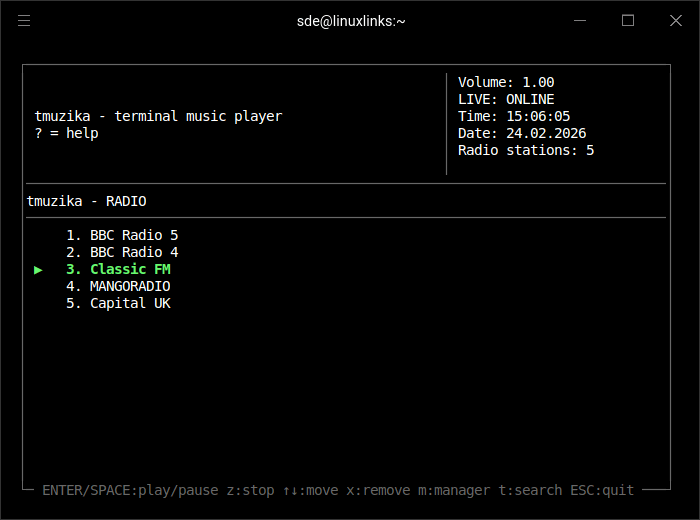
The project’s GitHub lists the program’s keyboard shortcuts. Surprisingly the keyboard shortcut to switch to the internet radio is not currently listed, but it’s included in the in-program help (it’s r).
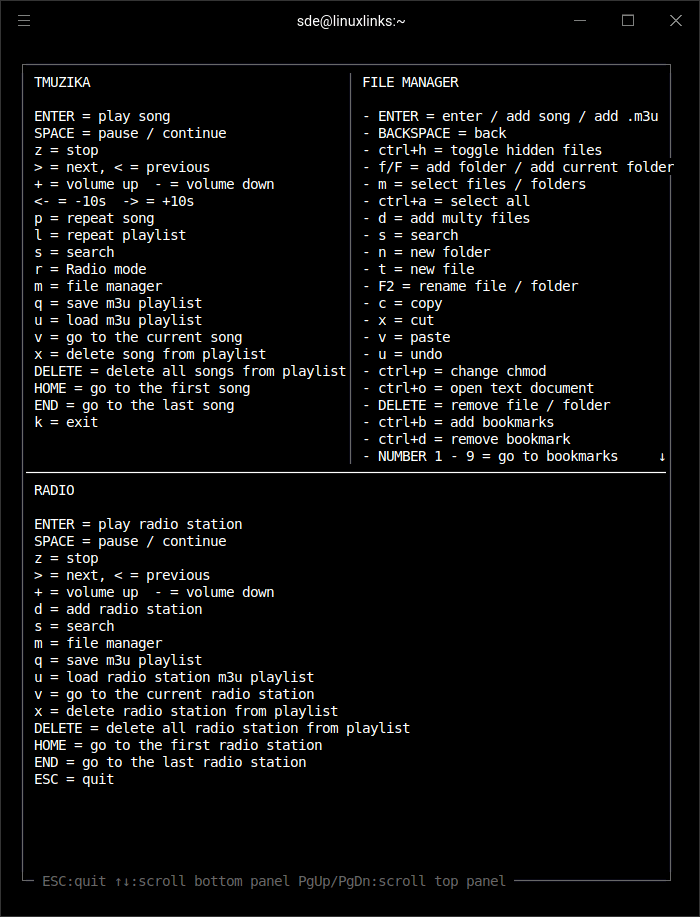
There are no radio stations populated. And the software doesn’t offer any access to a radio browser, so you have to manually add radio stations with each station URL. There are GUI radio programs such as Transistor that list stream URLs for stations. But it’s still a tortuous affair entering this information into tmuzika if you want to populate lots of stations, or if you like dabbling with new stations.
Summary
tmuzika is in a very alpha stage of development so it’s not really fair to judge the program. From small acorns mighty oaks grow. But it’s fair to say tmuzika is already usable as a music player and internet radio player. But even with only limited testing there are lots of issues and bugs evident. And using the program is not particularly intuitive.
As you might expect, tmuzika is very frugal with system resources. The ps_mem utility reports memory usage is a mere 14MB.
I’ll keep an eye on the program’s development and will revisit it at a later date.
Website: github.com/ivanjeka/tmuzika
Support:
Developer: ivanjeka
License: GNU General Public License v3.0
tmuzika is written in C. Learn C with our recommended free books and free tutorials.
Related Software
| Terminal-Based Music Players | |
|---|---|
| musikcube | Sublime audio engine, library, player and server written in C++ |
| tap | The lightest music player with gapless playback |
| Tizonia | Powerful cloud music player based on OpenMAX IL 1.2 written in C and C++ |
| cmus | Great set of features including the essential gapless playback |
| termusic | Music Player TUI written in Rust |
| kew | Music player written in C |
| spectrum | Simple and intuitive music player for tech enthusiasts |
| ncmpc | Frugal Music Player Daemon client |
| ncmpy | Music Player Daemon client |
| MOC | Designed to be powerful and easy to use |
| RMuP | Simple music player lacking gapless playback |
| Siren | Extremely frugal with system resources |
| grump | CLI audio player written in Go |
| Gomu | Another Go music player |
| mpvc | mpc-like control interface for mpv |
| RustPlayer | Audio and radio player written in Rust |
Read our verdict in the software roundup.
The program also has internet radio support. You can also read our verdict on terminal-based internet radio program in this separate software roundup.
 Explore our comprehensive directory of recommended free and open source software. Our carefully curated collection spans every major software category. Explore our comprehensive directory of recommended free and open source software. Our carefully curated collection spans every major software category.This directory is part of our ongoing series of informative articles for Linux enthusiasts. It features hundreds of detailed reviews, along with open source alternatives to proprietary solutions from major corporations such as Google, Microsoft, Apple, Adobe, IBM, Cisco, Oracle, and Autodesk. You’ll also find interesting projects to try, hardware coverage, free programming books and tutorials, and much more. Discovered a useful open source Linux program that we haven’t covered yet? Let us know by completing this form. |