

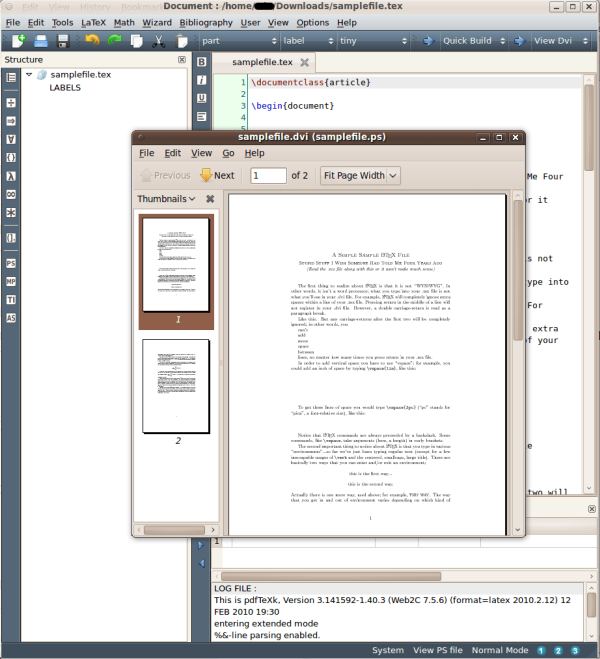
Texmaker is an open source LaTeX editor that integrates many tools into a single application.
It has an interface which is reminiscent of Kile.
The purpose of this software is to enable the user to focus on the content of a document, instead of grappling with writing compliant LaTeX code.
Key Features
- Unicode editor to write LaTeX source files (syntax highlighting, code completion, code folding, undo-redo, search-replace, spell checker, bi-directional support…).
- Clean and modern interface.
- Spell checker.
- Principal LaTex tags can be inserted directly with the “LaTeX” and “Math” menus
- 370 mathematical symbols can be inserted in just one click.
- Wizards to generate code (‘Quick document’, ‘Quick letter’, tabular, tabbing and array environments).
- LaTeX-related programs can be launched via the “Tools” menu.
- Standard Bibtex entry types can be inserted in the “.bib” file with the “Bibliography” menu.
- “Structure view” of the document for easier navigation of a document.
- See information about processes and the logfile after a LaTeX compilation.
- “Next Latex Error” and “Previous Latex Error” commands let you reach the LaTeX errors detected in the log file.
- Asymptote support.
- “Forward/Inverse search” support with DVI viewer.
- Integrated LaTeX to html conversion tool.
- Extensive LaTeX documentation.
Website: xm1math.net/texmaker
Support: User manual
Developer: Pascal Brachet, J. Amblard
License: GNU GPL v2
Texmaker is written in C++. Learn C++ with our recommended free books and free tutorials.
Related Software
| Document Processors | |
|---|---|
| TeXstudio | Fully featured open source LaTeX editor |
| LyX | Power and flexibility of TeX/LaTeX with an intuitive interface |
| TeXmacs | WYSIWYG mathematical text editor using TeX fonts |
| TeXmaker | Integrates many different tools |
| TeXworks | Simple front-end modeled on TeXShop |
| Kile | KDE Integrated LaTeX Environment |
| AUCTeX | Edit LaTeX, ConTeXt, docTeX, Texinfo, and TeX files |
| Enter TeX | Integrated LaTeX Environment for the GNOME desktop |
| Typewriter | Create documents with typst |
| Gummi | Simple LaTeX editor |
| Open LaTeX Studio | LaTeX editor supporting remote collaboration between users |
| SILE | Simon’s Improved Layout Engine |
Read our verdict in the software roundup.
| LaTeX Tools | |
|---|---|
| LyX | The power and flexibility of TeX/LaTeX with an intuitive graphical interface |
| KBibTeX | Reference management software primarily for BibTeX |
| TeXstudio | Fully featured open source LaTeX editor |
| VimTeX | Vim and Neovim filetype and syntax plugin |
| TeXmacs | WYSIWYG mathematical text editor using TeX fonts |
| JabRef | Graphical frontend to manage BibTeX databases |
| Biber | BibTeX replacement for users of BibLaTeX |
| TeXmaker | Integrates many different tools |
| Tectonic | Modernised, self-contained TeX and LaTeX engine |
| TeXworks | Simple front-end modeled on TeXShop |
| Atom-LaTeX | Typesetting with GitHub's Atom text editor |
| SiSU | Documents - structuring, publishing in multiple formats and search |
| Kile | KDE Integrated LaTeX Environment |
| BibLaTex | Programmable bibliographies and citations |
| Enter TeX | Integrated LaTeX Environment for the GNOME desktop |
| AUCTeX | Environment for editing LaTeX, ConTeXt, docTeX, Texinfo, and TeX files |
| TexMaths | LaTeX equation editor for LibreOffice |
| Setzer | Full-featured LaTeX editor |
| Gummi | Simple LaTeX editor |
| TexLab | Cross-platform implementation of the Language Server Protocol for LaTeX |
| Pybliographer | Tool for managing bibliographic databases |
| LaTeXDraw | Graphical drawing editor for LaTeX |
| KLatexFormula | Useful utility for creating images from LaTeX equations |
| Hieroglyphic | Find LaTeX symbols |
| Hand TeX | Handwritten LaTeX symbol classifier |
Read our verdict in the software roundup.
 Explore our comprehensive directory of recommended free and open source software. Our carefully curated collection spans every major software category. Explore our comprehensive directory of recommended free and open source software. Our carefully curated collection spans every major software category.This directory is part of our ongoing series of informative articles for Linux enthusiasts. It features hundreds of detailed reviews, along with open source alternatives to proprietary solutions from major corporations such as Google, Microsoft, Apple, Adobe, IBM, Cisco, Oracle, and Autodesk. You’ll also find interesting projects to try, hardware coverage, free programming books and tutorials, and much more. Discovered a useful open source Linux program that we haven’t covered yet? Let us know by completing this form. |
Please read our Comment Policy before commenting.