

A subtitle editor is a type of computer software that lets users create and edit subtitles. These subtitles are superimposed over, and synchronized with, video. Subtitles can literally make the difference between being immersed in a movie or only watching the screen, trying to keep up with developments. Good subtitling does not distract but actually enhances viewing pleasure, and even native speakers can find subtitles useful, not only where the individual is hearing-impaired.
A subtitle is a text representation of the dialog, narration, music, or sound effects in a video file. Subtitles are available in multiple formats.
Mangled subtitles can anger viewers. Fortunately, there is a good range of open source software that lets you make subtitles with Linux. These editors help you preview how the subtitles appear on the video, and listen to the dialog. Additionally, they offer the ability to make entering and editing text easy, with good control over text formatting and positioning.
We make the following recommendations captured in a legendary LinuxLinks-style ratings chart. Only free and open source software is eligible for inclusion.
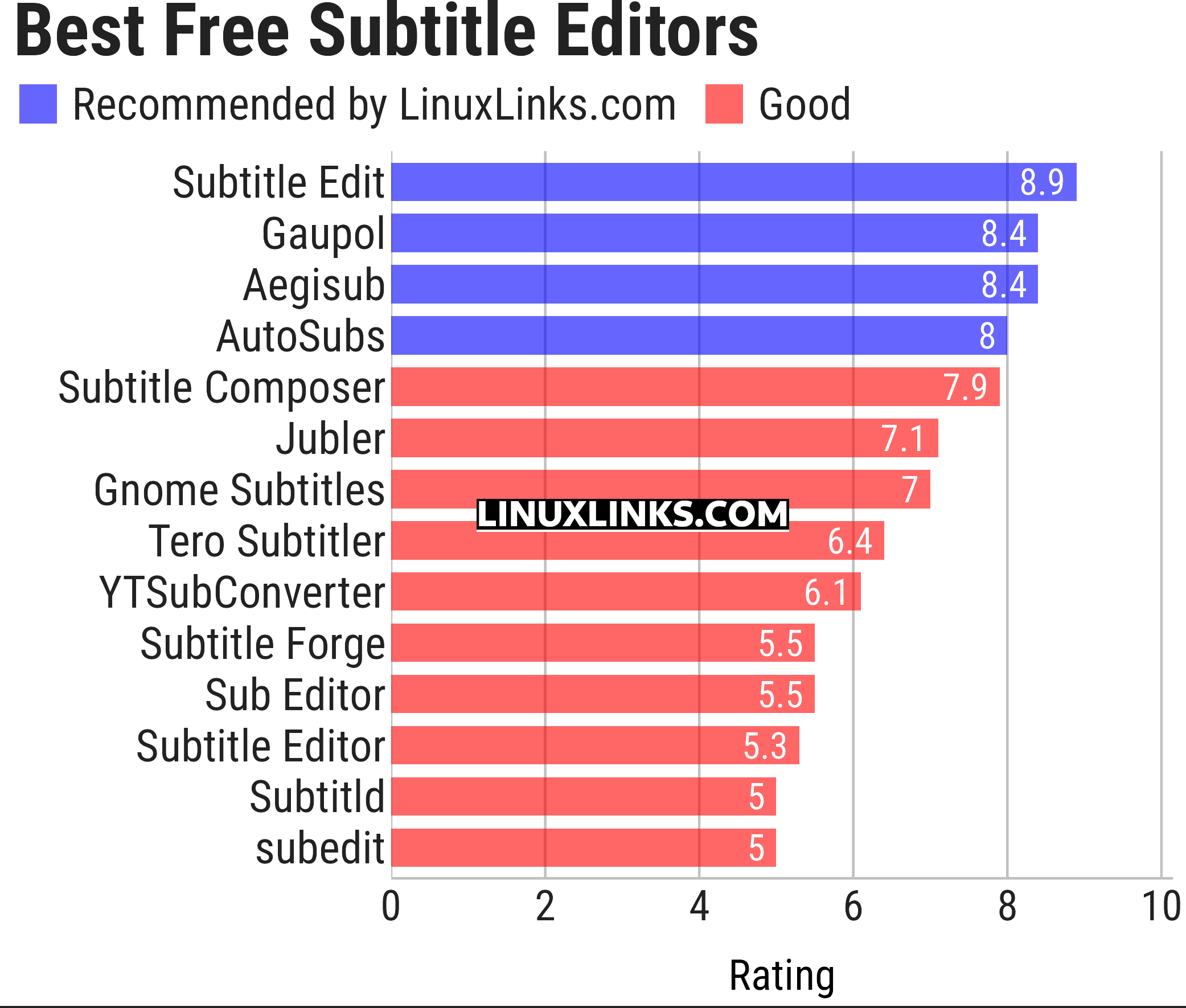
The software featured in this article also offer an easy way to perform a number of different editing jobs, besides adding and removing subtitles. They each boast a good feature set, and are all released under an open source license.
Let’s explore each of the applications.
| Subtitle Editors | |
|---|---|
| Subtitle Edit | Versatile and feature-laden editor for video subtitles |
| Gaupol | Editor for text-based subtitle files |
| Aegisub | Highly customizable tool for creating and modifying subtitles |
| AutoSubs | Subtitles made simple |
| Subtitle Composer | Editor that supports basic and advanced operations |
| Jubler | Author new subtitles - convert, transform, correct and refine |
| Gnome Subtitles | Video subtitling for the GNOME desktop |
| Tero Subtitler | Feature-rich subtitle creation, translation and validation tool |
| YTSubConverter | Create styled YouTube subtitles |
| Subtitle Forge | Desktop application for working with subtitles across the full workflow |
| Sub Editor | Visual, keyboard-driven subtitle editor with waveform timing |
| Subtitle Editor | GTK+3 tool to edit subtitles |
| Subtitld | Edit, transcribe and create subtitles |
| subedit | Command-line editor written in Bash |
This article has been updated to reflect the changes outlined in our recent announcement.
 Explore our comprehensive directory of recommended free and open source software. Our carefully curated collection spans every major software category. Explore our comprehensive directory of recommended free and open source software. Our carefully curated collection spans every major software category.This directory is part of our ongoing series of informative articles for Linux enthusiasts. It features hundreds of detailed reviews, along with open source alternatives to proprietary solutions from major corporations such as Google, Microsoft, Apple, Adobe, IBM, Cisco, Oracle, and Autodesk. You’ll also find interesting projects to try, hardware coverage, free programming books and tutorials, and much more. Know a useful open source Linux program that we haven’t covered yet? Let us know by completing this form. |
Please read our Comment Policy before commenting.
Gaupol is my choice app.