
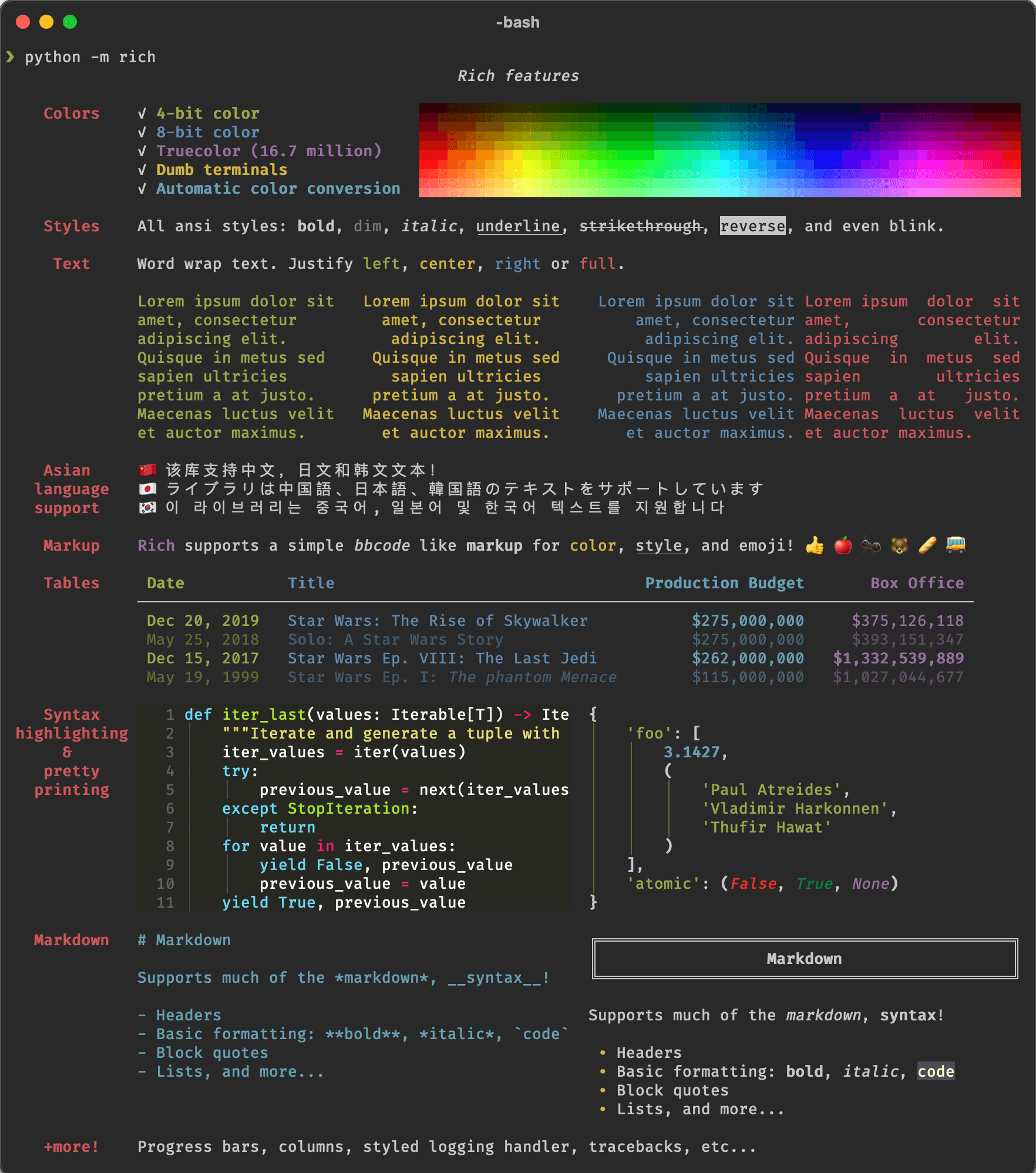
Rich is a Python library for rich text and beautiful formatting in the terminal.
The Rich API makes it easy to add color and style to terminal output. Rich can also render pretty tables, progress bars, markdown, syntax highlighted source code, tracebacks, and more — out of the box.
This is free and open source software.
Key Features
- Text class you can use to mark up strings with color and style attributes. You can use a Text instance anywhere a string is accepted, which gives you a lot of control over presentation.
- Automatically highlight patterns in text, such as numbers, strings, collections, booleans, None, and a few more exotic patterns such as file paths, URLs and UUIDs.
- Format (i.e. pretty print) containers such as lists, dicts, and sets.
- Supplies a logging handler which will format and colorize text written by Python’s logging module.
- Render Python tracebacks with syntax highlighting and formatting. Rich tracebacks are easier to read and show more code than standard Python tracebacks.
- Number of Prompt classes which ask a user for input and loop until a valid response is received (they all use the Console API internally).
- Render text or other Rich renderables in neat columns with the Columns class
- Group class allows you to group several renderables together so they may be rendered in a context where only a single renderable may be supplied. For instance, you might want to display several renderables within a Panel.
- Render Markdown to the console. To render markdown, construct a Markdown object then print it to the console.
- Add whitespace around text or other renderable.
- Display continuously updated information regarding the progress of long running tasks / file copies etc. The information displayed is configurable, the default will display a description of the ‘task’, a progress bar, percentage complete, and estimated time remaining.
- Syntax highlight various programming languages with line numbers.
- Variety of ways to render tabular data to the terminal.
- Generate a tree view in the terminal. A tree view is a great way of presenting the contents of a filesystem or any other hierarchical data.
Website: github.com/Textualize/rich
Support:
Developer: Will McGugan
License: MIT License
Rich is written in Python. Learn Python with our recommended free books and free tutorials.
Related Software
| Command-Line Python Application Development Tools | |
|---|---|
| Python Fire | Library for automatically generating command line interfaces |
| argparse | Parser for command-line options, arguments and sub-commands |
| Click | Create beautiful command line interfaces in a composable way |
| Typer | Library for building CLI applications |
| Rich | Python library for rich text and beautiful formatting |
| alive-progress | Progress bar, with real-time throughput |
| Gooey | Convert console programs into end-user-friendly GUI software |
| Python Prompt Toolkit | Build powerful interactive command line and terminal applications |
| tqdm | Fast, extensible progress bar for Python and CLI |
| Asciimatics | Create full-screen text UIs from interactive forms to ASCII animations |
| Cement | CLI application framework for Python |
| docopt | Command-line interface description language |
| cliff | Framework for building command line programs |
| Cyclopts | Framework for building command-line interfaces |
Read our verdict in the software roundup.
| Terminal String Styling Tools | |
|---|---|
| Rich | Python library for rich text and beautiful formatting |
| Chalk | Bills itself as “Terminal string styling done right” |
| picocolors | Tiny and fast library for terminal output formatting |
| yoctocolors | Small and fast command-line coloring package |
| yachalk | Clone of Chalk written in Python |
| kleur | Node.js library for formatting terminal text with ANSI colors |
| colorette | Set your terminal text color and styles |
| sty | String styling for your terminal |
| termcolor | ANSI color formatting for output in the terminal |
| colored | Simple Python library for color and formatting in terminal |
| ansicolors | ANSI colors for Python |
| ansi-colors | Add ANSI colors to terminal text |
Read our verdict in the software roundup.
 Explore our comprehensive directory of recommended free and open source software. Our carefully curated collection spans every major software category. Explore our comprehensive directory of recommended free and open source software. Our carefully curated collection spans every major software category.This directory is part of our ongoing series of informative articles for Linux enthusiasts. It features hundreds of detailed reviews, along with open source alternatives to proprietary solutions from major corporations such as Google, Microsoft, Apple, Adobe, IBM, Cisco, Oracle, and Autodesk. You’ll also find interesting projects to try, hardware coverage, free programming books and tutorials, and much more. Discovered a useful open source Linux program that we haven’t covered yet? Let us know by completing this form. |
Please read our Comment Policy before commenting.