

Internet radio, often referred to as web radio, streaming radio, or online radio, is a digital audio service that streams over the Internet.
So, what makes internet radio so appealing? For starters, there are no sign-up or subscription fees, making it accessible to everyone. You can tune into a vast array of stations from around the globe. Whether you’re a fan of classical music, pop, folk, or even news and talk shows, there’s something for everyone, no matter where you are, as long as you have an internet connection. Internet radio covers every format you’d find on traditional broadcast stations, providing endless listening options.
Receiver is a GUI internet radio player for Linux. While the program is designed for GNOME it runs fine under other desktop environments. It’s free and open source software.
Installation
I evaluated Receiver with Ubuntu 25.10. Installation is straightforward as the developer provides an AppImage and a deb package for Debian/Ubuntu. There’s also a Flatpak available. I went with the latter on this occasion.
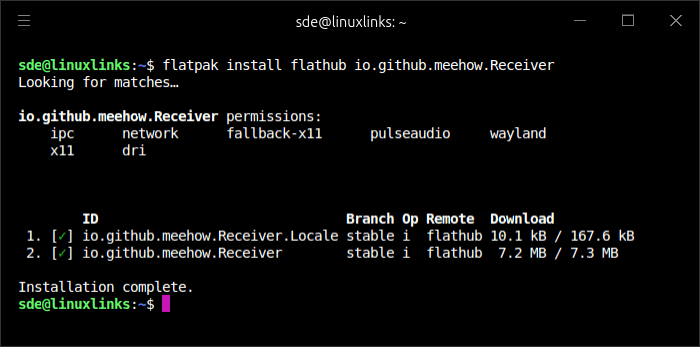
I’m not a huge fan of Flatpaks but they make installation trivial on a wide range of Linux distributions.
Key Features
- 30,000+ curated stations — deduplicated, scanned, and verified. At the time of writing there are 36,122 stations listed.
- Browse and search by tags, country, or language.
- Save your favourite stations for quick access.
- MP3, AAC, Ogg, and HLS stream support.
- MPRIS integration — control playback from your desktop.
- Session persistence — resume where you left off.
- Internationalization support with translations for 120 languages.
The UI is divided into Featured Stations, Browse by Genre, and the stream being played. Favourites are shown under Featured Stations when added.
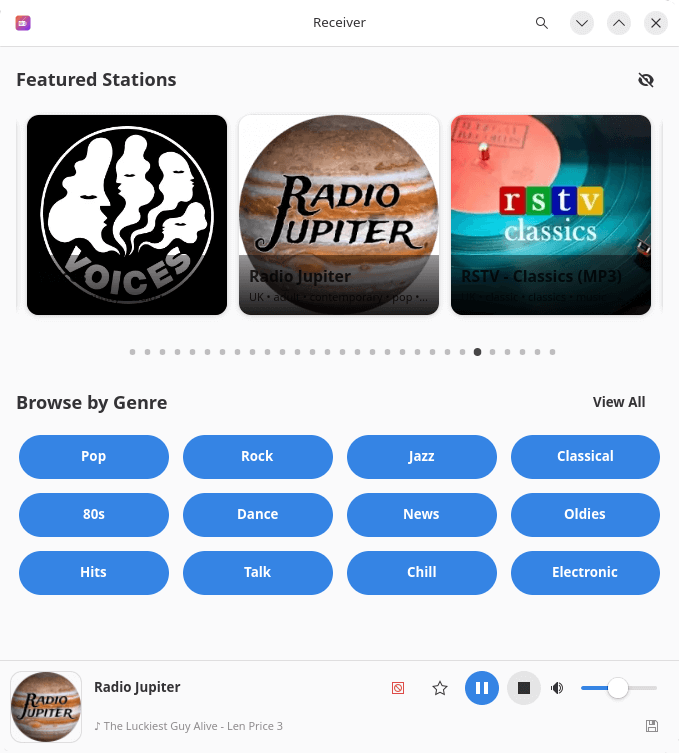
The user interface is very well designed but there’s room for improvement. For example, if you don’t like the Featured Station carousel you can hide it but the heading remains visible which is just wasted space. While I like the stations logos which add vibrancy, their inconsistent dimensions detract from the visual appeal. Both issues are highlighted in the image below.
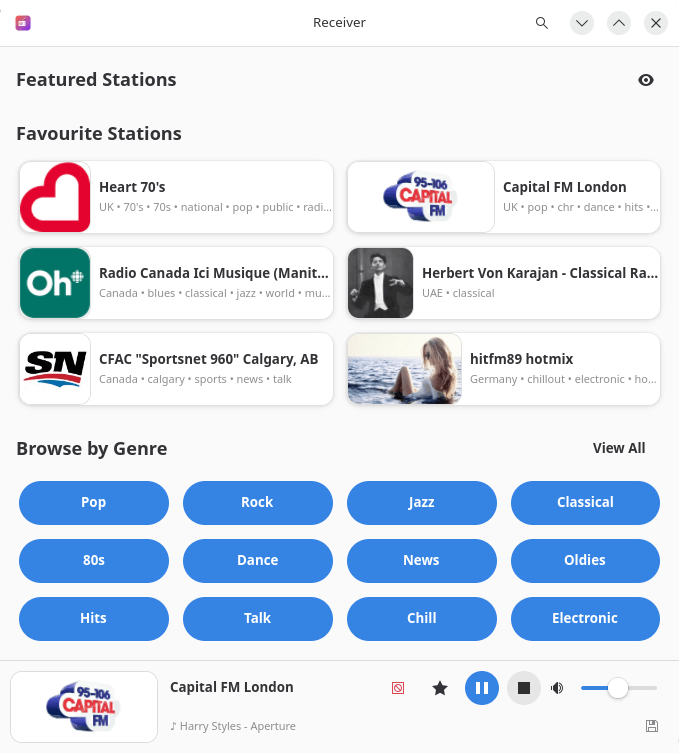
If you peek closely at the image above you’ll notice a tiny icon at the bottom right which lets you download the song being listed to. It accesses YouTube to download that song rather than save the playing stream.
What improvements would I love to see?
- More customization options. I’d really appreciate greater control over the interface — for example, the ability to remove sections like Featured Stations entirely to create a cleaner, more personalized layout.
- Stream bitrate visibility. It would be helpful to see the bitrate for each stream, especially since some stations offer multiple stream options.
- Session song saving. A feature that lets me save songs I’ve listened to during a session would make it much easier to revisit and rediscover great tracks later.
Summary
Receiver is an excellent program. It gets my strong recommendation.
The program is lightweight. ps_mem reports that memory usage is around 132MB.
While the developer claims that duplicates are removed and broken streams filtered out, it lists stations from the BBC that aren’t working at the time of writing.
With a bit more development, it’ll replace Shortwave, Tuner and Transistor as my go to GUI internet radio player.
Website: github.com/meehow/receiver
Support:
Developer: meehow
License: GNU General Public License v3.0
Receiver is written in Vala. Learn Vala with our recommended free books and free tutorials.
Related Software
| Internet Radio | |
|---|---|
| Tuner | Minimalist radio station player written in Vala |
| Transistor | Polished internet radio app written in C++ |
| Shortwave | Rust based dedicated internet radio program |
| MusicPod | Music, podcast and internet radio player written in Dart |
| Tauonx | Python based music player |
| QMPlay2 | C++ based music and video player |
| Yarock | C++ based music player |
| Olivia | C++ based music player |
| Sayonara Player | C++ based music player |
| Radio | Vala based radio station player |
| Rhythmbox | C based music player |
| Quod Libet | Python based music player |
| Byte | Vala based music player designed for elementary OS |
| StreamTuner2 | Python based dedicated internet radio program |
| Banshee | C# based music player |
| Amarok | C++ based music player |
| Clementine | C++ based music player |
| Radiotray-NG | C++ based dedicated internet radio program |
| Goodvibes | C based dedicated internet radio program |
| Melody | Vala based music player designed for elementary OS |
| Exaile | Python based music player |
| GogglesMM | C++ based music collection manager and player |
| Audacious | C++ based music player |
| Aqualung | C Gtk-based audio player |
Read our verdict in the software roundup.
 Explore our comprehensive directory of recommended free and open source software. Our carefully curated collection spans every major software category. Explore our comprehensive directory of recommended free and open source software. Our carefully curated collection spans every major software category.This directory is part of our ongoing series of informative articles for Linux enthusiasts. It features hundreds of detailed reviews, along with open source alternatives to proprietary solutions from major corporations such as Google, Microsoft, Apple, Adobe, IBM, Cisco, Oracle, and Autodesk. You’ll also find interesting projects to try, hardware coverage, free programming books and tutorials, and much more. Know a useful open source Linux program that we haven’t covered yet? Let us know by completing this form. |