
Piano Booster is open source piano teaching MIDI software that displays the musical notes and teaches you how to play the piano. It also provides piano lessons for beginners as well as for advanced players. It can be used for teaching music theory and is useful for piano practice and learning piano technique.
PianoBooster is a fun way of playing along with a musical accompaniment and at the same time learning the basics of reading musical notation. It takes elements of the game Guitar Hero to make musical learning enjoyable.
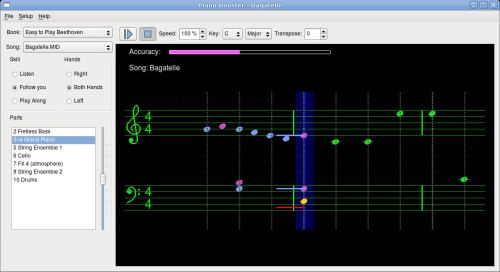
PianoBooster has been designed to allow you to play along on a midi piano keyboard with the scrolling notes shown on the screen. The notes you press on the keyboard appear as coloured lines on the musical stave, the colour of which depends whether you have pressed the right or wrong note.
A different musical instrument sound is used for your playing depending whether you are playing the right or wrong notes. This feature also allows PianoBooster to be used with printed sheet music so you can hear if you are playing the right notes while at the same time keeping your eyes on the printed score. The music accompaniment will automatically wait for you to find and play the correct notes in the piece.
To run Piano Booster you will need some MIDI files preferably with right and left piano parts on channels 4 and 3.
Key Features
- Follows your playing when playing along to a musical MIDI accompaniment.
- Play a single hand and Piano Booster will play the other hand in time with you (and will also play the violins, the bass, the drums etc. in time with you).
- Change the speed of playback to match your playing ability.
- Transpose +/- 12 semitones without stopping the play back.
- Change the Key Signature of the piece.
- Plays any standard midi or kar file.
- Play along to any instrument in the midi file.
- Adjust the volume of the current part or the volume your piano part.
- See the accuracy of you playing.
- Change the start bar to start playing from any bar in the music. The repeat bars allows you to practice just a few difficult bars continuously.
- Timing markers are white crosses that are drawn over each note and show if you are playing ahead or behind the beat.
- A different instrument sound is used for the right and wrong notes that you play.
Website: pianobooster.sourceforge.net
Support:
Developer: L.J. Barman
License: GNU General Public License v3.0
Piano Booster is written in C++. Learn C++ with our recommended free books and free tutorials.
Related Software
| Educational Games | |
|---|---|
| GCompris | Educational games for small children |
| Colobot | Educational game aiming to teach programming |
| Childsplay | Suite of educational games for young children |
| KDE Education Project | Educational applications from KDE |
| JClic | Create, play and evaluate multimedia educational activities |
| TuxMath | Math game for kids with Tux |
| Piano Booster | Boost your piano playing skills |
| Dr. Geo | Educational oriented interactive geometry |
| Omnitux | Educational activities based on multimedia elements |
| Tux Typing | Educational Typing Tutor Game Starring Tux, the Linux Penguin |
Read our verdict in the software roundup.
| Educational Music Software | |
|---|---|
| Nootka | Learn classical score notation |
| Piano Trainer | Learn piano scales and chords |
| LenMus | Music education software to learn music theory and language |
| Music Blocks | Programming environment for children interested in music and graphics |
| Impro-Visor | Jazz improvisation advisor for the improviser |
| Piano Booster | Boost your piano playing skills |
| Solfege | Highly proficient ear training software |
| Minuet | Grow your music knowledge |
| OpenEar | Ear training app for musicians |
| Tete | Ear training software |
Read our verdict in the software roundup.
 Explore our comprehensive directory of recommended free and open source software. Our carefully curated collection spans every major software category. Explore our comprehensive directory of recommended free and open source software. Our carefully curated collection spans every major software category.This directory is part of our ongoing series of informative articles for Linux enthusiasts. It features hundreds of detailed reviews, along with open source alternatives to proprietary solutions from major corporations such as Google, Microsoft, Apple, Adobe, IBM, Cisco, Oracle, and Autodesk. You’ll also find interesting projects to try, hardware coverage, free programming books and tutorials, and much more. Discovered a useful open source Linux program that we haven’t covered yet? Let us know by completing this form. |
Please read our Comment Policy before commenting.