
Orca Screen Reader (Orca) is a free, open source scriptable screen reader which provides access to applications and toolkits. It provides alternative access to the desktop by using speech synthesis, braille, and magnification.
Orca also provides a flexible, extensible, and powerful assistive technology that provides end-user access to applications and toolkits that support the AT-SPI (e.g. the GNOME desktop). With early input from and continued engagement with its end users, Orca has been designed and implemented by the Sun Microsystems, Inc., Accessibility Program Office.
Orca defines a set of default behaviors (reactions to application events) and key bindings (reaction to user key presses). These default behaviors and key bindings can be overwritten on a per-application basis. Orca creates a script object for each running application, which merges both the default behaviors and key bindings, and the application specific ones. Orca provides the infrastructure to activate and deactivate scripts, as well as a host of services accessible from within the scripts.
Key Features
- Screen reader enables non-visual access to standard applications in the GNOME Desktop by using speech and braille output.
- Magnifier provides automated focus tracking and full-screen magnification to aid low-vision user.
- Voice type: Default, Uppercase, Hyperlink, System.
- Speech synthesizer: Default, espeak, dummy.
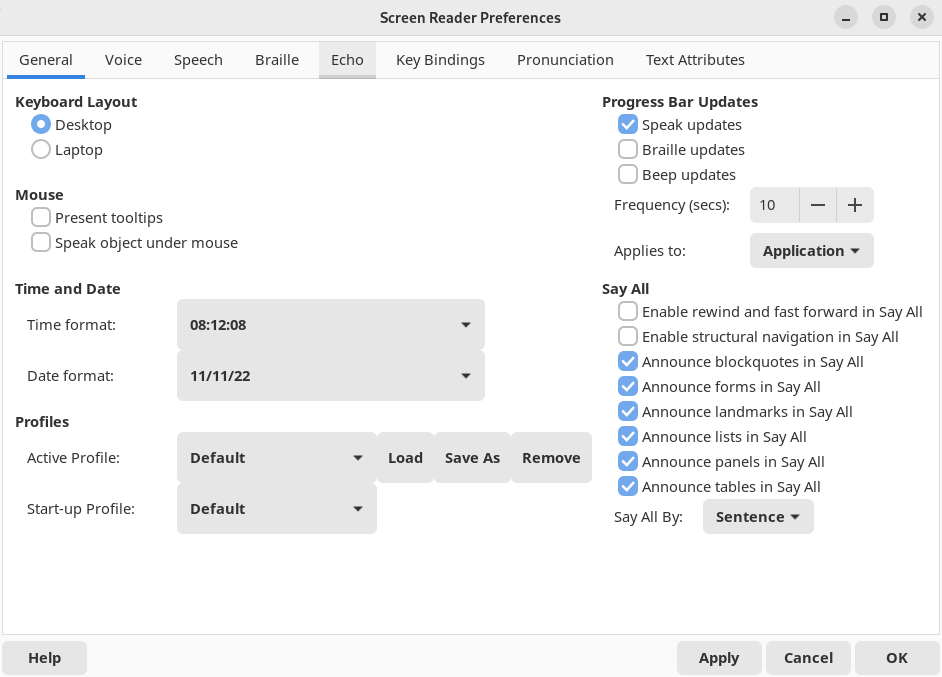
- Control rate, pitch, volume, and person.
- Verbosity (brief, verbose).
- Braille support.
- Keyboard modes – desktop and laptop keyboard layouts.
- Key echo.
- Key bindings.
- Pronunciation dictionary.
- Text attributes.
Website: orca.gnome.org
Support:
Developer: The Orca Team
License: GNU General Public License v2.0
Orca is written in Python. Learn Python with our recommended free books and free tutorials.
Related Software
| Speech Tools | |
|---|---|
| Piper | Fast, local neural text to speech system |
| Bark | Transformer-based text-to-audio model. |
| sherpa-onnx | Speech-to-text and text-to-speech software |
| Coqui TTS | Offers pretrained models in more than 1,100 different languages |
| Dia | 1.6B parameter text to speech model |
| Tortoise | Multi-voice text-to-speech system trained with an emphasis on quality |
| Festival | General multi-lingual speech synthesis system |
| PraatSpeechAnalyser | Software for speech analysis and synthesis |
| Chatterbox | Family of text-to-speech models |
| Speech Note | Speech to Text, Text to Speech and Machine Translation |
| Mimic 3 | Lightweight Text to Speech engine |
| OrcaScreenReader | Scriptable screen reader |
| MeloTTS | High-quality multi-lingual text-to-speech library |
| Parler-TTS | Lightweight text-to-speech (TTS) model |
| Flite | Small, fast run time text to speech synthesis engine |
| RHVoice | Gives the visually impaired a synthesis voice with their screen reader |
| eSpeak NG | Continuation of the eSpeak project |
| eSpeak | Speech synthesizer using a formant synthesis method |
| Orpheus-TTS-FastAPI | High-performance self-hosted text-to-speech server |
| Gespeaker | GTK-based frontend for eSpeak |
| VoiceGen | Simple text-to-speech application |
| Glate | Google Translator and Text To Speech Service |
Read our verdict in the software roundup.
| Screen-readers | |
|---|---|
| Orca Screen Reader | Screen-reader which provides access to applications and toolkits |
| Liblouis | Braille translator, back-translator and formatter |
| Speakup | Kernel-based speech synthesizer driver suite |
| BRLTTY | Provides access to the console using a refreshable braille display |
| Emacspeak | Emacs extension that provides spoken output |
| Odilia | Rust-based screen reader |
| Fenrir | Fast, flexible and efficient speech access for Linux text consoles |
| TDSR | Lightweight speech access for navigating Linux virtual consoles |
| SBW | Text editor with support for braille input |
Read our verdict in the software roundup.
| Universal Access Tools | |
|---|---|
| Orca Screen Reader | Scriptable screen reader |
| Liblouis | Braille translator, back-translator and formatter |
| Florence Virtual Keyboard | Extensible scalable virtual keyboard |
| Speakup | Kernel-based speech synthesizer driver suite |
| BRLTTY | Gives a braille user access to the text consoles |
| Maliit | Virtual keyboard implemented as a plug-in for Maliit Framework |
| keymapper | Context-aware key remapping with layers, shortcuts and macros |
| Julius | Two-pass large vocabulary continuous speech recognition engine |
| Emacspeak | Emacs extension that provides spoken output |
| Mouse actions | Execute commands from mouse events |
| squeekboard | Keyboard-shaped input method supporting Wayland |
| GOK | GNOME On Screen Keyboard |
| CoreKeyboard | Simple virtual keyboard with word suggestions |
| Dasher | Graphical predictive text input system |
| borse | Practice braille, Morse, semaphore |
| KMouseTool | Clicks automatically when the mouse pointer pauses |
| KMouth | Speech aid that turns typed text into spoken words and phrases |
Read our verdict in the software roundup.
 Explore our comprehensive directory of recommended free and open source software. Our carefully curated collection spans every major software category. Explore our comprehensive directory of recommended free and open source software. Our carefully curated collection spans every major software category.This directory is part of our ongoing series of informative articles for Linux enthusiasts. It features hundreds of detailed reviews, along with open source alternatives to proprietary solutions from major corporations such as Google, Microsoft, Apple, Adobe, IBM, Cisco, Oracle, and Autodesk. You’ll also find interesting projects to try, hardware coverage, free programming books and tutorials, and much more. Discovered a useful open source Linux program that we haven’t covered yet? Let us know by completing this form. |
Please read our Comment Policy before commenting.