

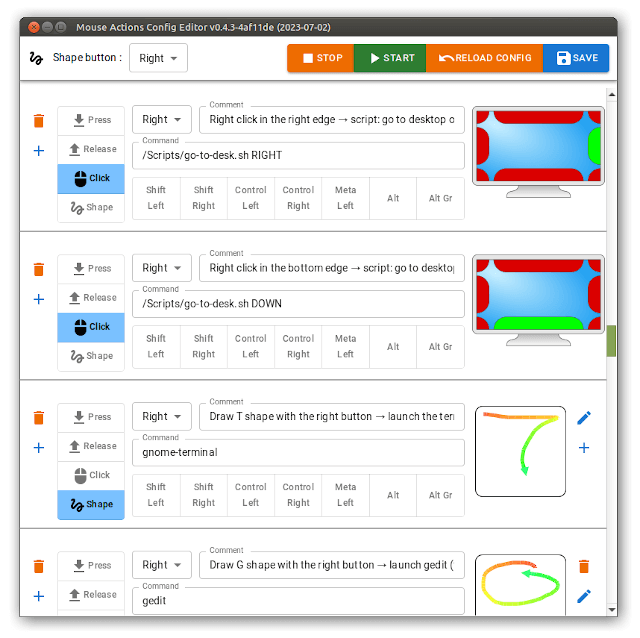
Mouse actions allows users to execute some commands from mouse events such as clicks / wheel on the side / corners of the screen, or drawing shapes.
It’s functionality combines that offered by Compiz edge commands and the now abandoned Easystroke application.
This is free and open source software.
Key Features
- Shape drawing with the mouse.
- Press/release only or click (don’t propagate the press & release event).
- With some modifiers : shift/Ctrl/Alt…
- With screen edge : Top/Left…
- Auto reload config on changes.
- Very low resource usage:
- Fast shape recognition : ~200µs (0.0002 sec) for a config with 30 shapes.
- Fast event without shape processing : ~30µs (0.00003 sec).
- CPU : ~7 sec CPU usage per hour (~0.2%).
- RAM : 5.6 Mo (GUI less version).
- Works under Wayland but with limitations. When Wayland is detected, it applies the
force --no-listenoption.
Website: github.com/jersou/mouse-actions
Support:
Developer: Jérémy Soulary
License: MIT License
Mouse actions is written in Rust. Learn Rust with our recommended free books and free tutorials
Related Software
| Universal Access Tools | |
|---|---|
| Orca Screen Reader | Scriptable screen reader |
| Liblouis | Braille translator, back-translator and formatter |
| Florence Virtual Keyboard | Extensible scalable virtual keyboard |
| Speakup | Kernel-based speech synthesizer driver suite |
| BRLTTY | Gives a braille user access to the text consoles |
| Maliit | Virtual keyboard implemented as a plug-in for Maliit Framework |
| keymapper | Context-aware key remapping with layers, shortcuts and macros |
| Julius | Two-pass large vocabulary continuous speech recognition engine |
| Emacspeak | Emacs extension that provides spoken output |
| Mouse actions | Execute commands from mouse events |
| squeekboard | Keyboard-shaped input method supporting Wayland |
| GOK | GNOME On Screen Keyboard |
| CoreKeyboard | Simple virtual keyboard with word suggestions |
| Dasher | Graphical predictive text input system |
| borse | Practice braille, Morse, semaphore |
| KMouseTool | Clicks automatically when the mouse pointer pauses |
| KMouth | Speech aid that turns typed text into spoken words and phrases |
Read our verdict in the software roundup.
 Explore our carefully curated directory of recommended free and open source software, covering every major software category. Explore our carefully curated directory of recommended free and open source software, covering every major software category.The directory forms part of our extensive collection of articles for Linux enthusiasts. It includes hundreds of detailed reviews, together with free and open source alternatives to proprietary software from companies such as Google, Microsoft, Apple, Adobe, IBM, Cisco, Oracle, and Autodesk. LinuxLinks also covers interesting projects worth exploring, Linux-compatible hardware, free programming books and tutorials, and much more. Know a useful free and open source Linux application that we haven’t covered? Tell us about it using our submission form. |
Please read our Comment Policy before commenting.