

This software is no longer maintained. For actively maintained alternatives, see the Related Software section below. |
Kazam is a desktop application for capturing screencasts and screenshots on Linux. It provides an interface for recording the complete desktop, an individual window or a selected region, while also supporting audio capture. The program was designed to make common recording tasks accessible without requiring detailed knowledge of multimedia encoding. It is suitable for demonstrating applications, capturing software behaviour and preparing instructional material.
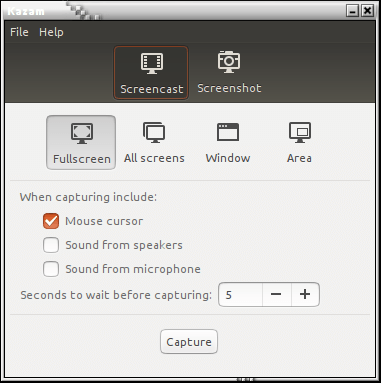
The application combines video capture and still-image capture in the same interface, with controls for choosing the recording area and configuring output preferences. Screencasts can include audio from devices recognised by PulseAudio, and users can select among several video encoding formats. Kazam also provides keyboard shortcuts for controlling recordings and a countdown before capture begins. Its original implementation primarily targets traditional X11 desktops rather than modern Wayland screen capture infrastructure.
This is free and open source software.
Key Features
- Record desktop activity as a video file.
- Capture the full screen, all monitors, an individual window or a selected rectangular area.
- Take screenshots using the same graphical interface.
- Record video using H.264 in MP4 containers.
- Support VP8 video encoding in WebM containers.
- Offer raw video recording in AVI containers.
- Provide additional supported encoding options including HUFFYUV.
- Record audio from input devices recognised by PulseAudio.
- Capture multiple audio streams simultaneously.
- Control audio recording levels.
- Configure the recording frame rate.
- Display a countdown before starting a screencast or screenshot capture.
- Control recording operations using keyboard shortcuts.
- Support multi-monitor desktop configurations.
- Save screenshots automatically using configured preferences.
- Choose screenshot shutter sounds modelled on the Canon 7D and Nikon D80.
- Configure video and screenshot saving directories.
- Provide command-line options for screenshots, recording and debugging.
- Use GStreamer for multimedia recording and encoding.
Website: launchpad.net/kazam
Support:
Developer: David Klasinc, Andrew Higginson
License: GNU General Public License v3.0
Kazam is written in Python. Learn Python with our recommended free books and free tutorials.
Related Software
| Screen Recorders | |
|---|---|
| OBS Studio | Complete video recording and live streaming solution |
| GPU Screen Recorder | Minimizes system performance by recording using the GPU only |
| vokoscreenNG | Easy to use screencast creator |
| Kooha | Simple GTK-based app to “elegantly record your screen” |
| screenkey | Screencasting software inspired by Screenflick |
| FFmpeg | Record, convert and stream audio and video |
| SimpleScreenRecorder | Easy to use screencast creator |
| wf-recorder | Utility for wlroots-based Wayland compositors |
| Casterr | Screen recorder, editor and video browse |
| Green Recorder | Simple screen recorder supporting Xorg and Wayland |
| Blue Recorder | Simple screen recorder written in Rust |
| wl-screenrec | wlroots screen recording, featuring hardware encoding |
| peek | Animated GIF screen recorder |
| wayfarer | Screen recorder for GNOME / Wayland / Pipewire |
| ScreenStudio | Streaming made easy |
| Kazam | Well designed and easy to use interface |
Read our verdict in the software roundup.
 LinuxLinks helps you discover the best free and open source software for Linux. Explore our extensive collection of recommended applications, including alternatives to popular proprietary software. We also publish software reviews, Linux tutorials, hardware reviews, free programming books and articles covering the wider open source community. Browse our Linux resources to discover more. Know a useful free and open source Linux application we haven't covered? Suggest a program for inclusion. Has your software been featured on LinuxLinks? Display one of our Featured on LinuxLinks badges on your website or GitHub README. |
Please read our Comment Policy before commenting.