

Gnome Subtitles is a subtitle editor for the GNOME desktop.
It supports the most common text-based subtitle formats and allows for subtitle editing, translation and synchronization.
Gnome Subtitles is free and open source software.
Key Features
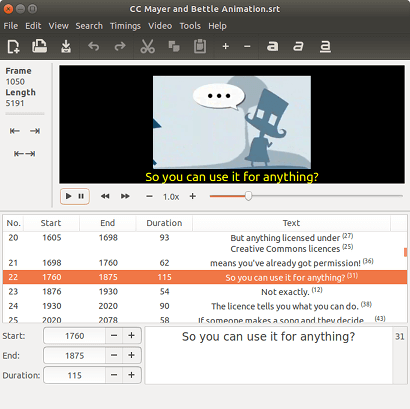
- WYSIWYG user interface.
- Supports a wide range of subtitle files including SubStation Alpha (and also Advanced SubStation Alpha), SubRip and MicroDVD.
- Support for webm and ogv video files.
- Support for non-standard video framerates.
- Subtitle translation support.
- Merge and split subtitle lines.
- View character counts.
- Spell checking support.
- Edit subtitle headers.
- Find and Replace, supporting regular expressions.
- Multi-level undo/redo.
- Drag-and-drop files.
- Character coding and subtitle format auto-detection (on file open).
- Relaxed subtitle parsing, to read subtitles that contain errors.
- Set the gap between subtitles, to be used when inserting or splitting subtitles.
- Reaction delay.
- Search functionality.
- Support for merging and splitting subtitle lines.
- Allow to view character counts in the subtitle list and editing area.
- Video previewing:
- Playback the videos showing subtitles with formatting.
- Drag-and-drop files.
- Can be used for timings synchronization.
- Fast and slow motion playback.
- Uses the GStreamer backend.
- Apply a reaction delay when timing start/end on video playback.
- Synchronize using the video, by setting 2 or more correct times (sync points).
- Shift subtitles by a specified delay (can be based on the video).
- Works for audio files too.
- Auto-adjust timings based on 2 correct times / sync points
- Convert between framerates.
- Apply a reaction delay.
- Shortcuts for quick synchronization.
- Encoding selection.
- Internationalization support.
Website: sourceforge.net/projects/gnome-subtitles
Support: GitLab Code Repository
Developer: Pedro Castro
License: GNU General Public License Version 2 or later
Gnome Subtitles is written in C#. Learn C# with our recommended free books and free tutorials.
Related Software
| Subtitle Editors | |
|---|---|
| Subtitle Edit | Versatile and feature-laden editor for video subtitles |
| Gaupol | Editor for text-based subtitle files |
| Aegisub | Highly customizable tool for creating and modifying subtitles |
| AutoSubs | Subtitles made simple |
| Subtitle Composer | Editor that supports basic and advanced operations |
| Jubler | Author new subtitles - convert, transform, correct and refine |
| Gnome Subtitles | Video subtitling for the GNOME desktop |
| Tero Subtitler | Feature-rich subtitle creation, translation and validation tool |
| YTSubConverter | Create styled YouTube subtitles |
| Subtitle Forge | Desktop application for working with subtitles across the full workflow |
| Sub Editor | Visual, keyboard-driven subtitle editor with waveform timing |
| Subtitle Editor | GTK+3 tool to edit subtitles |
| Subtitld | Edit, transcribe and create subtitles |
| subedit | Command-line editor written in Bash |
Read our verdict in the software roundup.
 Explore our carefully curated directory of recommended free and open source software, covering every major software category. Explore our carefully curated directory of recommended free and open source software, covering every major software category.The directory forms part of our extensive collection of articles for Linux enthusiasts. It includes hundreds of detailed reviews, together with free and open source alternatives to proprietary software from companies such as Google, Microsoft, Apple, Adobe, IBM, Cisco, Oracle, and Autodesk. LinuxLinks also covers interesting projects worth exploring, Linux-compatible hardware, free programming books and tutorials, and much more. Know a useful free and open source Linux application that we haven’t covered? Tell us about it using our submission form. |
Please read our Comment Policy before commenting.