

ghq is a command-line tool for organising local clones of remote repositories.
It stores repositories under a consistent root directory, by default ~/ghq, using a host/user/project directory layout. This makes it easier to keep many repositories tidy, locate checked-out projects, and avoid scattering clones across unrelated directories.
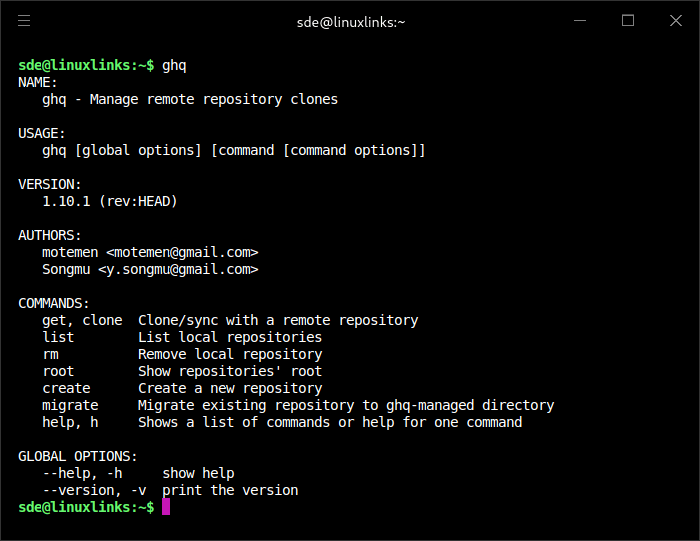
The tool can clone repositories from compact names or full URLs, list existing local repositories, remove managed clones, create new repositories, and migrate existing checkouts into its managed directory structure. It’s particularly useful for developers who regularly work across multiple GitHub projects, self-hosted repositories, or mixed source control environments.
This is free and open source software.
Key Features
- Clones remote repositories into a predictable host/user/project directory hierarchy.
- Lists managed local repositories, with optional query matching and full-path output.
- Updates existing clones when requested instead of duplicating repositories.
- Supports shallow, bare, branch-specific, recursive, and partial clone options for Git repositories.
- Supports multiple ghq root directories, with one primary root used for new clones.
- Can remove managed local repositories, with a dry-run option for safety.
- Migrates existing repository directories into the ghq-managed layout.
- Uses git-config variables for configuration, including root paths, default host, and VCS settings.
- Cross-platform support – runs under Linux, macOS, and Windows.
Website: github.com/x-motemen/ghq
Support:
Developer: x-motemen
License: MIT License
ghq is written in Go. Learn Go with our recommended free books and free tutorials.
Related Software
| Git Storage and Security Tools | |
|---|---|
| git-lfs | Git extension for versioning large files |
| Jujutsu | Powerful version control system for software projects |
| git-bug | Distributed offline-first bug tracker |
| Dash | Rich terminal UI for GitHub |
| git-secrets | Prevent adding secrets into git repositories |
| Commitizen | Create well-structured Git commit messages |
| git-repair | Repair various forms of damage to git repositories |
| git-secret | Bash tool which stores private data inside a git repo |
| git-annex | Manage files with git without checking the file contents into git |
| gitmoji-cli | Use gitmojis in Git commit messages |
| ghq | Organise local clones of remote repositories |
| git-crypt | Transparent file encryption in git |
| gita | Manage multiple git repos |
| git-chglog | CHANGELOG generator implemented in Go |
| cz-git | Commitizen adapter and command-line tool |
| gitpane | Multi-repo Git workspace dashboard |
| git-trim | Keep Git working directories clear of stale local branches |
| gfold | Keep track of multiple Git repositories |
| Garden | Command runner and multi-repo Git configuration tool |
| mani | Manage collections of Git repositories |
| GitSocial | Git-native cross-forge collaboration |
| git-fresh | Refresh Git working copies from the terminal |
| Forge Sparks | Get Git forges notifications |
| gohome | Git standup and activity reporting CLI |
| git-appraise | Distributed code review system for Git repositories |
Read our verdict in the software roundup.
 Explore our carefully curated directory of recommended free and open source software, covering every major software category. Explore our carefully curated directory of recommended free and open source software, covering every major software category.The directory forms part of our extensive collection of articles for Linux enthusiasts. It includes hundreds of detailed reviews, together with free and open source alternatives to proprietary software from companies such as Google, Microsoft, Apple, Adobe, IBM, Cisco, Oracle, and Autodesk. LinuxLinks also covers interesting projects worth exploring, Linux-compatible hardware, free programming books and tutorials, and much more. Know a useful free and open source Linux application that we haven’t covered? Tell us about it using our submission form. |
Please read our Comment Policy before commenting.