

dvd::rip is a full featured DVD ripping program written in Perl.
This software provides an easy to use but feature-rich Gtk+ GUI to control almost all aspects of the ripping and transcoding process.
dvd::rip uses the widely known video processing swissknife Transcode and many other Open Source tools.
Features include:
- Rip to hard disk, on the fly, or from an existing DVD image.
- Select audio track(s), viewing angle(s), multitple titles.
- Rip multiple audio tracks into one AVI/OGG/SVCD file.
- Supports nearly all of transcode’s video codecs, e.g: divx4, divx5, xvid, xvidcvs, ffmpeg, fame, opendivx and mpeg2enc.
- DivX/Xvid multipass encoding.
- (S)VCD modes, with multiple audio tracks for SVCD.
- Integrated video bitrate calculator based on target size resp. number of discs.
- Automatic splitting of the target files for best fit on the specified number of discs.
- Deinterlace filter presets.
- Audio AC3 and PCM passthrough.
- Audio MP3 encoding.
- Audio volume maximizing and/or range compression.
- OGG/Vorbis support, quality and bitrate based, adjusting the optimal video bitrate after audio transcoding in quality mode.
- WAV file creation from a selected audio track.
- Subtitle rendering and vobsub creation.
- Support for all transcode video filters, with realtime configuration and video preview.
- Live video transcoding preview window.
- Chapter mode: one file per chapter.
- Use your favorite movie player for preview.
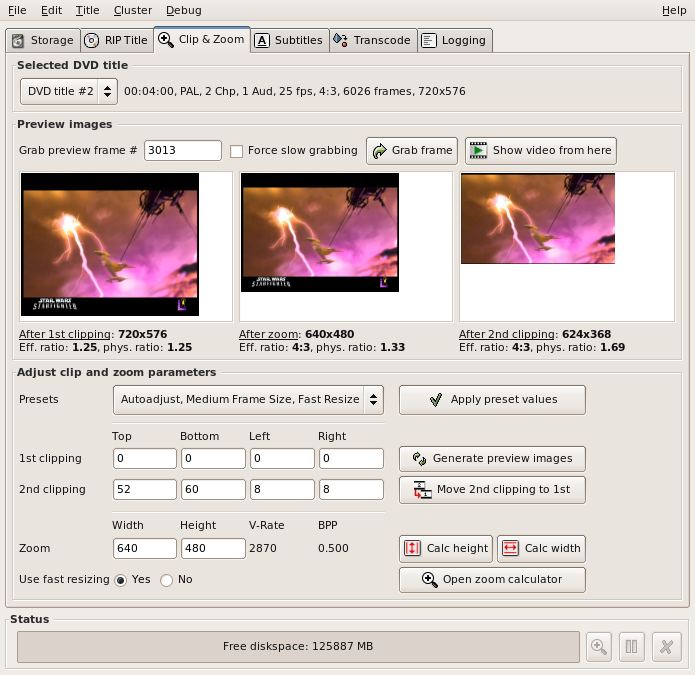
- Provide frame clipping, resizing and final clipping.
- Powerful auto adjusting of all clip & zoom parameters.
- Adjust clipping area using drag and drop.
- dvd::rip’s zoom calculator let you adjust every possible parameter.
- Two resize modes: fast and high quality resizing.
- Simple but easy to use CD burning facility.
- Comprehensive cluster mode for parallel encoding.
Website: www.exit1.org/dvdrip
Support: Documentation
Developer: Joern Reder and many contributors
License: GNU General Public License
dvd::rip is written in Perl and C. Learn Perl with our recommended free books and free tutorials. Learn C with our recommended free books and free tutorials.
Return to DVD Tools Home Page | Return to Video Converters
| Popular series | |
|---|---|
 | The largest compilation of the best free and open source software in the universe. Each article is supplied with a legendary ratings chart helping you to make informed decisions. |
 | Hundreds of in-depth reviews offering our unbiased and expert opinion on software. We offer helpful and impartial information. |
 | The Big List of Active Linux Distros is a large compilation of actively developed Linux distributions. |
 | Replace proprietary software with open source alternatives: Google, Microsoft, Apple, Adobe, IBM, Autodesk, Oracle, Atlassian, Corel, Cisco, Intuit, SAS, Progress, Salesforce, and Citrix |
 | Awesome Free Linux Games Tools showcases a series of tools that making gaming on Linux a more pleasurable experience. This is a new series. |
 | Machine Learning explores practical applications of machine learning and deep learning from a Linux perspective. We've written reviews of more than 40 self-hosted apps. All are free and open source. |
 | New to Linux? Read our Linux for Starters series. We start right at the basics and teach you everything you need to know to get started with Linux. |
 | Alternatives to popular CLI tools showcases essential tools that are modern replacements for core Linux utilities. |
 | Essential Linux system tools focuses on small, indispensable utilities, useful for system administrators as well as regular users. |
 | Linux utilities to maximise your productivity. Small, indispensable tools, useful for anyone running a Linux machine. |
 | Surveys popular streaming services from a Linux perspective: Amazon Music Unlimited, Myuzi, Spotify, Deezer, Tidal. |
 | Saving Money with Linux looks at how you can reduce your energy bills running Linux. |
 | Home computers became commonplace in the 1980s. Emulate home computers including the Commodore 64, Amiga, Atari ST, ZX81, Amstrad CPC, and ZX Spectrum. |
 | Now and Then examines how promising open source software fared over the years. It can be a bumpy ride. |
 | Linux at Home looks at a range of home activities where Linux can play its part, making the most of our time at home, keeping active and engaged. |
 | Linux Candy reveals the lighter side of Linux. Have some fun and escape from the daily drudgery. |
 | Getting Started with Docker helps you master Docker, a set of platform as a service products that delivers software in packages called containers. |
 | Best Free Android Apps. We showcase free Android apps that are definitely worth downloading. There's a strict eligibility criteria for inclusion in this series. |
 | These best free books accelerate your learning of every programming language. Learn a new language today! |
 | These free tutorials offer the perfect tonic to our free programming books series. |
 | Linux Around The World showcases usergroups that are relevant to Linux enthusiasts. Great ways to meet up with fellow enthusiasts. |
 | Stars and Stripes is an occasional series looking at the impact of Linux in the USA. |
Please read our Comment Policy before commenting.