

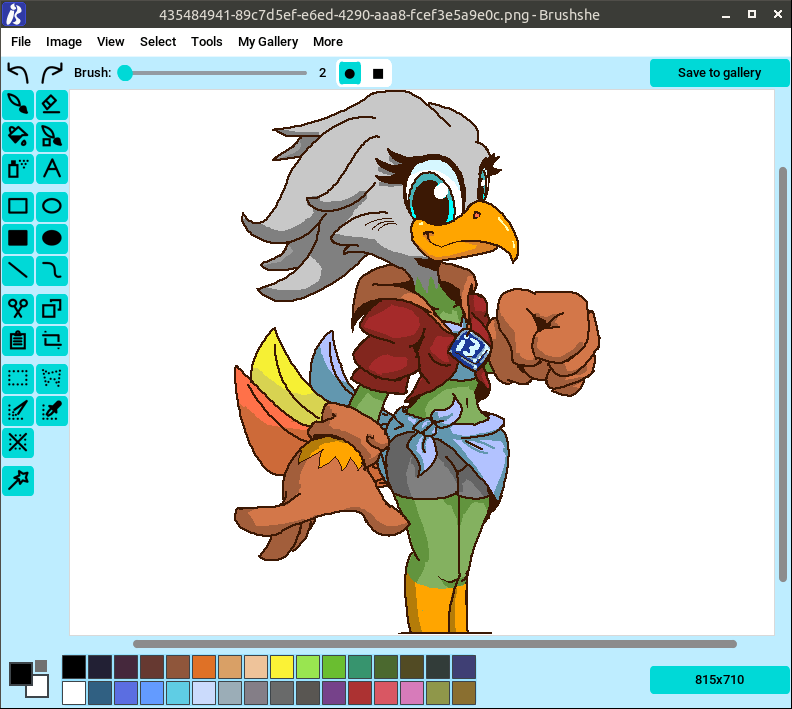
Brushshe is a simple and user-friendly raster graphics editor.
This is cross-platform software running under Linux and Windows.
This is free and open source software.
Features include:
- Open: You can open a picture from a file or URL.
- Painting: You can choose a color, change the brush thickness and shape, and paint. You can change canvas size.
- Recoloring brush: Draws through contours.
- Save to device: You can save picture to your PC in different formats (PNG, JPEG, GIF, BMP, DDS, DIB, EPS, ICNS, ICO, IM, MPO, PCX, PPM, SGI, TGA, TIFF, WEBP, PDF (only for save)).
- Autosave is supported.
- Undo and redo: You can undo and redo last actions.
- Eraser: Removing excess with an eraser.
- Fill: You can fill areas of a drawing, including with a gradient fill.
- Eyedropper: Right click on the desired place on the canvas to get its color and paint with it.
- Spray: Spray paint.
- Background: You can choose the background color.
- Stickers: You can add stickers from Brushshe sticker set (all sticker images are drawn by limafresh, founder of Brushshe, or created by AI) and resize them. You can also add a sticker from a file or URL.
- Text: You can place text and change its size.
- Frames: You can decorate the picture with frames.
- Shapes: Rectangle and oval (with or without fill), line, bezier curve.
- Effects: Blur, detail, contour, grayscale, inversion and other. Not work on GIF images.
- My Gallery: Window showing images drawn in Brushshe and “saved to gallery”. Images from the gallery are stored in /Pictures/Brushshe Images or /Brushshe Images on some minimalistic Linux distributions.
- Dark theme: There is a light and dark theme.
- Rotate: Rotate right, rotate left.
- Create screenshot: You can take a screenshot and draw on it. Not work on Linux with Wayland.
- Paste image from clipboard: You can paste image from clipboard.
- View: Zoom in, zoom out, reset zoom.
- Change size: You can change the size by cropping or scaling.
- Palettes: There are 4 built-in palette sets in the settings, and if there are not enough of them, you can load your own from .hex files.
- Brush smoothing: Brush smoothing with params.
- Cut, copy and insert: Cut, copy or insert fragments. Works on Windows, but on Linux you need to install xclip (X11) or wl-paste (Wayland). If they are not installed, everything else will work, but when you try to paste from the buffer, you will get a message that this is impossible.
- Remove white background: Replace white or really light gray background to transparent.
- Palettes: use standard or custom HEX palettes.
- Select: rectangle and polygon select, invert selected, deselect all, fuzzy select, select by color.
Website: github.com/limafresh/Brushshe
Support:
Developer: Maksim
License: Mozilla Public License 2.0
Brushshe is written in Python. Learn Python with our recommended free books and free tutorials.
| Popular series | |
|---|---|
 | The largest compilation of the best free and open source software in the universe. Each article is supplied with a legendary ratings chart helping you to make informed decisions. |
 | Hundreds of in-depth reviews offering our unbiased and expert opinion on software. We offer helpful and impartial information. |
 | The Big List of Active Linux Distros is a large compilation of actively developed Linux distributions. |
 | Replace proprietary software with open source alternatives: Google, Microsoft, Apple, Adobe, IBM, Autodesk, Oracle, Atlassian, Corel, Cisco, Intuit, SAS, Progress, Salesforce, and Citrix |
 | Awesome Free Linux Games Tools showcases a series of tools that making gaming on Linux a more pleasurable experience. This is a new series. |
 | Machine Learning explores practical applications of machine learning and deep learning from a Linux perspective. We've written reviews of more than 40 self-hosted apps. All are free and open source. |
 | New to Linux? Read our Linux for Starters series. We start right at the basics and teach you everything you need to know to get started with Linux. |
 | Alternatives to popular CLI tools showcases essential tools that are modern replacements for core Linux utilities. |
 | Essential Linux system tools focuses on small, indispensable utilities, useful for system administrators as well as regular users. |
 | Linux utilities to maximise your productivity. Small, indispensable tools, useful for anyone running a Linux machine. |
 | Surveys popular streaming services from a Linux perspective: Amazon Music Unlimited, Myuzi, Spotify, Deezer, Tidal. |
 | Saving Money with Linux looks at how you can reduce your energy bills running Linux. |
 | Home computers became commonplace in the 1980s. Emulate home computers including the Commodore 64, Amiga, Atari ST, ZX81, Amstrad CPC, and ZX Spectrum. |
 | Now and Then examines how promising open source software fared over the years. It can be a bumpy ride. |
 | Linux at Home looks at a range of home activities where Linux can play its part, making the most of our time at home, keeping active and engaged. |
 | Linux Candy reveals the lighter side of Linux. Have some fun and escape from the daily drudgery. |
 | Getting Started with Docker helps you master Docker, a set of platform as a service products that delivers software in packages called containers. |
 | Best Free Android Apps. We showcase free Android apps that are definitely worth downloading. There's a strict eligibility criteria for inclusion in this series. |
 | These best free books accelerate your learning of every programming language. Learn a new language today! |
 | These free tutorials offer the perfect tonic to our free programming books series. |
 | Linux Around The World showcases usergroups that are relevant to Linux enthusiasts. Great ways to meet up with fellow enthusiasts. |
 | Stars and Stripes is an occasional series looking at the impact of Linux in the USA. |