
bpython is a fancy, open source, interface to the Python interpreter for Linux, BSD, OS X and Windows.
The idea is to provide the user with all the features in-line, much like modern IDEs, but in a simple, lightweight package that can be run in a terminal window.
bpython doesn’t seek to create anything new or groundbreaking. Instead, it brings together a few neat ideas and focuses on practicality and usefulness.
Key Features
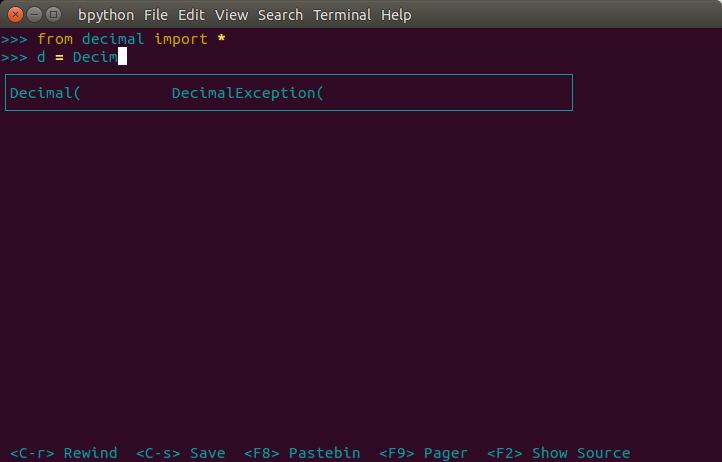
- In-line syntax highlighting – uses Pygments for lexing the code as you type, and colours appropriately.
- Readline-like autocomplete with suggestions displayed as you type.
- Expected parameter list for any Python function – seeks to display a list of parameters for any function you call.
- “Rewind” function to pop the last line of code from memory and re-evaluate.
- Send the code you’ve entered off to a pastebin. Hit a key and what you see on the screen will be sent to a pastebin and a URL is returned for you to do what you like with. bpaste.net is used by default, but you can configure bpython to use a different pastebin.
- Save the code you’ve entered to a file.
- Auto-indentation.
- Python 3 support.
Website: www.bpython-interpreter.org
Support: FAQ, Community
Developer: Bob Farrell and contributors
License: MIT License
bpython is written in Python. Learn Python with our recommended free books and free tutorials.
Related Software
| Open Source Python Shells | |
|---|---|
| IPython | Enhanced interactive Python shell |
| ptpython | Advanced Python Read-Eval-Print Loop |
| bpython | Fancy interface to the Python interpreter for Linux, BSD, OS X and Windows |
| IDLE | Integrated development environment for Python |
| DreamPie | Python shell which is designed to be reliable and fun |
Read our verdict in the software roundup.
 Explore our comprehensive directory of recommended free and open source software. Our carefully curated collection spans every major software category. Explore our comprehensive directory of recommended free and open source software. Our carefully curated collection spans every major software category.This directory is part of our ongoing series of informative articles for Linux enthusiasts. It features hundreds of detailed reviews, along with open source alternatives to proprietary solutions from major corporations such as Google, Microsoft, Apple, Adobe, IBM, Cisco, Oracle, and Autodesk. You’ll also find interesting projects to try, hardware coverage, free programming books and tutorials, and much more. Discovered a useful open source Linux program that we haven’t covered yet? Let us know by completing this form. |
Please read our Comment Policy before commenting.