

File synchronization (often know as syncing) is the process which ensures that files stored on different devices are kept up-to-date. File syncing has become increasingly popular as businesses and individuals employ cloud computing on a wider scale.
There are two types of synchronization. In one-way file synchronization, also called mirroring, updated files are copied from a source location to one or more target locations, but no files are copied back to the source location. In two-way file synchronization, updated files are copied in both directions, usually with the purpose of keeping the two locations identical to each other.
With two-way file synchronization, two replicas of a collection of files and directories to be stored on different hosts (or different disks on the same host), modified separately, and then brought up to date by propagating the changes in each replica to the other.
Here’s our verdict captured in a legendary LinuxLinks-style ratings chart. Only free and open source software is eligible for inclusion. Both command-line and GUI apps are included.
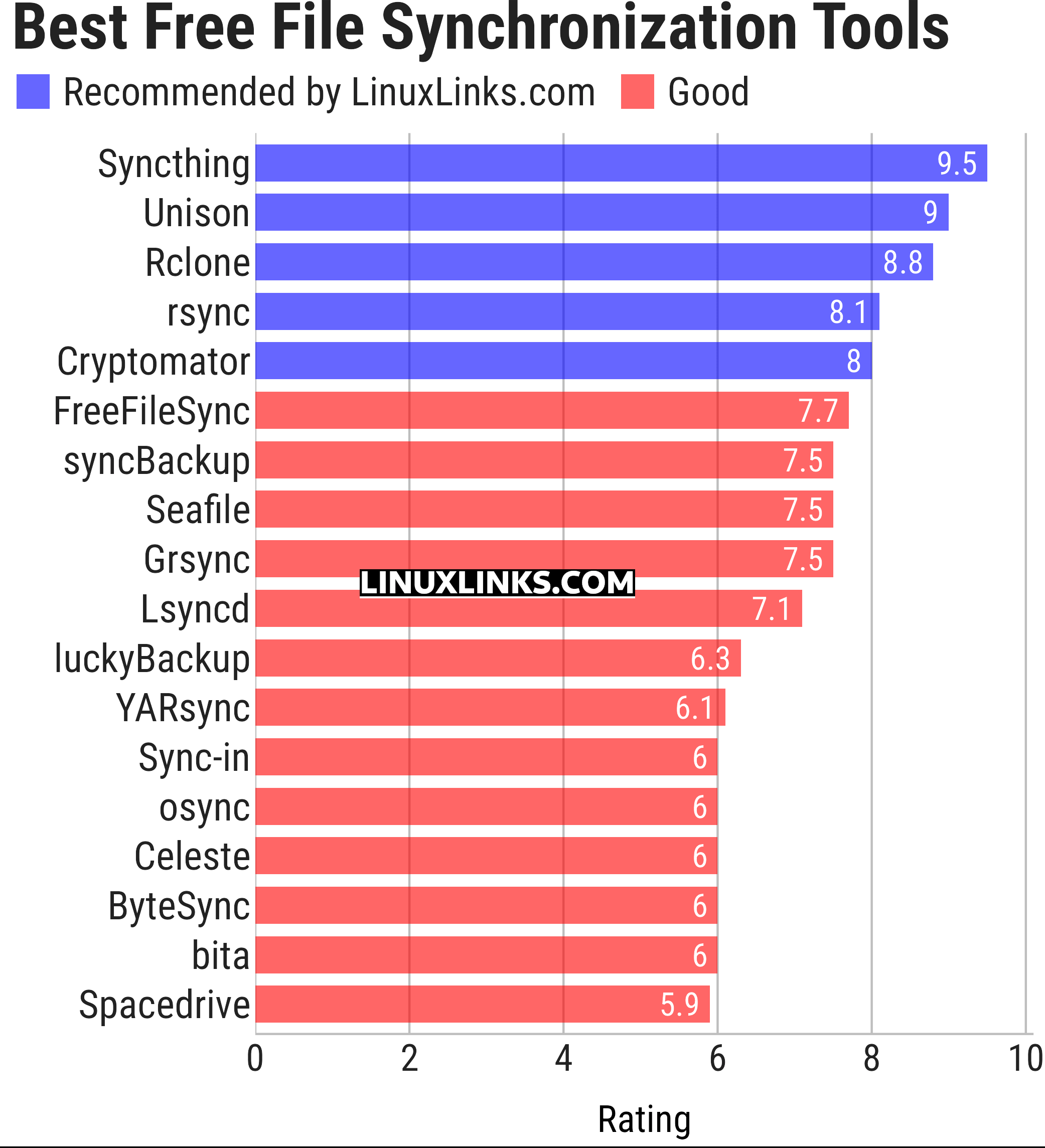
Some of the software featured here also functions as backup software. The ratings chart reflects these programs from a file synchronization perspective only. It’s important to appreciate that file synchronization and backup are different. While they have some similarities, it’s vital to recognize the difference when working out how to protect your data. Backup is crucial or safeguarding your data, but equally important is easy-yet-secure access to that data using file synchronization. For dedicated backup software, we recommend you visit this roundup.
Let’s explore the file synchronization tools in more detail. Click the links below to learn all about each tool.
| File Synchronization Tools | |
|---|---|
| Syncthing | Continuous file synchronization program |
| Unison | File-synchronization tool for POSIX-compliant systems |
| Rclone | Command line program to sync files and directories |
| rsync | Fast incremental file transfer |
| Cryptomator | Multi-platform transparent client-side encryption of files in the cloud |
| FreeFileSync | Folder comparison and synchronization software |
| syncBackup | Backup and mirror your drives |
| Seafile | Coud storage system with privacy protection and teamwork features |
| Grsync | Graphical user interface for rsync |
| Lsyncd | Live Syncing Daemon |
| luckyBackup | Backup & sync tool |
| YARsync | Yet Another Rsync |
| Sync-in | File sync and server management |
| osync | Two way filesync script running on Bash |
| Celeste | GUI file synchronization client |
| ByteSync | File synchronization, backup, and deduplication |
| bita | Differential file synchronization over HTTP |
| Spacedrive | File manager powered by a virtual distributed filesystem |
This article has been updated to reflect the changes outlined in our recent announcement.
 Explore our carefully curated directory of recommended free and open source software, covering every major software category. Explore our carefully curated directory of recommended free and open source software, covering every major software category.The directory forms part of our extensive collection of articles for Linux enthusiasts. It includes hundreds of detailed reviews, together with free and open source alternatives to proprietary software from companies such as Google, Microsoft, Apple, Adobe, IBM, Cisco, Oracle, and Autodesk. LinuxLinks also covers interesting projects worth exploring, Linux-compatible hardware, free programming books and tutorials, and much more. Know a useful free and open source Linux application that we haven’t covered? Tell us about it using our submission form. |
Please read our Comment Policy before commenting.