
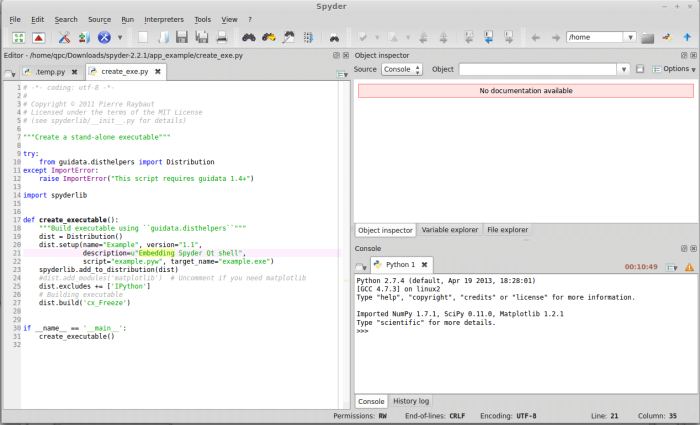
Spyder (previously known as Pydee) is an open-source Python development environment providing MATLAB-like features in a simple and light-weighted software.
Spyder is part of spyderlib, a Python module based on PyQt, pyflakes, rope and sphinx providing powerful PyQt4 widgets like source code editors, Python console (easy to embed in your own application: see this example) or GUI-based dictionary, lists/tuples and NumPy array editors.
This project is part of a larger effort to promote and facilitate the use of Python for scientific and engineering software development. The popular Python distributions Python(x,y) and WinPython also contribute to this plan.
Key Features
- Syntax coloring for Python, C/C++ and Fortran files.
- Powerful dynamic code introspection features (powered by rope):
- Code completion and calltips.
-
- Go to an object definition with a mouse click.
- Class and function browser.
- Occurrence highlighting.
- To-do lists (TODO, FIXME, XXX).
- Get errors and warnings on the fly (provided by pyflakes).
- Breakpoints and conditional breakpoints to use with the python debugger (pdb).
- To easily interact with your code as you progress, Spyder lets you.
- Open as many Python and Ipython consoles as you want.
- Run a whole script or any portion of it from the Editor.
- Have code completion and automatic link to documentation through the Object Inspector.
- Execute all consoles in a separate process so they don’t block the application.
- With the Variable Explorer you can browse and analyze all the results your code is producing, and also.
- Edit variables with Spyder’s Array Editor, which has support for a lot of data types (numbers, strings, lists, arrays, dictionaries).
- Have multiple Array Editors open at once, thus allowing to compare variable contents.
- Import/Export data from/to a lot of file types (text files, numpy files, Matlab files).
- Generate 2D plots of list and arrays.
- View local variables while you’re debugging.
- Quick access to documentation is a must for every programmer, either to explore new libraries or to remember how to use a piece of code. Spyder gives you the docs in three different formats:
- Rich text (powered by Sphinx).
- Plain text, to use when rich text is not working.
- Source code, to look at the internal implementation.
- History log.
- Array editor.
- Project explorer.
- Pylint integration.
Website: github.com/spyder-ide/spyder
Support:
Developer: Pierre Raybaut – Developed and maintained by the Spyder Development Team
License: MIT License
Spyder is written in Python. Learn Python with our recommended free books and free tutorials.
Related Software
| Python Integrated Development Environments | |
|---|---|
| PyCharm | Full-featured IDE. Two editions are available, one is open source software |
| Spyder | Python development environment providing MATLAB-like features |
| eric | Full featured Python editor and IDE, written in Python |
| Thonny | Tk-based IDE designed for novice programmers |
| PyDev | Python plugin for Eclipse |
| Leo | PIM, IDE and outliner |
| Pyzo | Interactive editor for scientific Python |
| PTK | Interactive environment for Python |
| IDLE | Python’s Integrated Development and Learning Environment |
Read our verdict in the software roundup.
| Integrated Development Environments | |
|---|---|
| RStudio | Enterprise-ready professional software for R |
| PyCharm | Integrated Development Environment for Python |
| Neovim | Continuation and extension of Vim |
| Lapce | Fast and powerful code editor written in Rust |
| NetBeans IDE | Java based IDE from Apache |
| VSCodium | Binary distribution of VS Code |
| Eclipse | Java based environment combining a number of different Eclipse projects |
| Qt Creator | Cross-platform, complete Integrated Development Environment |
| Spyder | The Scientific Python Development Environment |
| KDevelop | An easy to use IDE for KDE |
| Helix | Post-modern modal text editor |
| Positron | Next-generation data science IDE |
| eric | Full featured Python editor and IDE |
| Thonny | Python Integrated Development Environment for Beginners |
| Lazarus | Delphi compatible cross-platform IDE |
| PyDev | Python Integrated Development Environment for Eclipse |
| Gambas | Development environment and a full powerful development platform |
| Leo | Python based IDE, Outliner and PIM |
| IntelliJ IDEA | IDE for Java, Groovy, and other languages |
| LiteIDE | Edit and build Go projects |
| Arduino IDE | Electronics prototyping platform |
| ZeroBrane Studio | Lightweight Lua-based IDE for Lua |
| CodeLite | Powerful and lightweight C/C++ IDE |
| Pyzo | Cross-Platform Python IDE focused on interactivity and introspection |
| DrRacket | IDE for the Racket programming languages |
| Builder | IDE for GNOME |
| Geany | Small and lightweight IDE based on Scintilla |
| Code::Blocks | Very extensible and fully configurable |
| Ecere SDK | Software development kit |
| Zasper | IDE for Data Science |
| U++ | Rapid application development framework |
| roobuilder | Vala and JavaScript IDE |
Read our verdict in the software roundup.
 Explore our comprehensive directory of recommended free and open source software. Our carefully curated collection spans every major software category. Explore our comprehensive directory of recommended free and open source software. Our carefully curated collection spans every major software category.This directory is part of our ongoing series of informative articles for Linux enthusiasts. It features hundreds of detailed reviews, along with open source alternatives to proprietary solutions from major corporations such as Google, Microsoft, Apple, Adobe, IBM, Cisco, Oracle, and Autodesk. You’ll also find interesting projects to try, hardware coverage, free programming books and tutorials, and much more. Know a useful open source Linux program that we haven’t covered yet? Let us know by completing this form. |