
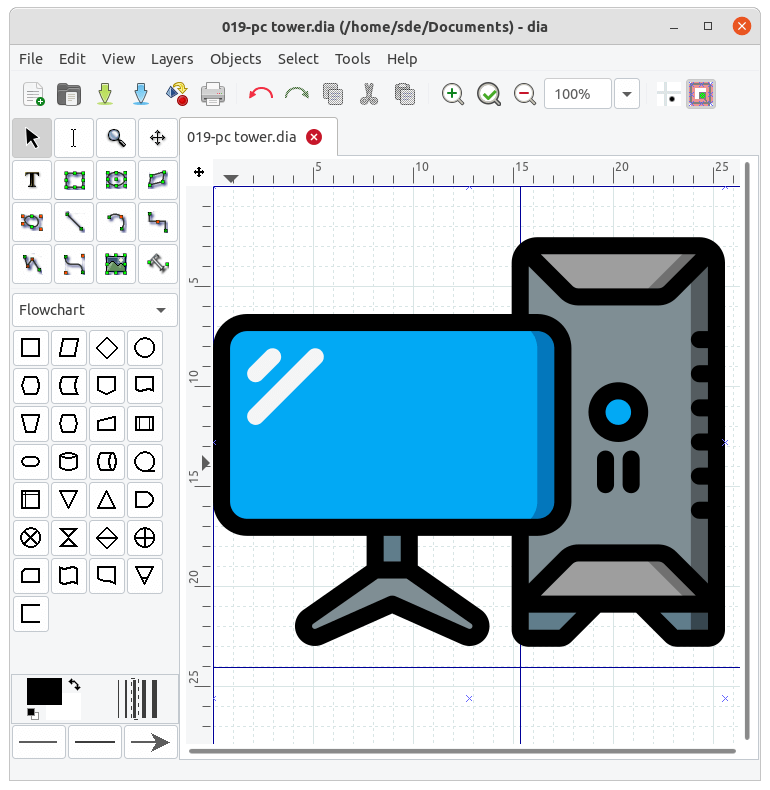
Dia is an open source GTK+ based diagram creation tool.
More specifically, Dia is a tool for making diagrams and schematic illustrations for articles, books, documentation, modelling and other uses, inspired by Visio, but with a simple and intuitive interface.
Dia is designed to be much like the commercial Windows program ‘Visio’. It can be used to draw many different kinds of diagrams. It currently has special objects to help draw entity relationship diagrams, UML diagrams of various types, flowcharts, network diagrams, and simple circuits. It is also possible to add support for new shapes by writing simple XML files, using a subset of SVG to draw the shape.
It can be scripted using the Python programming language.
Dia can be used from the command line.
Key Features
- Import and export of Visio VDX files.
- Special objects to help draw entity relationship diagrams, UML diagrams, flowcharts, network diagrams, and many other diagrams.
- Loads and saves diagrams to a custom XML format (gzipped by default, to save space).
- Exports diagrams to a number of formats:
- Computer Graphics Metafile (.cgm).
- Dia Native Diagram (.dia).
- Dia Shape File (.shape).
- AutoCad Drawing eXchange Format (.dxf).
- HP Graphics Language (.plt, .hpgl).
- Encapsulated Postscript (.eps, .epsi).
- Portable Network Graphics (.png).
- Scalable Vector Graphics (.svg).
- Scalable Vector Graphics gzip compressed (.svgz).
- TeX Metapost macros (.mp).
- TeX PSTricks macros (.tex).
- WordPerfect Graphics (.wpg).
- XFig format (.fig).
- XSLT (eXtensible Stylesheet Language Transformation) (.code).
- Prints diagrams (including ones that span multiple pages).
- Cross-platform support – Linux, MacOS X and Windows are supported. There are also third-party binaries available for Solaris, and Irix.
Website: wiki.gnome.org/Apps/Dia
Support: Documentation, FAQ
Developer: Dia Developers
License: GNU General Public License v2.0
Dia is written in C. Learn C with our recommended free books and free tutorials.
Related Software
| Unified Modeling Language tools | |
|---|---|
| Eclipse Papyrus | Edit models based on UML and related languages |
| PlantUML | Draw UML diagrams from simple textual description |
| Mermaid | Generate diagrams from markdown-like text |
| Umple | Create UML models textually |
| Modelio | UML and BPMN modeling environment |
| Gaphor | Simple UML and SysML modeling tool |
| Umbrello | UML Modeller based on KDE technology |
| UMLet | Java-based UML tool |
| JetUML | Sketch software design ideas with a minimum of fuss |
| Violet | Designed for people who need to produce simple UML diagrams |
| Dia | GTK+ based diagram creation software |
| ArgoUML | UML modeling tool |
| crystal-facet-uml | Desktop UML and SysML modeling application |
| UML Designer | UML tool based on Sirius and Eclipse |
Read our verdict in the software roundup.
 Explore our comprehensive directory of recommended free and open source software. Our carefully curated collection spans every major software category. Explore our comprehensive directory of recommended free and open source software. Our carefully curated collection spans every major software category.This directory is part of our ongoing series of informative articles for Linux enthusiasts. It features hundreds of detailed reviews, along with open source alternatives to proprietary solutions from major corporations such as Google, Microsoft, Apple, Adobe, IBM, Cisco, Oracle, and Autodesk. You’ll also find interesting projects to try, hardware coverage, free programming books and tutorials, and much more. Discovered a useful open source Linux program that we haven’t covered yet? Let us know by completing this form. |
Please read our Comment Policy before commenting.
Dia is indeed good and I have seen so many users recommended it. Do you know whether the tool can export /import vsdx or vsd files? I’m using Visio 2016 pro sometimes so I may need to export vsdx files to other diagramming tools.
So far, the one I found recently that can export vsdx and vsd files is Edraw Max 9.4, but it is not free if you need to edit your files (only open and view are totally free).
Why don’t you try Dia and report back if it can export / import the file types you want?