

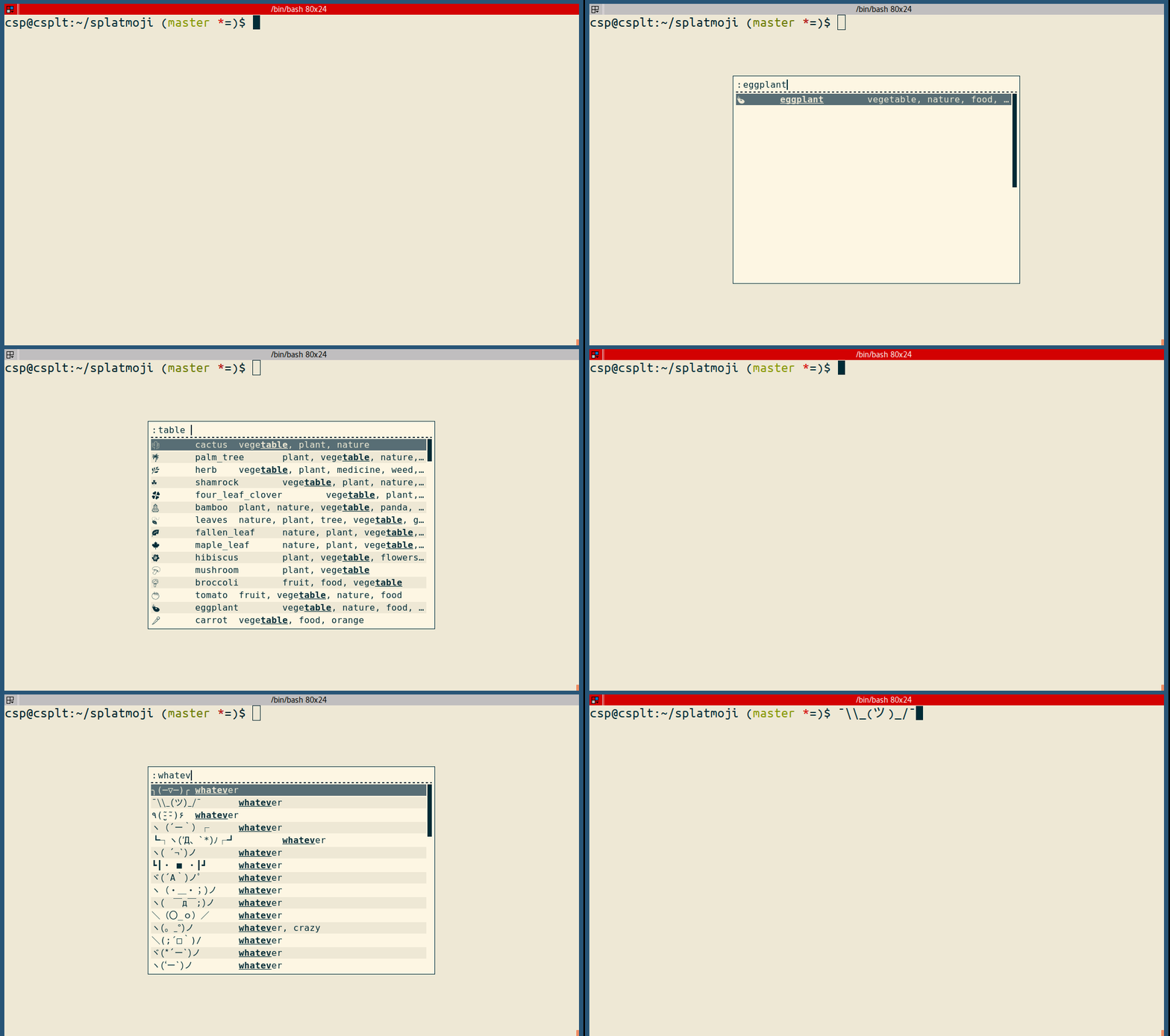
Splatmoji lets you look up and input emoji and/or emoticons/kaomoji on your desktop via a pop-up menu.
By default, Splatmoji keepS a list of the ${history_length} most-recently selected entries and show them at the top of the menu.
This is free and open source software.
Key Features
- Escape output (this only affects emoticons). There’s support for github-flavored markdown, json, and site-flavored markdown escaping.
- Languages – With emoji from the included database, it is possible to specify keyword/annotation languages to include in addition to `en`. `nn` for Norwegian, `fr-CA` for Canadian French, etc. In theory this could apply to both emoji *and* emoticons, but the emoticons only come in English currently.
- Skin tones – light, medium-light, medium, medium-dark, dark, and none. This lets you choose specific Fitzpatrick scale skin tones to display for emoji that can be modified by such.
Website: github.com/cspeterson/splatmoji
Support:
Developer: Christopher Peterson
License: MIT License
Splatmoji is written in Shell.
Related Software
| Terminal Emoji Tools | |
|---|---|
| emoj | Find relevant emoji from text on the command-line |
| emoji | emoji terminal output for Python |
| em | Find emoji by name and copy them to the clipboard |
| emojify | Substitutes emoji aliases that many services use for emoji raw characters |
| vim-emoji | Emoji in the Vim text editor |
| rofmoji | Find emoji for your clipboard |
| emoji-cli | Emoji completion on the command line |
| gmocli | Emoji selection with gitmoji support |
| Termiji | Fast terminal-based emoji picker |
| emoji-fzf | Search and retrieve emoji with the fzf fuzzy finder |
| tuimoji | Terminal based emoji chooser |
| splatmoji | Look up and input emoji and/or emoticons/kaomoji |
Read our verdict in the software roundup.
 Explore our carefully curated directory of recommended free and open source software, covering every major software category. Explore our carefully curated directory of recommended free and open source software, covering every major software category.The directory forms part of our extensive collection of articles for Linux enthusiasts. It includes hundreds of detailed reviews, together with free and open source alternatives to proprietary software from companies such as Google, Microsoft, Apple, Adobe, IBM, Cisco, Oracle, and Autodesk. LinuxLinks also covers interesting projects worth exploring, Linux-compatible hardware, free programming books and tutorials, and much more. Know a useful free and open source Linux application that we haven’t covered? Tell us about it using our submission form. |
Please read our Comment Policy before commenting.