

SilverBullet is a note-taking application optimized for people with a hacker mindset.
With this applications your notes essentially become a database that you can query. You can build custom knowledge applications on top of.
This is free and open source software.
Key Features
- Web application – instantly accessible wherever a (modern) web browser is available.
- Progressive web app that supports two Client Modes: Online mode and Synced mode, where the synced mode enables 100% offline operation, keeping a copy of the content in the browser’s local IndexedDB database, syncing back to the server when a network connection is available.
- Self-hosted – you own your data. Your space is stored as plain files in a folder on disk on your server. Back it up, sync, edit, publish, script it with any additional tools you like.
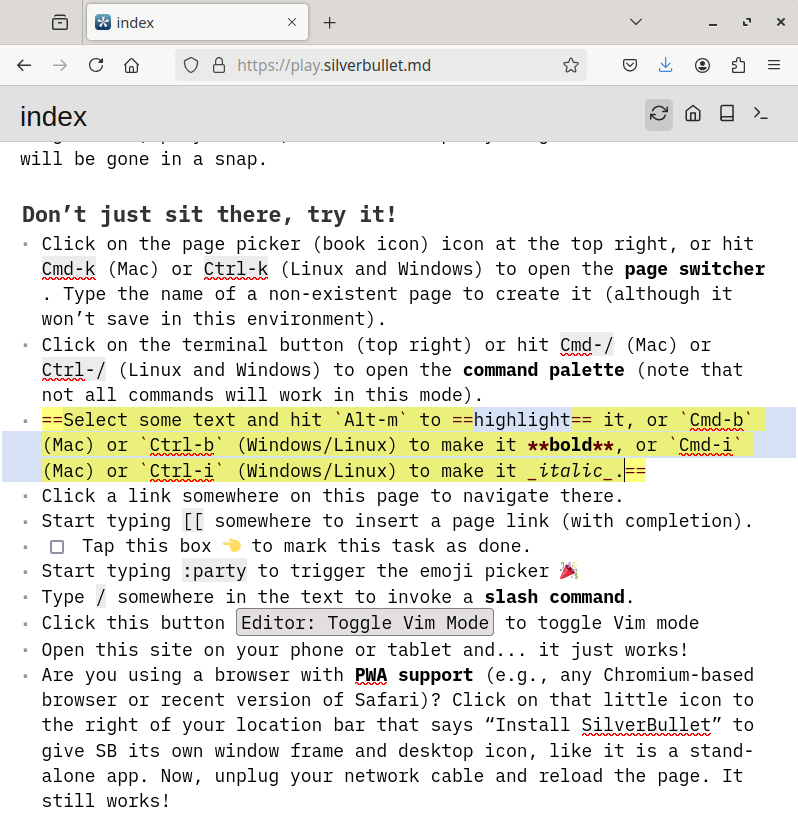
- Provides an enjoyable Markdown writing experience with a clean UI, rendering text using live preview], further reducing visual noise while still providing direct access to the underlying markdown syntax.
- Supports wiki-style page linking using the page link syntax. Incoming links are indexed and appear as linked mentions at the bottom of the pages linked to, thereby providing bi-directional linking.
- Optimized for keyboard-based operation:
- Quickly navigate between pages using the page switcher.
- Run commands via their keyboard shortcuts or the command palette.
- Use slash commands to perform common text editing operations.
- Platform for end-user programming through its support for objects, live queries, live templates and live template widgets, allowing to make parts of your pages and UI dynamic.
- Boost your writing/knowledge collection productivity using its various templates mechanisms including powerful snippets and page templates.
- Extend using libraries and plugs.
Website: silverbullet.md
Support: GitHub Code Repository
Developer: Zef Hemel
License: MIT License
SilverBullet is written in TypeScript. Learn TypeScript with our recommended free books and free tutorials.
Related Software
| Desktop Wiki GUI Notes Apps | |
|---|---|
| Zim Desktop Wiki | Brings the concept of a wiki to your desktop |
| logseq | Privacy-first platform for knowledge management and collaboration |
| AppFlowy | Bring projects, wikis, and teams together with AI. |
| Trilium Notes | Hierarchical note taking application |
| SiYuan | Privacy-first personal knowledge management and note-taking app |
| SilverBullet | Note-taking application optimized for people with a hacker mindset |
| Tangent | Designed to let you write the way you think |
| MyTetra | Smart manager for information collecting |
| OutWiker | Cross-platform note-taking app with a tree-based structure |
| WikidPad | Wiki-like notebook for storing your thoughts, ideas, todo lists |
| Reor | AI note-taking app |
Read our verdict in the software roundup.
 Explore our carefully curated directory of recommended free and open source software, covering every major software category. Explore our carefully curated directory of recommended free and open source software, covering every major software category.The directory forms part of our extensive collection of articles for Linux enthusiasts. It includes hundreds of detailed reviews, together with free and open source alternatives to proprietary software from companies such as Google, Microsoft, Apple, Adobe, IBM, Cisco, Oracle, and Autodesk. LinuxLinks also covers interesting projects worth exploring, Linux-compatible hardware, free programming books and tutorials, and much more. Know a useful free and open source Linux application that we haven’t covered? Tell us about it using our submission form. |
Please read our Comment Policy before commenting.