

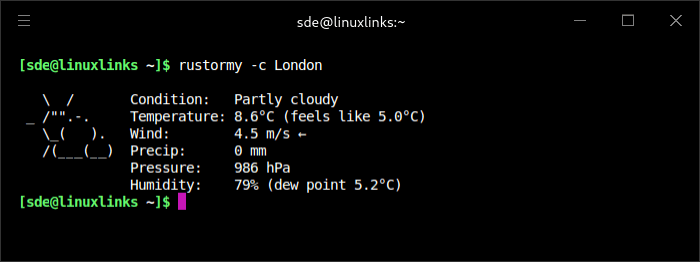
rustormy is a minimal and neofetch-like weather CLI with multiple data providers support, ASCI-icons, ANSI colors, localization and various output modes.
This is free and open source software.
Key Features
- Fetch weather data from multiple providers:
- OpenMeteo (default, no API key required).
- OpenWeatherMap.
- World Weather Online.
- WeatherAPI.com.
- Weatherbit.io.
- Tomorrow.io.
- Automatically fall back to the next provider if the primary one is unavailable (e.g., due to API limits).
- Display current temperature, “feels like” temperature, weather conditions, wind speed and direction humidity, precipitation, atmospheric pressure, dew point, and UV index (if supported by the provider).
- Render ASCII art icons for weather conditions.
- Support ANSI colors in terminal output.
- Provide geocoding by city name or latitude/longitude input.
- Cache geocoding results to reduce API calls (optional).
- Support multiple languages (English, Russian, Spanish).
- Support automatic conversion between imperial and metric units.
- Provide various text output modes (full, compact, one-line) and JSON output.
- Support live mode for periodically updating weather data.
- Cross-platform (Linux, macOS, Windows).
Website: github.com/Tairesh/rustormy
Support:
Developer: Ilia Agafonov
License: MIT License
rustormy is written in Rust. Learn Rust with our recommended free books and free tutorials.
Related Software
| HDR Imaging Software | |
|---|---|
| RawTherapee | The Experimental Raw Photo Editor |
| OpenEXR | HDR image file format and HDR utilities |
| Hugin | Panorama photo stitching program |
| pfstools | Command line HDR manipulation programs |
| tev | High dynamic range image comparison tool |
| HyperHDR | Ambient lighting implementation for television and music sets |
| HDRView | Depth-map and high-dynamic range image viewer |
| Luminance HDR | Provides a workflow for HDR imaging |
| Radiance | Lighting simulation and rendering system |
| HDRMerge | Combine two or more raw images into a single raw |
| CinePaint | Works with 16-bit and floating point pixels for HDR imaging |
Read our verdict in the software roundup.
 Explore our comprehensive directory of recommended free and open source software. Our carefully curated collection spans every major software category. Explore our comprehensive directory of recommended free and open source software. Our carefully curated collection spans every major software category.This directory is part of our ongoing series of informative articles for Linux enthusiasts. It features hundreds of detailed reviews, along with open source alternatives to proprietary solutions from major corporations such as Google, Microsoft, Apple, Adobe, IBM, Cisco, Oracle, and Autodesk. You’ll also find interesting projects to try, hardware coverage, free programming books and tutorials, and much more. Discovered a useful open source Linux program that we haven’t covered yet? Let us know by completing this form. |