
Last Updated on July 12, 2021
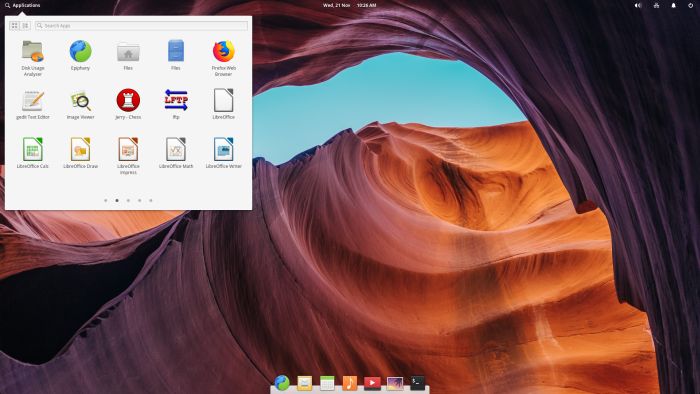
Pantheon is the desktop environment originally created for the elementary OS distribution. It’s written from scratch in Vala, using GTK3 and Granite. With regards to usability and appearance, the desktop has some similarities with GNOME Shell and macOS.
Pantheon is rarely seen outside of Elementary OS although it can be installed on other distributions.
Pantheon offers a transparent panel, with three core areas, across the top of the screen. You can launch applications by clicking Applications in the top left. In the center, there’s the date and time. Clicking here pulls up a calendar. System indicators sit in the top right.
A dock sits at the bottom of the screen, similar to seen on a MacBook. The dock’s name is Plank.
The Pantheon desktop environment is built on top of the GNOME software base, i.e. GTK+, GDK, Cairo, GLib (including GObject and GIO), GVfs and Tracker.
Features include:
- Pantheon applications:
- Pantheon Greeter – session manager based on LightDM but is more visually appealing.
- Gala – a window and compositing manager based on libmutter.
- Wingpanel – extensible top panel, like GNOME Shell’s top panel. This stylish panel holds indicators and spawns Slingshot.
- Slingshot – a lightweight and stylish application launcher located in Wingpanel.
- Plank – a dock. The goal is to provide just what a dock needs and absolutely nothing more.
- Switchboard – settings application. Switchboard is just the container application for Switchboard Plugs, which provide the actual settings for various hardware and software.
- Mail – email client written in Vala. It uses Evolution Data Server and Camel to display emails.
- Calendar – a desktop calendar app.
- Music – audio player.
- Code – code-focused text editor.
- Terminal – a terminal emulator.
- Files – a file manager with plugin support.
Website: elementary.io
Support: GitHub code repository, Support
Developer: elementary LLC
License: GNU GPL, LGPL
Return to Desktop Environments Home Page
| Explore Linux | |
|---|---|
 | Best Free and Open Source Software - A huge collection of recommended free and open source software covering every major category. |
 | In-depth Linux Software Reviews - Detailed assessments of Linux software covering features, usability and overall quality. |
 | The Big List of Active Linux Distros - An extensive collection of actively developed Linux distributions. |
 | Open Source Alternatives - Alternatives to software and services from Google, Microsoft, Apple, Adobe, IBM, Autodesk, Oracle and others. |
 | Essential Linux System Tools - Indispensable utilities for monitoring, maintaining and managing Linux systems. |
 | Linux Productivity Tools - Useful utilities for improving productivity and streamlining everyday tasks. |
 | Alternatives to Popular CLI Tools - Modern alternatives to familiar command-line utilities supplied with Linux systems. |
 | Awesome Free Linux Game Tools - Tools, utilities and companion software that improve gaming on Linux. |
 | Machine Learning on Linux - Machine learning and deep learning software, self-hosted applications and practical tools. |
 | Saving Money with Linux - Practical ways to reduce electricity consumption and lower computing costs with Linux. |
 | Linux Candy - Fun, entertaining and sometimes delightfully quirky software from the lighter side of Linux. |
Please read our Comment Policy before commenting.