
Last Updated on June 8, 2024
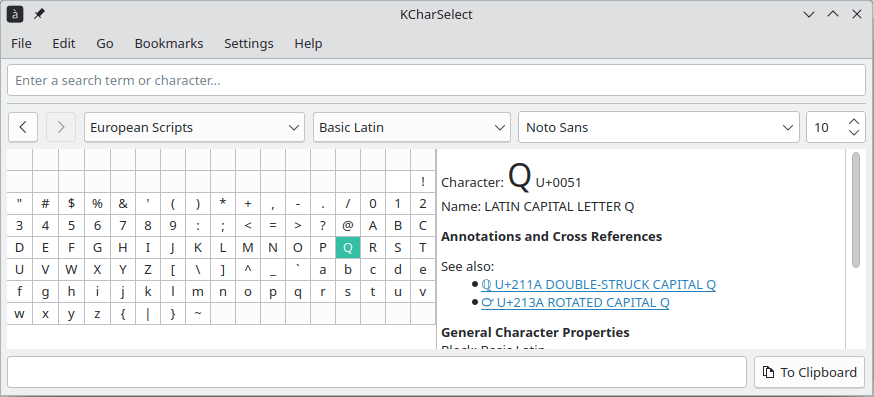
KCharSelect is a tool to select special characters from all installed fonts and copy them in different format (Plain text, Unicode or HTML) into the clipboard.
Double clicking on a character in the preview or pressing Enter adds it to the bar below the font preview. This feature allows to collect a word or a group of several characters and copy them together to the clipboard.
Use Flip Text to reverse the order of the chosen characters.
By default characters are added to the right end of the group or cursor position. With Reverse Direction you can change this behavior and add characters in the left direction.
You can browse characters by their category or quickly find a certain character by searching for its name. KCharSelect displays various information about the selected character. This includes not only the Unicode character name, but also aliases, general notes and cross references to similar characters.
For technical use, different representations of the character are shown. KCharSelect also contains Unihan data for East Asian characters to display English definitions and different pronunciations.
This is free and open source software.
Website: apps.kde.org/en-gb/kcharselect
Support: GitHub Code Repository
Developer: Christoph Feck, Daniel Laidig, Reginald Stadlbauer
License: GNU General Public License v2.0
KCharSelect is written in C++. Learn C++ with our recommended free books and free tutorials.
Related Software
| Character Map Tools | |
|---|---|
| KCharSelect | Select special characters from all installed fonts and copy them |
| gucharmap | GNOME Character Map (gucharmap) is a Unicode character map |
| Characters | Browse characters by various categories |
| Charmap | Pick characters and display substantial Unicode data about each one |
| Runemaster | Character map app for GNOME |
Read our verdict in the software roundup.
 Explore our comprehensive directory of recommended free and open source software. Our carefully curated collection spans every major software category. Explore our comprehensive directory of recommended free and open source software. Our carefully curated collection spans every major software category.This directory is part of our ongoing series of informative articles for Linux enthusiasts. It features hundreds of detailed reviews, along with open source alternatives to proprietary solutions from major corporations such as Google, Microsoft, Apple, Adobe, IBM, Cisco, Oracle, and Autodesk. You’ll also find interesting projects to try, hardware coverage, free programming books and tutorials, and much more. Discovered a useful open source Linux program that we haven’t covered yet? Let us know by completing this form. |
Please read our Comment Policy before commenting.