

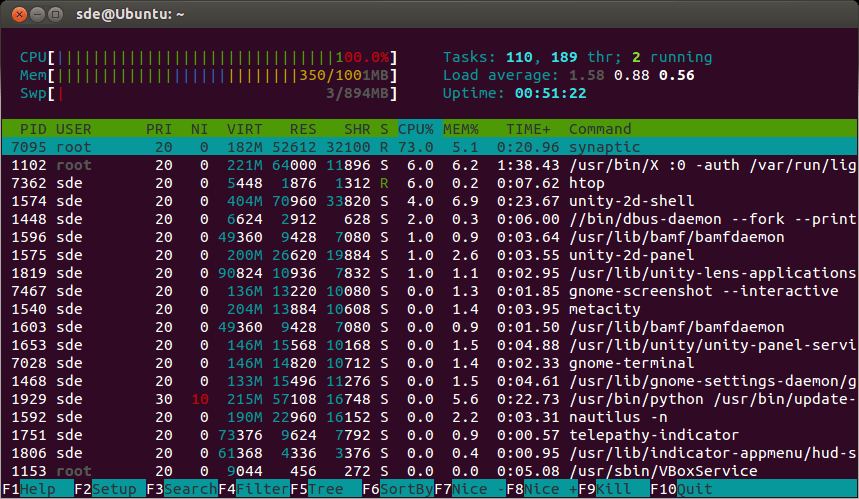
htop is an interactive process viewer that makes it easier to see what is happening on a Linux system. It presents running processes in a scrollable table, together with information about processor usage, memory consumption, swap space and system load.
Unlike the traditional top utility, htop lets you navigate processes with the keyboard or mouse and carry out common administrative tasks without manually entering process IDs. Its colourful display makes it particularly useful when tracking down an application consuming excessive resources.
The interface can be adapted to suit different machines and monitoring requirements. On systems with many processor cores, the ability to examine individual CPU activity and control process affinity is especially useful.
This is free and open source software.
Key Features
- Sort processes by CPU usage, memory consumption, execution time, user and other attributes, with incremental searching and filtering.
- Display parent-child relationships in an expandable process tree, with options for viewing individual threads.
- Send signals, adjust process priorities and select CPU affinity for processes directly from the interface.
- Customise the header with CPU meters, load averages, uptime, memory and swap indicators, and other system information.
- Inspect process details including open files, executable paths and environment variables, depending on platform support.
- Supports Linux-specific monitoring information such as I/O statistics, process capabilities and delay accounting where available.
- Offers configurable colour schemes, mouse interaction and horizontal scrolling for inspecting long command lines.
Website: htop.dev
Support:
Developer: Hisham Muhammad and contributors
License: GNU General Public License v2.0
htop is written in C. Learn C with our recommended free books and free tutorials.
Related Software
| Process Viewers | |
|---|---|
| btop++ | Continuation of bashtop and BpyTOP rewritten in C++ |
| htop | Provides a full list of processes running |
| Glances | System monitoring tool written in Python |
| nmon | Performance monitoring tool |
| bottom | GUI process/system monitor seeking inspiration from gtop, gotop and htop |
| gtop | System monitoring dashboard for the terminal |
| Conky | Advanced, highly configurable system monitor for X based on torsmo |
| Zenith | Turbo-charged top utility |
| BpyTOP | Presents the system resources in a logical and well-thought out way |
| atop | Monitor for system resources and process activity |
| amdtop | Monitor AMD CPU, GPU and NPU activity in the terminal |
| ttop | System monitoring tool with historical snapshots and alerts |
| below | Time traveling resource monitor |
| sysstat | System performance tools |
| gotop | Seeks inspiration from gtop and vtop |
| sot | System observation tool |
| vtop | System monitoring tool in the spirit of top |
| dgop | System monitoring tool with CLI and REST API |
| collectl | Collects data that describes the current system status |
| socktop | Remote system monitor with a rich TUI |
| Saidar | Displays live system statistics |
| Xtop | TUI system monito |
| tiptop | Graphical activity monitor for the command line |
| TTV | Term-task-viewer |
| SysWatch | Terminal-based system diagnostics with anomaly detection |
| Lyvoxa Stellar | Built from the ground up in Rust |
| bb | Simple process viewer |
Read our verdict in the software roundup.
 LinuxLinks helps you discover the best free and open source software for Linux. Explore our extensive collection of recommended applications, including alternatives to popular proprietary software. We also publish software reviews, Linux tutorials, hardware reviews, free programming books and articles covering the wider open source community. Browse our Linux resources to discover more. Know a useful free and open source Linux application we haven't covered? Suggest a program for inclusion. Has your software been featured on LinuxLinks? Display one of our Featured on LinuxLinks badges on your website or GitHub README. |
Please read our Comment Policy before commenting.