

A news aggregator is software which collect news, weblog posts, and other information from the web so that they can be read in a single location for easy viewing. With the range of news sources available on the internet, news aggregators play an essential role in helping users to quickly locate breaking news.
For people that read lots of weblogs, a news aggregator makes keeping track of them effortless, and particularly useful if the weblogs are only updated occasionally.
There are a number of different file formats which information publishers use. The most frequently ones are RSS and Atom. RSS is an acronym for Really Simple Syndication. It is a defined standard based on XML with the specific purpose of delivering updates to web-based content. In other words, RSS is a Web content syndication format.
goread is an RSS/Atom feed reader for the terminal. It’s written in Go and published under an open source license.
Installation
We decided to install goread from the goread package located in the Arch User Repository.
As the AUR is for Arch and Arch-based distros, if you’re running a different distro, you’ll need to install goread in a different way. We recommend installing the software with go, the internal package manager.
$ go install github.com/TypicalAM/goread@latest
This command installs goread to ~/go/bin. If that directory is not in your PATH, copy the file to a directory already in your PATH such as /usr/local/bin, or add ~/go/bin to your PATH.
In Operation
The first thing you’ll want to do is add some news feeds. In the example below we’re adding our news feed to illustrate the process.
To add a feed, we navigate to the Tech section, and press nor ctrl+n. You’ll see the dialog box below in which we’ve entered:
Name: LinuxLinks.com
URL: https://www.linuxlinks.com/feed/
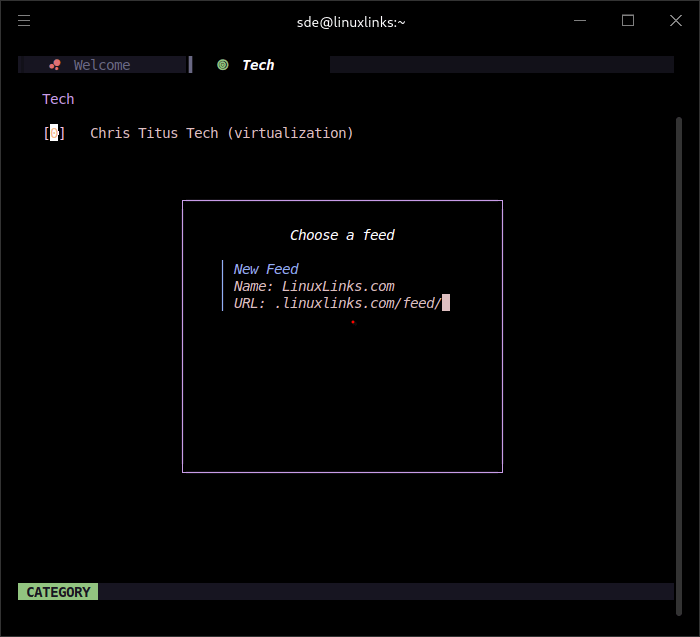
LinuxLinks.com will now appear in the Tech section. Press enter to access our feed.
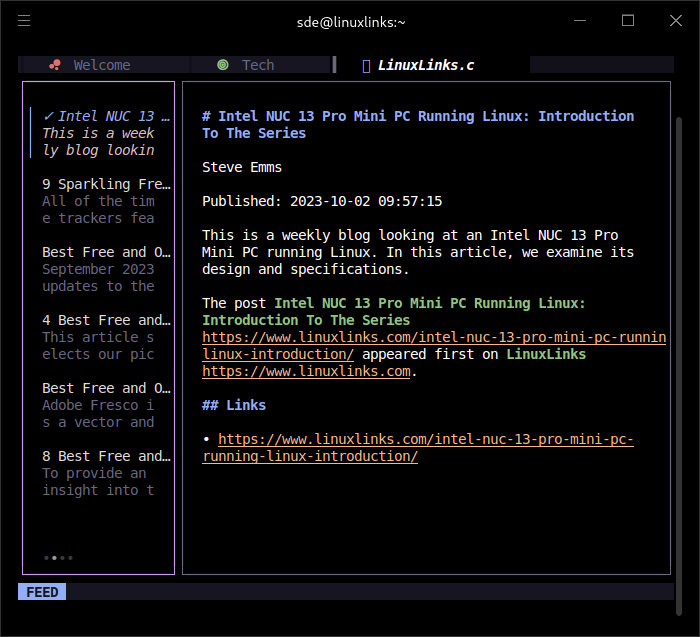
goread’s configuration file containing links to RSS feeds is stored in a urls file which is stored at ~/.config/goread/urls.yml
goread lets you download articles, categorize feeds, and also has OPML file support. The program’s keyboard shortcuts are displayed by pressing h or ctrl+h.
Summary
goread gets our recommendation. It has an attractive and easy to use text-based user interface, and its default color scheme is attractive. A great distraction-free way to keep abreast of your favorite web sites.
If you don’t like the color scheme, it’s easy to generate a color scheme using Pywal, a tool that generates a color palette from the dominant colors in an image.
Sadly there’s currently no support for terminal image previews or customizable keybinds.
There’s pretty stiff competition. We’ve compiled roundups of our recommended graphical, terminal, and self-hosted news aggregators. We’ll shortly add goread to the terminal-based roundup.
Website: github.com/TypicalAM/goread
Support:
Developer: Adam Piaseczny
License: GNU General Public License v3.0
goread is written in Go. Learn Go with our recommended free books and free tutorials.
Related Software
| Terminal-Based News Aggregators | |
|---|---|
| Newsboat | Snazzy RSS feed reader |
| Feedr | Polished Linux terminal-based RSS/Atom feed reader |
| Elfeed | Extensible web feed reader for Emacs, supporting both Atom and RSS |
| goread | Go-based news feed reader |
| gorss | Simple RSS/Atom reader written in Golang |
| Snownews | Text mode reader for RSS and Atom feeds written in C |
| tuifeed | News feed reader with a fancy terminal user interface |
| nom | RSS reader for the terminal written in Go |
| eilmeldung | Based on the awesome news-flash library |
| Newsraft | Greatly inspired by Newsboat and tries to be its lightweight counterpart |
| syndicationd | Keyboard-driven RSS and Atom reader with a clean interface |
| moccasin | TUI feed reader for RSS, Atom, and (eventually) Podcasts |
| izrss | Lightweight RSS reader focused on simplicity and speed |
| bulletty | Fast RSS and Atom reader with an uncluttered interface |
| CAST-text | Full-text RSS terminal reader |
| hys | RSS reader for digital minimalists |
| Feedln | Simple interface to view, update, and categorize feed |
| srss | Simple command-line news feed reader |
| newsroom | Modern CLI to get your favorite news |
| blogtato | RSS and Atom feed reader |
| Rivulet | Focuses on usability for users who prefer keyboard-driven tools |
| NewsGoat | Written in Go using the Bubble Tea TUI framework |
| Canto | Crank through feeds using a minimal, yet information packed interface |
Read our verdict in the software roundup.
 Explore our carefully curated directory of recommended free and open source software, covering every major software category. Explore our carefully curated directory of recommended free and open source software, covering every major software category.The directory forms part of our extensive collection of articles for Linux enthusiasts. It includes hundreds of detailed reviews, together with free and open source alternatives to proprietary software from companies such as Google, Microsoft, Apple, Adobe, IBM, Cisco, Oracle, and Autodesk. LinuxLinks also covers interesting projects worth exploring, Linux-compatible hardware, free programming books and tutorials, and much more. Know a useful free and open source Linux application that we haven’t covered? Tell us about it using our submission form. |
Please read our Comment Policy before commenting.