

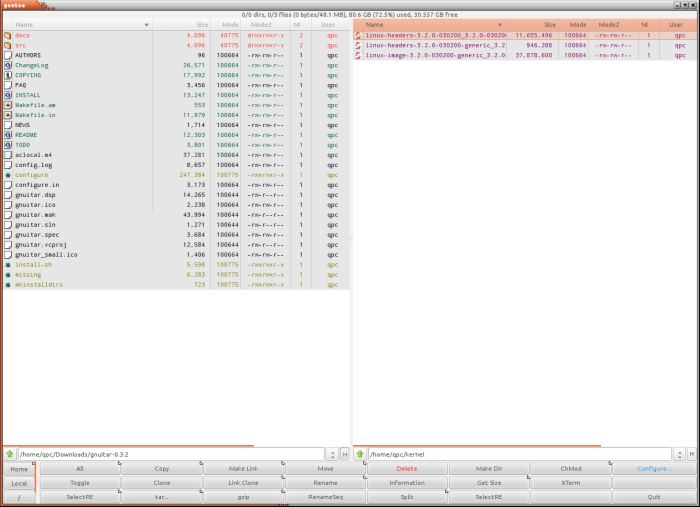
gentoo is a two-pane graphical file manager. This application lets users do almost all of the configuration and customizing from within the software. If you still prefer to hand-edit configuration files, they are easy to work with as they are written in a readable format (XML).
One of the design goals with gentoo has been to provide extensive customization and configuration abilities, and to do so from an integrated, graphic, interface. The user should not have to edit the configuration file directly “by hand”, and especially not have to restart the program for changes to take effect.
gentoo offers a fairly complex and powerful file identification system, coupled to an object-oriented style system, which together provide control of how files of different types are displayed and acted upon. Additionally, over a hundred pixmap images are available to be used in file type descriptions.
gentoo uses the GTK+ toolkit and is written from scratch in C. It attempts to capture the look and feel of Directory Opus, a notable file manager written for the Amiga home computer.
Key Features
- Reasonably small and fast.
- Aims to be completely graphically configurable.
- Support for most common file operations (copy, move, rename, makedir etc).
- Uses GIO, which means file system access is virtualized.
- Direct graphical configuration of most main features.
- Powerful file recognition system that allows you to configure how files of different types are listed (what colors and icons), and what happens when you double click them (start image viewers, music players, etc).
- Includes more than 120 original pixmap icons (16×15 in size).
Website: sourceforge.net/projects/gentoo
Support:
Developer: Emil Brink
License: GNU General Public License v2.0
gentoo is written in C. Learn C with our recommended free books and free tutorials.
Related Software
| Orthodox File Managers | |
|---|---|
| Krusader | Advanced twin panel (commander style) file manager for KDE |
| Midnight Commander | User-friendly yet powerful text-mode file manager and visual shell |
| Double Commander | Inspired by Total Commander |
| Ranger | File manager with an ncurses frontend written in Python |
| GNOME Commander | Built on the GTK-toolkit and GnomeVFS |
| Xfe | Very similar to Windows Explorer but with twin panes |
| muCommander | Lightweight, cross-platform file manager |
| far2l | AR Manager fork bringing panels, plugins and archives to Linux |
| Vifm | Vim-style two-pane navigator with modal keyboard control |
| File Commander | Total Commander-like orthodox file manager |
| Sunflower | Small and highly customizable twin-panel file manager |
| trolCommander | Fork of muCommander |
| FileRunner | Simple and efficient file manager written in Tcl |
| F2 Commander | Lean text-mode commander for browsing and batch operations |
| Tux Commander | Uses the old GTK2 windowing toolkit |
| Midday Commander | Dual-pane console navigator with Midnight Commander-style flow |
| Worker | In the style of the Amiga's DirOpus |
| Waydir | Wayland-native desktop browser focused on speed and simplicity |
| WCMCommander | Mimicking the look-n-feel of Far Manager |
| gentoo | Two-pane file manager |
| emelFM2 | Orthodox file manager using GTK+ 2 |
Read our verdict in the software roundup.
 Explore our comprehensive directory of recommended free and open source software. Our carefully curated collection spans every major software category. Explore our comprehensive directory of recommended free and open source software. Our carefully curated collection spans every major software category.This directory is part of our ongoing series of informative articles for Linux enthusiasts. It features hundreds of detailed reviews, along with open source alternatives to proprietary solutions from major corporations such as Google, Microsoft, Apple, Adobe, IBM, Cisco, Oracle, and Autodesk. You’ll also find interesting projects to try, hardware coverage, free programming books and tutorials, and much more. Discovered a useful open source Linux program that we haven’t covered yet? Let us know by completing this form. |
Please read our Comment Policy before commenting.
Heavily reminiscent of Worker File Manager.