

A container is an operating-system-level virtualization method for running multiple isolated Linux systems on a control host using a single Linux kernel. The container runs a set of processes isolated from the system, running from a distinct image that provides all the files necessary to support the processes.
There’s an important distinction between OS-level virtualization and virtualization. The former is often known as containers.
OS-level virtualization (containers) share the same operating system kernel and isolate the application processes from the rest of the system. For example: ARM Linux systems run ARM Linux containers, x86 Linux systems run x86 Linux containers, x86 Windows systems run x86 Windows containers. Linux containers are extremely portable, but they must be compatible with the underlying system.
Containers are different from Type 1 and 2 hypervisors. A Type 1 hypervisor is known as native or bare-metal. With this type, the hypervisor runs directly on the host’s hardware to control the hardware resources and to manage guest operating systems. In other words, the software hypervisor does not require an additional underlying operating system.
This article focuses on container managers, software which make it easy to find, run, build, share and deploy applications using open containers. We explore containers in a separate article.
Here’s our verdict captured in a legendary LinuxLinks-style ratings chart. Only free and open source software is eligible for inclusion here.
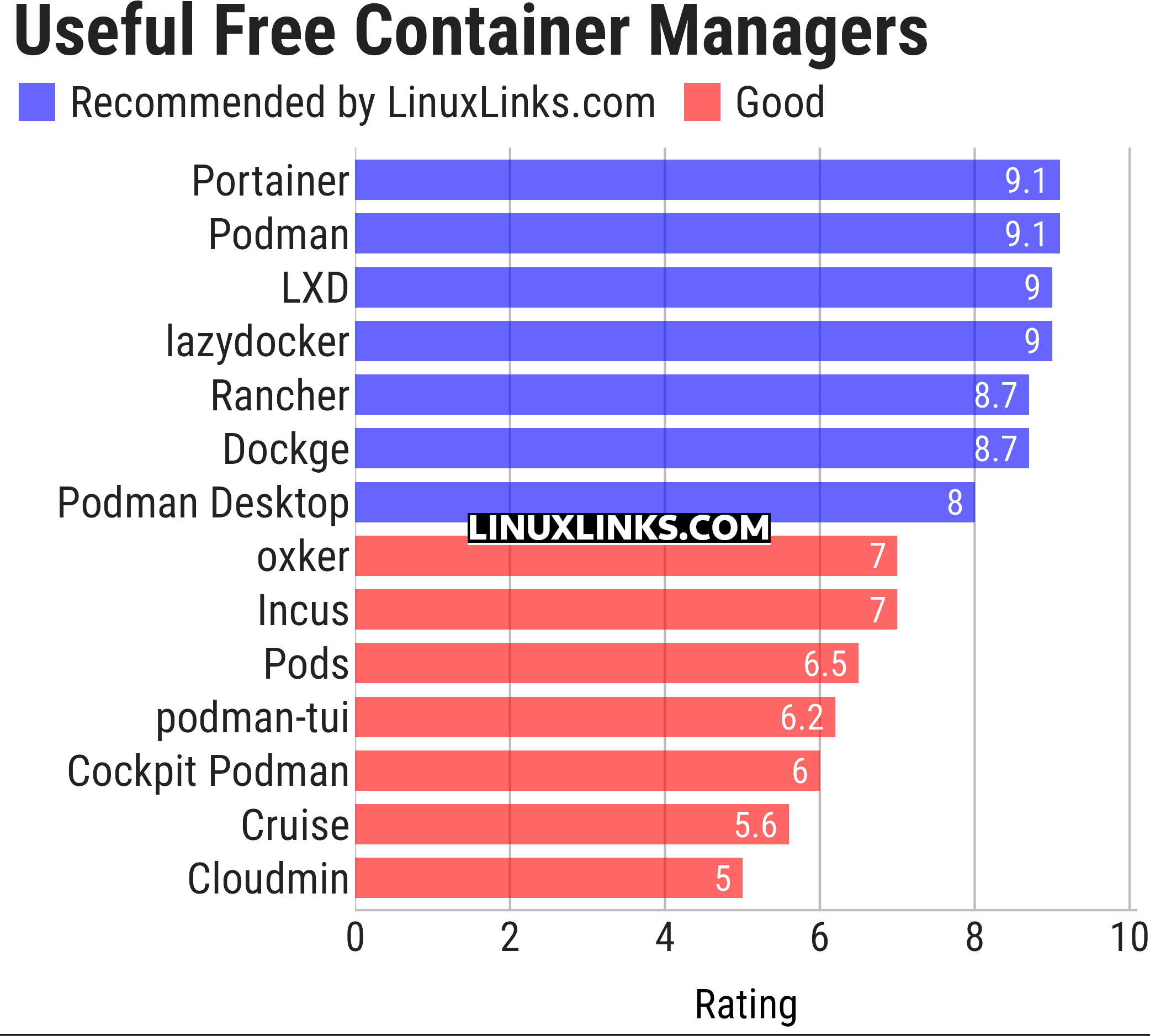
Let’s explore each of the container managers.
| Container Managers | |
|---|---|
| Portainer | Lightweight and easy to use management UI |
| Podman | Tool for managing OCI containers and pods |
| LXD | Manage virtual machines and containers |
| lazydocker | Terminal interface for managing Docker containers and Compose services |
| Rancher | Container management platform |
| Dockge | Web-based Docker Compose stack manager with an interactive editor |
| Podman Desktop | Desktop GUI for containers, images, pods and Kubernetes workflows |
| oxker | Fast terminal interface to view and control Docker containers |
| Incus | Secure and powerful system container and virtual machine manager |
| Pods | Manage your Podman containers |
| podman-tui | Terminal interface for managing Podman environments |
| Cockpit Podman | Web interface for managing Podman containers and images |
| Cruise | Docker TUI client |
| Cloudmin | Manage virtual systems running virtualization technology |
This article has been updated to reflect the changes outlined in our recent announcement.
 Explore our carefully curated directory of recommended free and open source software, covering every major software category. Explore our carefully curated directory of recommended free and open source software, covering every major software category.The directory forms part of our extensive collection of articles for Linux enthusiasts. It includes hundreds of detailed reviews, together with free and open source alternatives to proprietary software from companies such as Google, Microsoft, Apple, Adobe, IBM, Cisco, Oracle, and Autodesk. LinuxLinks also covers interesting projects worth exploring, Linux-compatible hardware, free programming books and tutorials, and much more. Know a useful free and open source Linux application that we haven’t covered? Tell us about it using our submission form. |
Please read our Comment Policy before commenting.