

CryptPad is a browser-based productivity and collaboration suite that uses end-to-end encryption to protect documents and other content. It enables individuals and teams to work together on shared material without giving the hosting server access to the unencrypted document contents.
The software offers a collection of office and organisational applications, including document editors, spreadsheets, presentations and collaborative planning tools. Its document, spreadsheet and presentation editors incorporate ONLYOFFICE technology within CryptPad’s encrypted collaboration system.
CryptPad can be used through a hosted service or deployed on an organisation’s own infrastructure. Its privacy-focused design makes it particularly appealing to teams that need collaborative editing while retaining control over access to sensitive information.
This is free and open source software.
Key Features
- End-to-end encryption – encrypts document contents in the browser before transmitting them to the server.
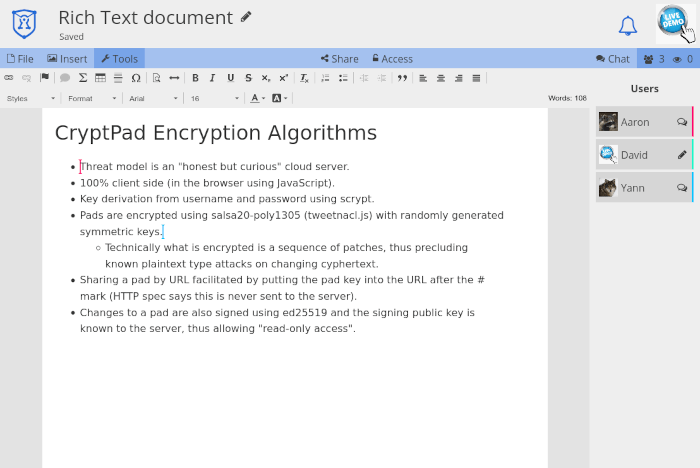
- Document editor – creates and edits formatted documents using integrated ONLYOFFICE technology.
- Spreadsheet editor – provides collaborative spreadsheets with formulas, tables and calculation tools.
- Presentation editor – creates and edits slide presentations with support for collaborative editing.
- Rich text editor – provides a lightweight environment for shared notes and formatted text.
- Markdown editor – supports collaborative editing of Markdown documents and code.
- Slides – creates presentations using Markdown-based content.
- Forms – builds questionnaires and surveys with separate author, auditor and participant permissions.
- Kanban boards – organises tasks and projects using configurable boards and cards.
- Diagram editor – creates and edits diagrams collaboratively.
- Whiteboard – provides a shared canvas for drawings, sketches and visual ideas.
- Real-time collaboration – synchronises changes between multiple participants.
- CryptDrive – organises documents using folders, shared folders, tags and templates.
- Document permissions – controls viewing, editing and sharing through access lists and protected links.
- Document history – allows users to inspect previous changes and restore earlier versions.
- Team workspaces – provides shared document storage and collaboration facilities for groups.
- Guest access – allows users to create and collaborate on documents without registering an account.
- Two-factor authentication – provides additional account protection for registered users.
Website: github.com/cryptpad/cryptpad
Support:
Developer: XWiki SAS
License: GNU Affero General Public License v3.0
XWiki began developing CryptPad as part of a French research project.
CryptPad is written in JavaScript. Learn JavaScript with our recommended free books and free tutorials.
Related Software
| Office Suites | |
|---|---|
| ONLYOFFICE | Multifunctional cloud online office suite |
| LibreOffice | Powerful, high quality, complete, free open source office suite |
| CryptPad | Encrypted collaborative office suite |
| Calligra Suite | Integrated set of open source applications, forked from KOffice in 2010 |
| OpenOffice | Office productivity software suite |
| Collabora Office | Desktop office suite |
Read our verdict in the software roundup.
| Collaborative Editing Tools | |
|---|---|
| ONLYOFFICE | Multifunctional cloud online office suite |
| Etherpad | Web-based collaborative real-time editor |
| La Suite Docs | Collaborative writing platform to create, organize, and share knowledge |
| Foam | Personal knowledge management and sharing system |
| CodiMD | Realtime collaborative markdown notes taking inspiration from Hackpad |
| ProseMirror | Rich semantic content editor |
| CryptPad | Realtime collaborative editor |
| HedgeDoc | Create real-time collaborative markdown notes |
| Notes | Distraction free notes taking app for Nextcloud |
| Collabora | Desktop office suite |
| Firepad | Full-featured text editor |
| Gobby | Supporting multiple documents in one session and a multi-user chat |
Read our verdict in the software roundup.
 LinuxLinks helps you discover the best free and open source software for Linux. Explore our extensive collection of recommended applications, including alternatives to popular proprietary software. We also publish software reviews, Linux tutorials, hardware reviews, free programming books and articles covering the wider open source community. Browse our Linux resources to discover more. Know a useful free and open source Linux application we haven't covered? Suggest a program for inclusion. Has your software been featured on LinuxLinks? Display one of our Featured on LinuxLinks badges on your website or GitHub README. |
Please read our Comment Policy before commenting.