

There are many ways you can transfer files between computers. Here’s a few methods. We can transfer files between two hosts on Linux using the scp command. The scp command establishes a secure connection between the two hosts and it uses the standard SSH port in order to transfer files. Alternatively, many people send files as attachments although there are often limitations with this method. Or users frequently use file hosting services in the cloud, WebTorrents, a personal server, wormhole and many others.
We are always on the look out for easy, simple and secure ways to transfer files and folders.
Many of the tools in this roundup are good replacements for AirDrop, letting you wirelessly send documents, photos, videos, websites, map locations, and more to a nearby device.
Here’s our verdict captured in a legendary LinuxLinks-style ratings chart. Only free and open source software is eligible for inclusion here. And only GUI tools are included here.
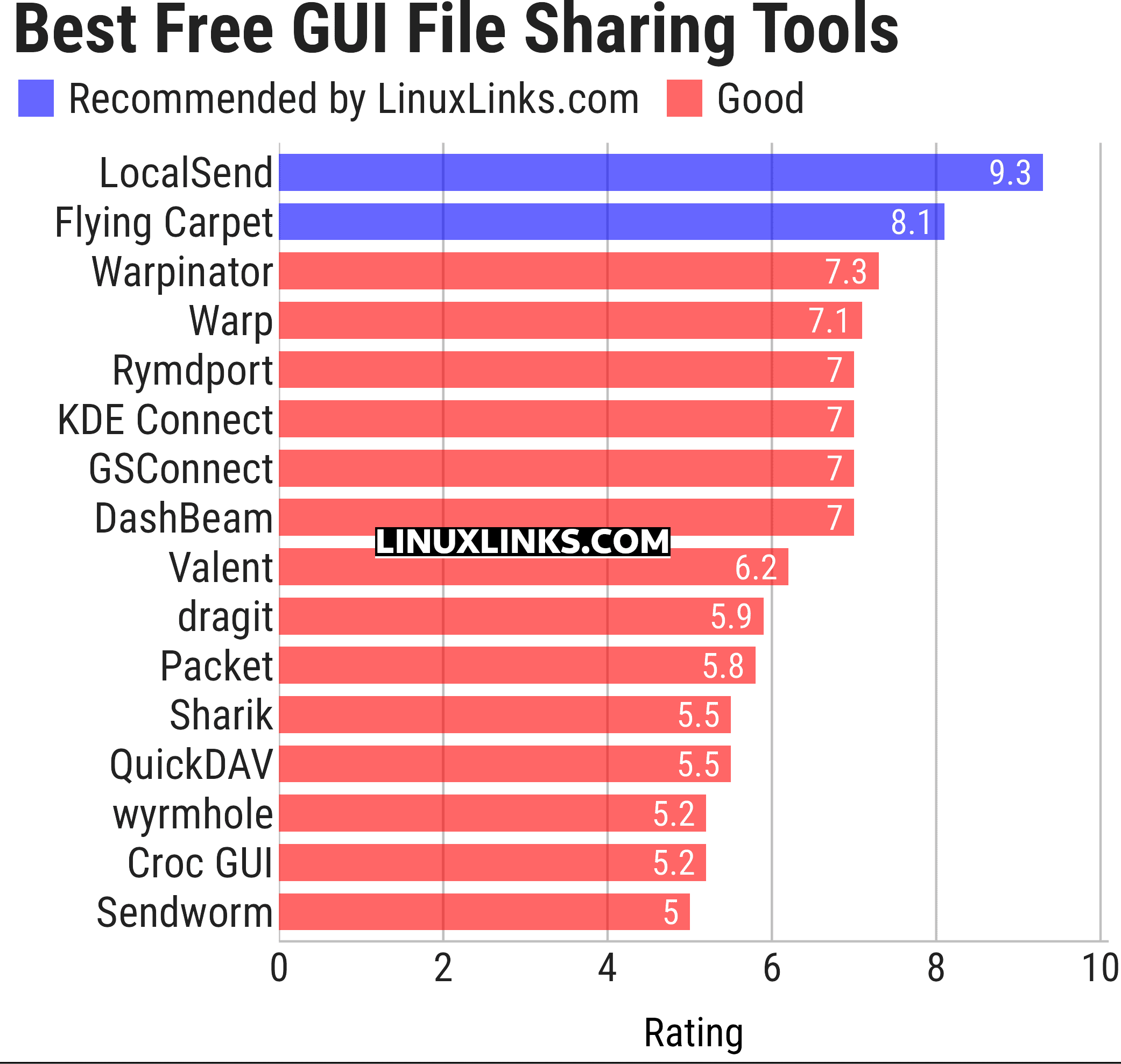
Let’s explore the file sharing tools in more detail. Click the links below to learn all about each tool.
| GUI File Sharing Tools | |
|---|---|
| LocalSend | Cross-platform alternative to AirDrop |
| Flying Carpet | Cross-platform AirDrop alternative |
| Warpinator | Share files across the LAN |
| Warp | Fast and secure file transfer over the internet or local network |
| Rymdport | File, folder and text sharing |
| KDE Connect | Wireless communications and data transfer between devices |
| GSConnect | Complete implementation of KDE Connect |
| DashBeam | Send files and folders anywhere in the world |
| Valent | Connect, control and sync devices |
| dragit | Intuitive file sharing between devices |
| Packet | Implementation of the Google Quick Share protocol |
| Sharik | Share files via Wi-Fi or mobile hotspot |
| QuickDAV | Transfer files between devices |
| wyrmhole | Secure peer-to-peer file transfer app built around Magic Wormhole |
| Croc GUI | GUI for simple, secure peer-to-peer file transfers |
| Sendworm | Send files securely using Magic Wormhole |
This article has been updated to reflect the changes outlined in our recent announcement.
Terminal-based file sharing tools are explored in this separate roundup. Web-based file sharing tools are explored in this separate roundup.
 Explore our carefully curated directory of recommended free and open source software, covering every major software category. Explore our carefully curated directory of recommended free and open source software, covering every major software category.The directory forms part of our extensive collection of articles for Linux enthusiasts. It includes hundreds of detailed reviews, together with free and open source alternatives to proprietary software from companies such as Google, Microsoft, Apple, Adobe, IBM, Cisco, Oracle, and Autodesk. LinuxLinks also covers interesting projects worth exploring, Linux-compatible hardware, free programming books and tutorials, and much more. Know a useful free and open source Linux application that we haven’t covered? Tell us about it using our submission form. |
Please read our Comment Policy before commenting.
What about SyncThing?
That’s peer-to-peer file sync software, a different kettle of fish really.