

Application sandboxing tools create a restricted environment in which software can run with limited access to the rest of the operating system. Instead of allowing an application unrestricted access to files, devices, processes, network resources and other parts of the system, a sandbox applies boundaries that reduce what the program can see and do.
This isolation can help limit the damage caused by vulnerable, compromised or simply untrusted software. Depending on the tool, restrictions may be enforced using Linux namespaces, seccomp filters, control groups, filesystem isolation, capabilities and other kernel security mechanisms. Some sandboxing tools provide ready-made profiles for common desktop applications, while others are lower-level utilities intended for building custom isolation environments.
Application sandboxing is useful for security-conscious desktop users who want tighter control over everyday applications, developers testing unfamiliar software, system administrators running potentially risky workloads, and researchers analysing programs they do not fully trust. Sandboxing is not a substitute for keeping software updated or following good security practices, but it adds another defensive layer by reducing an application’s ability to affect the wider system.
Here’s our verdict captured in a legendary LinuxLinks-style ratings chart. Only free and open source software is eligible for inclusion.
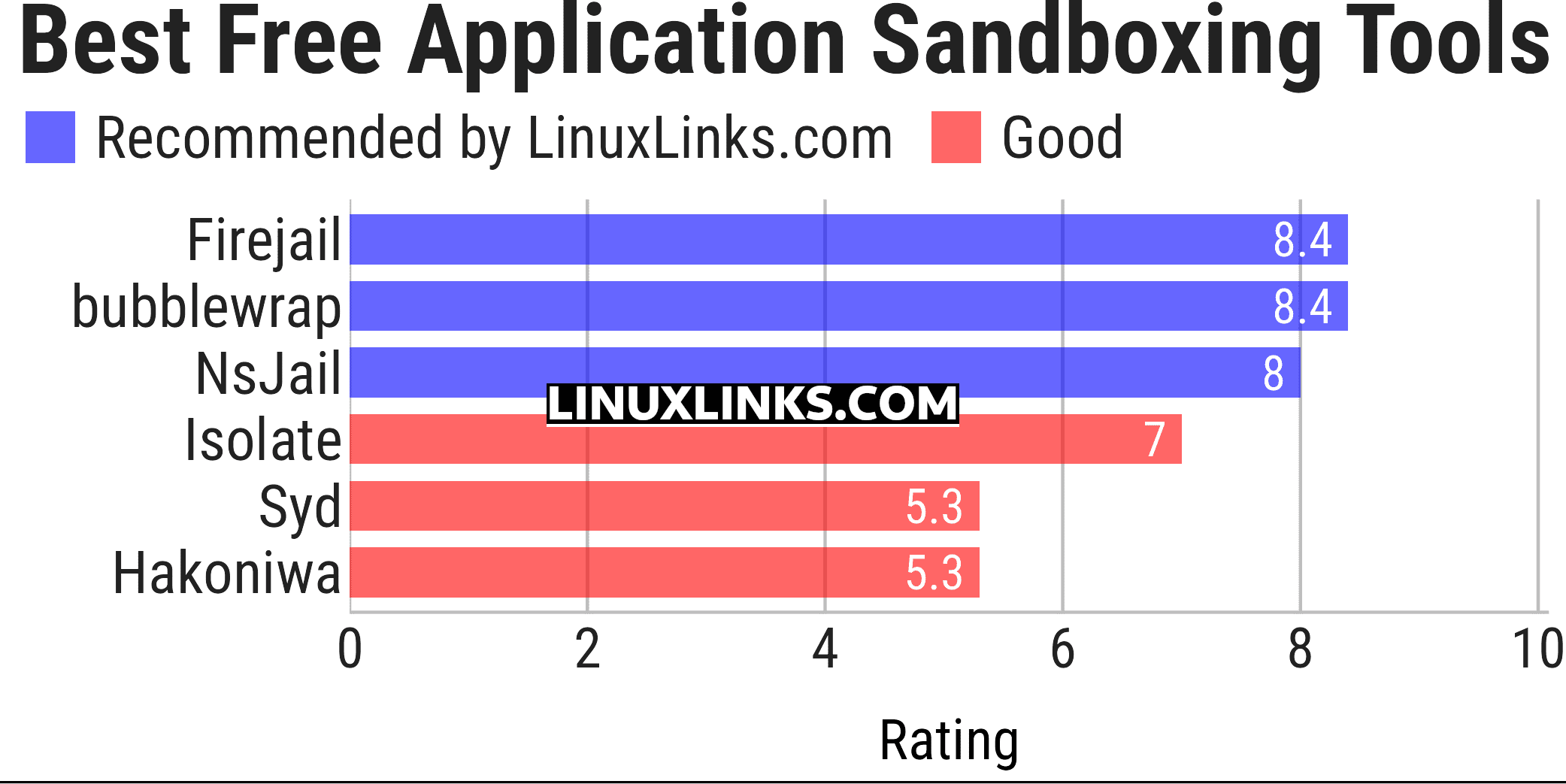
Click the links to learn more about each tool.
| Application Sandboxing Tools | |
|---|---|
| Firejail | Linux SUID sandbox for restricting application access |
| bubblewrap | Low-level tool for building unprivileged sandboxes |
| NsJail | Process isolation tool using namespaces, cgroups, and seccomp filters |
| Isolate | Secure execution environment for running untrusted programs with limits |
| Syd | Application sandbox providing configurable filesystem and syscall isolation |
| Hakoniwa | Process isolation tool built around Linux namespaces and security facilities |
 Explore our carefully curated directory of recommended free and open source software, covering every major software category. Explore our carefully curated directory of recommended free and open source software, covering every major software category.The directory forms part of our extensive collection of articles for Linux enthusiasts. It includes hundreds of detailed reviews, together with free and open source alternatives to proprietary software from companies such as Google, Microsoft, Apple, Adobe, IBM, Cisco, Oracle, and Autodesk. LinuxLinks also covers interesting projects worth exploring, Linux-compatible hardware, free programming books and tutorials, and much more. Know a useful free and open source Linux application that we haven’t covered? Tell us about it using our submission form. |
Please read our Comment Policy before commenting.