

Byobu is Ubuntu’s text-based window manager based on the screen utility.
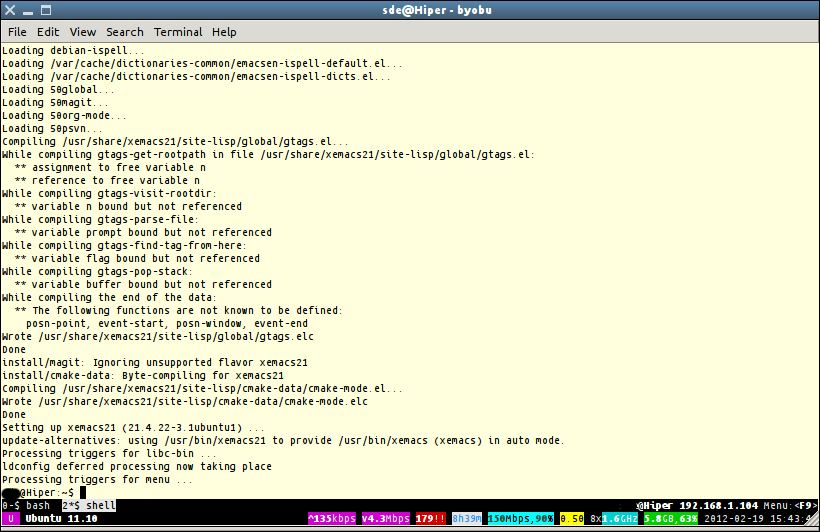
Using Byobu, users can quickly create and move between different windows over a single SSH connection or TTY terminal, monitor many important statistics about their system, detach and reattach to sessions later while programs continue to run in the background.
Byobu includes an enhanced profile and configuration utilities for the screen window manager, such as toggle-able system status notifications.
Key Features
- Caption line – shows your open windows, and highlights the one upon which you are focused, and optionally displays your user name, host name, IP address, and reference to the Menu.
- Hard status line – color coded output and symbols with configurable and dynamically updated facts, statistics, and information about the local system.
- 40 different status notifications with descriptions of each of them including:
- apport – indicates pending crash reports.
- arch – system architecture.
- battery – battery information showing discharging, charging, fully charged, colour indicators.
- cpu_count.
- cpu_freq.
- cpu_temp.
- custom – user defined custom scripts.
- date.
- disk – total disk space available and total used.
- disk_io – instantaneous read/write throughput in KB/s or MB/s over the last 3 seconds.
- ec2_cost – stimation of the cost of the current boot of the system in terms of the Amazon EC2 billing model.
- entropy.
- raid.
- rcs_cost – estimation of the cost of the current boot of the system in terms of the Rackspace Cloud Server billing model.
- fan_speed – as reported by lm-sensors.
- hostname.
- ip_address.
- ip_address4.
- ip_address6.
- load_average – system load average over the last minute.
- logo.
- mail.
- memory – total memory available and currently used.
- network – instantaneous upload/download bandwidth in [GMk]bps over the last 3 seconds.
- notify_osd.
- processes – total number of processes running on the system.
- reboot_required – symbol present if a reboot is required.
- release.
- services – configure a list of services to monitor.
- swap – total swap space and total used as a percentage of the total available.
- time.
- time_binary.
- time_utc.
- updates_available.
- uptime – total system uptime since last boot.
- users.
- whoami.
- wifi_quality – the connection rate and signal quality of the wifi connection.
- Key bindings.
- Run by default at every text login.
Website: byobu.org
Support: Manual page
Developer: Dustin Kirkland, Nick Barcet, Raphaël Pinson, Derek Carter
License: GNU General Public License v3.0
Related Software
| Terminal Multiplexers | |
|---|---|
| Zellij | Terminal workspace with batteries included |
| tmux | Truly sublime terminal multiplexer which uses a client-server model |
| Tmuxinator | Create and manage complex tmux sessions easily |
| Byobu | Powerful, text based window manager and shell multiplexer |
| vtm | Terminal multiplexer with window manager and session sharing |
| Screen | Terminal multiplexer with VT100/ANSI terminal emulation |
| TUIOS | vim-like modal interface with comprehensive keyboard shortcuts |
| 3mux | Terminal multiplexer inspired by i3 |
| mtm | Micro terminal multiplexer |
| TERM39 | Modern terminal multiplexer with classic MS-DOS aesthetic |
| tab | Intuitive, config-driven terminal multiplexer |
| dvtm | Dynamic virtual terminal manager |
Read our verdict in the software roundup.
 Explore our comprehensive directory of recommended free and open source software. Our carefully curated collection spans every major software category. Explore our comprehensive directory of recommended free and open source software. Our carefully curated collection spans every major software category.This directory is part of our ongoing series of informative articles for Linux enthusiasts. It features hundreds of detailed reviews, along with open source alternatives to proprietary solutions from major corporations such as Google, Microsoft, Apple, Adobe, IBM, Cisco, Oracle, and Autodesk. You’ll also find interesting projects to try, hardware coverage, free programming books and tutorials, and much more. Discovered a useful open source Linux program that we haven’t covered yet? Let us know by completing this form. |