

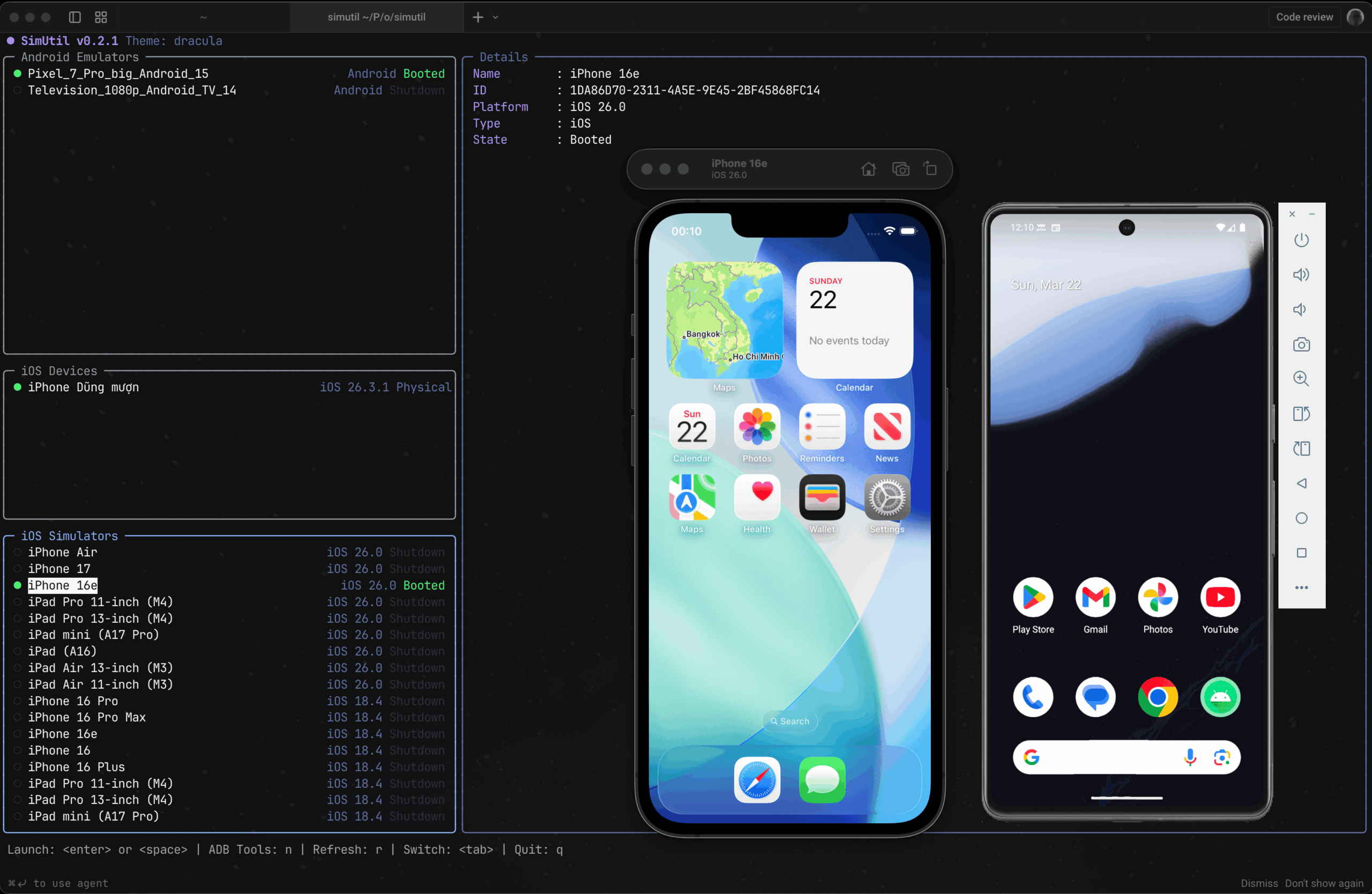
SimUtil is a terminal user interface for launching and managing Android emulators and iOS simulators.
It lets you browse available devices, launch them with custom options, connect to physical Android devices, and access device tools from the terminal.
This is free and open source software.
Key Features
- Browse Android emulators and iOS simulators side by side.
- Launch devices with a single key press.
- Supports normal, cold boot, no audio, and combined Android launch options.
- Shut down simulators and emulators.
- View and filter Android logcat output.
- Connect to physical Android devices wirelessly using an IP address.
- Pair Android 11+ devices using a six-digit code or QR code.
- Run external tools and custom commands through YAML-defined plugins.
- Supports plugin command shortcuts, device filtering, and template variables.
- Edit the configuration file using the default editor.
- Runs on Linux, macOS, and Windows.
Website: github.com/dungngminh/simutil
Support:
Developer: Dzung Nguyen Minh
License: MIT License
SimUtil is written in Dart. Learn Dart with our recommended free books and free tutorials.
 Explore our comprehensive directory of recommended free and open source software. Our carefully curated collection spans every major software category. Explore our comprehensive directory of recommended free and open source software. Our carefully curated collection spans every major software category.This directory is part of our ongoing series of informative articles for Linux enthusiasts. It features hundreds of detailed reviews, along with open source alternatives to proprietary solutions from major corporations such as Google, Microsoft, Apple, Adobe, IBM, Cisco, Oracle, and Autodesk. You’ll also find interesting projects to try, hardware coverage, free programming books and tutorials, and much more. Discovered a useful open source Linux program that we haven’t covered yet? Let us know by completing this form. |