

Last Updated on March 13, 2026
Zashterminal is a modern, intuitive, and innovative terminal built with GTK4 and Adwaita. While it offers advanced features appreciated by developers and system administrators, it also stands out for making the command-line environment more accessible, helping those who are just beginning to learn how to use the terminal. Its simplified session management, built-in file manager, automatic color highlighting for improved readability, and a variety of other features bring convenience to users of all skill levels on any Linux distribution.
This is free and open source software.
Key Features
- AI Assistant Integration: Zashterminal creates a bridge between your shell and Large Language Models (LLMs), offering an optional and fully non-intrusive AI experience. The assistant only processes the content that you explicitly select and choose to send, ensuring full control over your privacy.
- Multi-Provider Support: Native integration with Groq, Google Gemini, OpenRouter, and Local LLMs (Ollama/LM Studio).
- Context Aware: The AI understands your OS and distribution context to provide accurate and relevant commands.
- Chat Panel: A dedicated side panel for persistent conversations, command suggestions, and “Click-to-Run” code snippets.
- Smart Suggestions: Ask how to perform tasks and receive ready-to-execute commands directly in the UI.
- Advanced File Manager & Remote Editing:
- Integrated Side Panel: Browse local and remote file systems without leaving the terminal.
- Remote Editing: Click to edit remote files (SSH/SFTP) in your favorite local editor. Zashterm watches the file and automatically uploads changes on save.
- Drag & Drop Transfer: Upload files to remote servers simply by dragging them into the terminal window over (SFTP/Rsync)
- Transfer Manager: Track uploads and downloads with a detailed progress manager and history.
- Productivity Tools:
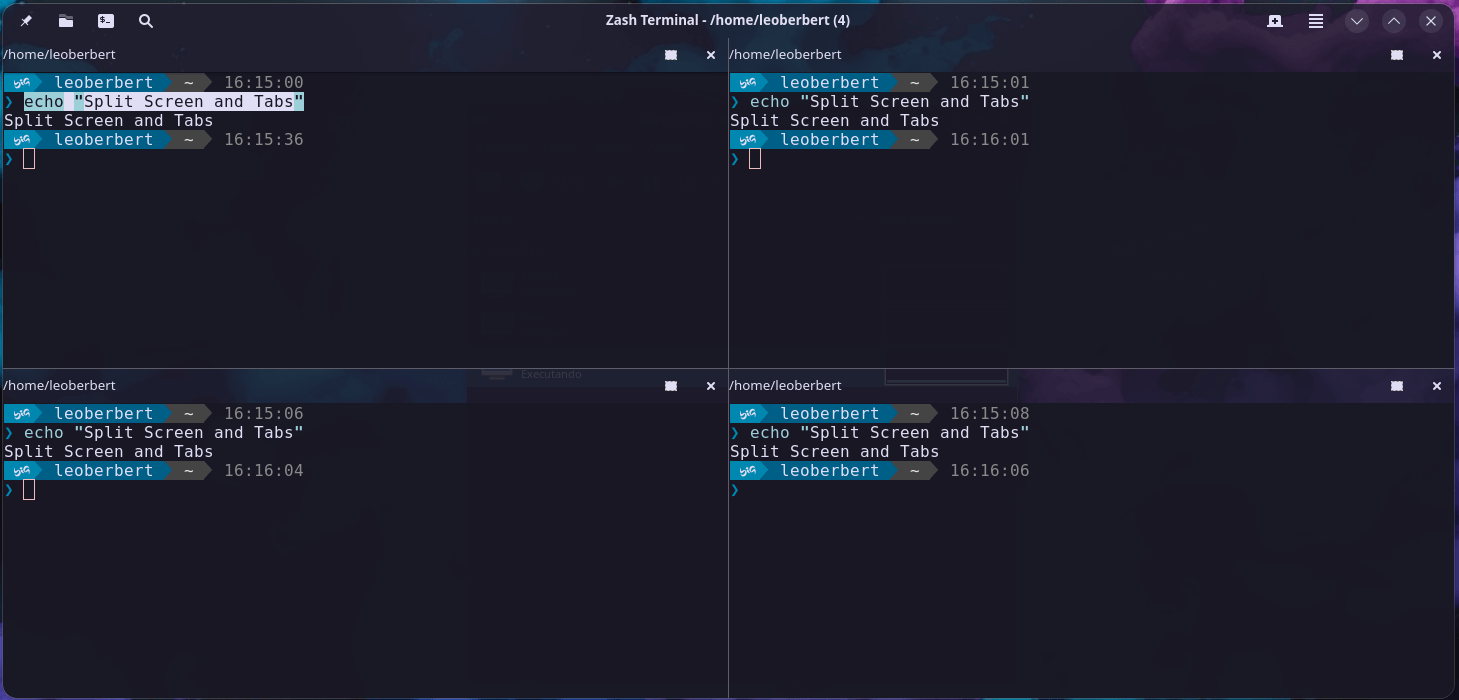
- Input Broadcasting: Type commands in one terminal and execute them simultaneously across multiple selected tabs/panes.
- Quick Prompts: One-click AI prompts for common tasks (e.g., “Explain this error”, “Optimize this command”).
- Session Management: Save, organize (with folders), and launch Local, SSH, and SFTP sessions.
- Flexible Layouts: Split panes horizontally and vertically; save and restore complex window layouts.
- Directory Tracking: Updates tab titles automatically based on the current working directory (OSC7 support).
- Deep Customization: Visual theme editor, font sizing, transparency (window and headerbar), and extensive keyboard shortcuts.
Website: github.com/leoberbert/zashterminal
Support:
Developer: Leonardo Berbert
License: GNU General Public License v3.0
Zashterminal is written in Python. Learn Python with our recommended free books and free tutorials.
Related Software
| Terminal Emulators | |
|---|---|
| Tabby | (Terminus) Highly configurable terminal emulator, SSH and serial client |
| Alacritty | Hardware-accelerated terminal emulator |
| Wave Terminal | AI-native terminal built for seamless workflows |
| urxvt | RXVT-like terminal emulator with Unicode support |
| Kitty | Like Alacritty, Kitty offers hardware acceleration |
| Ghostty | Feature-rich and cross-platform terminal emulator |
| Guake | Drop-down terminal for GNOME |
| Terminator | Multiple GNOME terminals in one window |
| WezTerm | GPU-accelerated cross-platform terminal emulator and multiplexer |
| rio | Hardware-accelerated GPU terminal emulator |
| electerm | Terminal emulator and much more |
| st | Simple terminal implementation for X which sucks less |
| contour | Aimed at power users with a modern feature mindset |
| Zutty | High-end terminal emulator for low-end systems |
| xterm | Provides DEC VT102 and Tektronix 4014 compatible terminals |
| Extraterm | Swiss army chainsaw of terminal emulators |
| Tilda | Gtk based drop down terminal |
| Ptyxis | Terminal for a container-oriented desktop |
| MATE Terminal | Terminal emulator the MATE desktop environment |
| Hyper | Terminal emulator built with web technologies |
| GNOME Terminal | Terminal emulator for the GNOME desktop environment |
| foot | Fast, lightweight and minimalistic Wayland terminal emulator |
| Xfce Terminal | Lightweight and easy to use terminal emulator application |
| Tilix | Advanced GTK3 tiling emulator |
| Terminology | Fast, lean and visually enhanced open source terminal emulator |
| Konsole | The KDE 5 terminal emulator |
| Black Box | GTK 4 terminal |
| Yakuake | Drop-down terminal emulator based on KDE Konsole technology |
| Station | Convergent terminal emulator |
| Sakura | Vte-based terminal emulator |
| QTerminal | Lightweight Qt-based terminal emulator |
| Zashterminal | Modern, intuitive, and innovative terminal built with GTK4 and Adwaita |
| LazyCat Terminal | Built with Vala and GTK4. |
| Kerminal | Modern terminal emulator and SSH manager |
| Termy | Minimal terminal emulator |
| DomTerm | Terminal emulator, REPL console, and screen multiplexer |
| CRT | Visually expressive terminal emulator written in Rust |
| kermit | VTE-based, simple and froggy terminal emulator |
| ROXTerm | VTE terminal emulator with tabs |
| LXTerminal | Lightweight terminal emulator based on GTK+ for the LXDE desktop |
| Bobcat | Built using the U++ framework and TerminalCtrl widget |
| fortty | GPU-accelerated terminal emulator written in Fortran |
| Tess | Hackable, simple, rapid and beautiful terminal |
| mlterm | Multilingual terminal emulator on X11 |
| Termite | Keyboard-centric VTE-based terminal |
| Packet | Terminal multiplexer and broadcast system |
| fingerterm | Terminal emulator with a custom virtual keyboard |
Read our verdict in the software roundup.
 Explore our comprehensive directory of recommended free and open source software. Our carefully curated collection spans every major software category. Explore our comprehensive directory of recommended free and open source software. Our carefully curated collection spans every major software category.This directory is part of our ongoing series of informative articles for Linux enthusiasts. It features hundreds of detailed reviews, along with open source alternatives to proprietary solutions from major corporations such as Google, Microsoft, Apple, Adobe, IBM, Cisco, Oracle, and Autodesk. You’ll also find interesting projects to try, hardware coverage, free programming books and tutorials, and much more. Discovered a useful open source Linux program that we haven’t covered yet? Let us know by completing this form. |